Advertising on ChatGPT: A Marketer's Launch Playbook
Yes, you can advertise on ChatGPT right now. OpenAI runs paid ads through its self-serve Ads Manager and a roster of certified agency and technology partners, and eligible advertisers can be live within days of creating an account. If you’re weighing whether advertising on ChatGPT belongs in your 2026 media plan, the honest answer is: it depends less on whether the platform works and more on whether your creative and measurement setup is ready for it.
Three moves get you into testing fastest. First, decide your entry point: self-serve through Ads Manager, or through a certified partner like Adobe, Criteo, Pacvue, or StackAdapt if you already run programmatic buys through one of them. Second, verify your identity through Persona, OpenAI’s verification vendor, since this step gates campaign approval and can take a few business days. Third, build one tightly scoped ad group with a plain-language context hint and a landing page that mirrors your ad copy word for word.
Early orientation numbers from advertisers running pilot campaigns put click-through rates near 1% to 3%, cost-per-click around $2 to $5, and CPMs in the $20s to $30s, though these ranges will move as the platform matures and competition increases. Agencies including Rivetline are already building measurement stacks around the Conversions API to make those numbers meaningful rather than just interesting.
Key Takeaways
Advertising on ChatGPT works best when context-first creative, verified identity, and live Conversions API tracking are all in place before the first dollar spends.
PointDetailsYes, you can advertise nowSelf-serve Ads Manager or certified partners like Adobe, Criteo, Pacvue, and StackAdapt both offer entry points.Context hints beat keywordsWrite plain-language scenarios at the ad-group level instead of keyword lists for better matching.Set up measurement firstInstall the Conversions API or pixel before launch so bidding data is trustworthy from week one.Expect early-stage rangesCTR near 1% to 3%, CPC around $2 to $5, and CPM in the $20s to $30s, all likely to shift as the platform matures.Consider managed executionRivetline builds ChatGPT ad strategy, creative, and GA4-linked measurement dashboards for teams without in-house bandwidth.
Table of Contents
Setting Up Your Ads Manager Account: A Step-By-Step Walkthrough
Targeting, Bidding, and Measurement: What to Configure Before Launch
Which Categories Are Restricted From Advertising on ChatGPT?
Creative and Segmentation Tactics That Actually Move the Needle
Estimated Costs and Budget Ranges for Advertising on ChatGPT
How Does Advertising on ChatGPT Actually Work?
ChatGPT ads run on a strict separation principle: the ad you see and the answer the model gives you are two different systems, and OpenAI has been explicit that advertisers cannot influence or edit a ChatGPT response to favor their product. The ad sits below the answer, visually distinct and labeled as sponsored. That separation isn’t just a policy footnote. It’s the entire trust proposition that makes users tolerate ads inside a tool they use for research and decision-making in the first place.
Ads currently appear for Free and Go tier users. Paid ChatGPT plans stay ad-free, which matters for targeting math since your addressable audience skews toward casual and price-sensitive users rather than the power users on Plus or Team subscriptions.
Matching works nothing like keyword bidding on Google Search. Instead of building match-type lists, you write context hints, plain-language descriptions of the situation where your product is relevant. OpenAI and independent reporting both frame this as closer to search advertising than social advertising, because the ad shows up while someone is actively researching or deciding, not while they’re passively scrolling.
Every ad unit is built from the same core components:
Brand name and a high-resolution favicon
A headline (short, direct)
A description line
An image or product card
A landing page URL, and for product-style units, price and rating data can surface directly in the card
Pro Tip: Write your context hint as a scenario, not a list. “A small business owner comparing payroll software for a 10-person team” will out-target a string of keywords like “payroll, HR software, small business” every time, because the matching system reads intent, not tokens.
Setting Up Your Ads Manager Account: A Step-By-Step Walkthrough
Getting your first campaign live involves a predictable sequence, and skipping steps is the number one reason first submissions get delayed.
Register for Ads Manager. Self-serve accounts open with no platform minimum spend.
Complete identity verification through Persona. Budget a few business days for this, since it’s the step most teams underestimate.
Add billing details and set your account currency and payment method.
Upload your creative assets, starting with a high-resolution favicon, since it appears prominently in every ad unit you run.
Build your campaign structure: Campaign, then Ad Group, then individual Ads, mirroring the hierarchy you’d expect from any modern ads platform.
Write your context hints at the ad-group level, not the campaign level, so each group can target a distinct scenario.
Submit for review and monitor for landing page or creative rejections.
Before you submit, run this checklist:
Confirm creative sizes and character limits match current Ads Manager specs for headline and description fields.
Make sure your landing page headline and offer match your ad copy almost verbatim. Mismatches are a common cause of rejection or throttled delivery.
Build in buffer time for verification. Persona checks are routine but not instant.
Two onboarding routes exist, and the right one depends on your team’s scale:
Self-serve Ads Manager suits teams testing a handful of campaigns who want direct control over context hints and creative iteration speed.
Certified partner or agency access through names like Adobe, Criteo, Pacvue, or StackAdapt, or through an agency partner like Rivetline, suits teams that already run cross-channel budgets and want ChatGPT folded into existing reporting rather than managed as a standalone tool.
Targeting, Bidding, and Measurement: What to Configure Before Launch
Targeting on ChatGPT leans on three levers rather than the dozens you’d find in a mature ad platform. Context hints do the heaviest lifting, since they tell the matching system what user situation your ad should appear against. Geographic targeting narrows delivery to markets you actually serve. First-party audience uploads let you layer in your own customer data, though thresholds and formats follow standard privacy-safe matching practices rather than raw list uploads.

Bidding has evolved quickly. OpenAI’s original pilot ran on CPM only, but the platform has since added CPC bidding so advertisers can pay for clicks instead of impressions.
ModelBilling basisBest forStarting guidanceCPMPer thousand impressionsAwareness, top-of-funnel reachEarly reports place CPMs in the $20s to $30sCPCPer clickTraffic and consideration campaignsEarly reports place CPCs around $2 to $5Conversion-optimizedPlatform bids toward outcomesLead gen or purchase campaigns once conversion data volume is sufficientRequires Conversions API or pixel data flowing before it optimizes reliably
Measurement needs to be live before your first dollar spends, not after. OpenAI supports both a pixel and a server-side Conversions API, and advertisers can pull aggregated reports covering impressions, clicks, CTR, average CPC or CPM, and conversions.
Your pre-launch measurement checklist:
Install the OpenAI pixel or implement the Conversions API on your key conversion pages.
Tag every landing URL with consistent UTM parameters so ChatGPT traffic is distinguishable in GA4.
Confirm conversion events (form fill, purchase, signup) fire correctly before scaling spend.
Set up a Looker Studio view that reconciles Ads Manager’s aggregated exports against GA4 sessions, since the two won’t match perfectly and you need to know your expected variance range.
Pro Tip: Don’t wait for “enough” conversion volume to install the Conversions API. Server-side tracking takes time to accumulate a reliable signal, so the sooner it’s live, the sooner your bidding data becomes trustworthy.
Privacy, Ad Labeling, and What Users Control
OpenAI built the ad system around a principle it calls answer independence: the model’s response is never altered to favor an advertiser, and conversations are not shared with advertisers in any identifiable form. Advertisers see aggregated performance metrics. They never see chat text or personal identifiers.
Ads in ChatGPT are shown only to Free and Go plan users, are clearly labeled as sponsored, and are visually separated from the model’s own response. Paid tiers remain ad-free, and advertisers do not receive users’ chat content or personal data.
That framing matters when you’re pitching this channel internally, because the objection you’ll hear most often from a skeptical CMO or legal team is some version of “won’t this feel invasive inside an AI chat.” The honest answer, backed by OpenAI’s own Help Center documentation, is that the platform was built specifically to avoid that perception.
Users retain meaningful control over how ads are personalized:
Ad personalization settings can be turned off, which shifts an account toward more generic, less context-matched ad delivery.
Users can request deletion of ads-related data associated with their account.
Paid ChatGPT plans opt out of ads entirely, which functions as the platform’s built-in “ads-free” tier.
None of this changes your labeling obligations as an advertiser. Every unit carries a sponsored label by default, and that’s not something you can strip or soften in your creative.
Which Categories Are Restricted From Advertising on ChatGPT?
Not every business can buy ads on ChatGPT today, and knowing the restricted categories before you build creative saves a rejected submission and a wasted week.
OpenAI currently excludes several categories from its ad pilot:
Political advertising is not permitted during the current testing phase.
Sensitive or regulated topics, including personal health content, are kept clear of ads to avoid the appearance of influencing a user during a vulnerable conversation.
Categories touching minors or requiring special age-related handling face extra scrutiny.
Geographic availability is still limited, with testing beginning in the U.S. and expanding in phases, so international campaigns may hit availability gaps.
Run this quick red-flags check before you submit a campaign:
Does your product or service brush against health, financial hardship, or political topics, even tangentially? If so, expect extra review.
Does your landing page match your ad copy closely enough to survive a manual check?
Is your target market inside the currently supported geographic rollout?
Does your creative avoid implying the ad is part of ChatGPT’s own response rather than a paid placement?
Creative and Segmentation Tactics That Actually Move the Needle
The single biggest lever in ChatGPT advertising isn’t your bid. It’s whether your context hint, headline, description, and landing page all describe the exact same user scenario. When ChatGPT ads behave like search ads shown during active research, a generic “shop our spring collection” hint underperforms a specific one describing exactly who’s asking and why.
Segmentation should be narrow, not broad. Structure ad groups around one use case or one persona each, rather than folding your entire product catalog into a single context hint. A single hint like “a marketing manager comparing email tools for a 20-person team” will outperform a catchall hint trying to cover freelancers, agencies, and enterprise buyers at once.
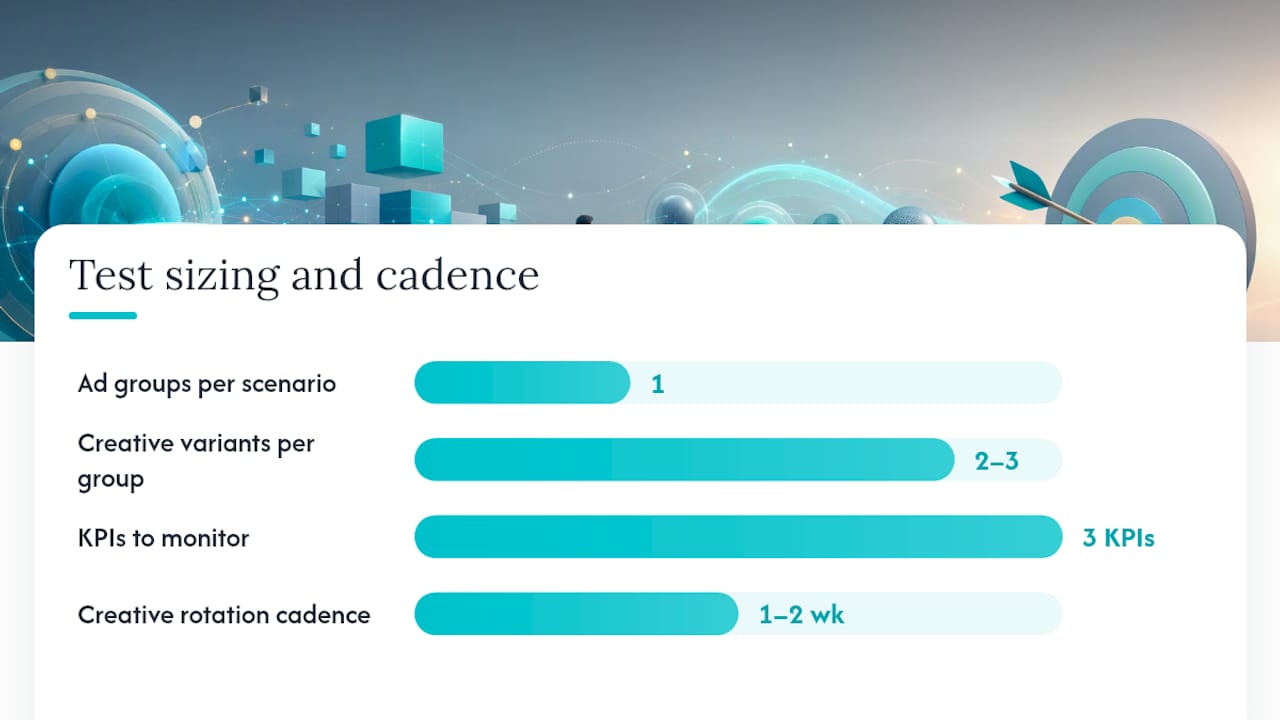
Practical segmentation framework:
One ad group per distinct user scenario, not per product SKU.
Two to three creative variants per group, testing headline angle rather than wholesale design changes.
A dedicated landing page per scenario where budget allows, since matching your ad’s specific claim to a specific page reduces bounce and supports the favicon and landing-page alignment guidance StackAdapt documents for ChatGPT units specifically.
Optimization cadence in the first 30 days should center on three KPIs: CTR as your creative-fit signal, CPC as your efficiency signal, and downstream conversion rate once your Conversions API data has enough volume to trust. Rotate creative every one to two weeks early on, since conversation-level feedback is limited compared to a platform like Meta, and you’re inferring performance from aggregate numbers rather than granular audience insights.
Pro Tip: When you brief an agency on ChatGPT ads, hand them your three best customer scenarios in plain language before you hand them a single keyword list. The scenarios are the creative brief; the keywords are almost irrelevant here.
Agencies structuring these tests well tend to run each context hint as its own hypothesis, tracking CTR movement independently before touching bids, which keeps a small test budget from getting muddied by too many simultaneous variables.
What Do Early ChatGPT Advertiser Results Suggest?
Treat early benchmarks as orientation points, not guarantees, since sample sizes across pilot advertisers remain small and vary widely by category.
MetricEarly reported rangeNotesCTR1% to 3%Varies heavily by how tightly the context hint matches user intentCPC$2 to $5Category and competition dependentCPM$20s to $30sExpected to shift as more advertisers enter the auction
Advertisers who report stronger early results tend to share a few habits:
They write context hints as specific scenarios, not broad category descriptions.
They build a dedicated landing page per ad group instead of routing everything to a homepage.
They keep ad groups segmented by persona rather than lumping an entire catalog into one group.
None of these ranges should be read as a ceiling or a floor. A platform this early in its ad rollout will see CPMs and CPCs move as auction density increases and as OpenAI’s own Ads Manager measurement tools mature. Treat this quarter’s numbers as a starting hypothesis, not a fixed budget model.
Your Launch Checklist and Common Troubleshooting Fixes
Before your first campaign goes live, confirm each of these:
Identity verification through Persona is complete and approved.
Creative assets, including favicon, headline, description, and image, meet current size and character specs.
Context hints are written per ad group as plain-language scenarios.
Pixel or Conversions API is installed and firing on key conversion events.
Budgets and initial bids are set conservatively for the first test window.
UTM parameters are applied consistently across every landing URL.
When something goes wrong, it’s usually one of these:
Ads not serving: check that your context hint isn’t too narrow or too vague, both of which can suppress delivery in early testing.
Landing page rejected: confirm your page content matches your ad copy closely and doesn’t redirect through an intermediate URL.
Low delivery volume: widen geographic targeting slightly or review whether your category sits near a restricted topic that’s triggering extra review.
On timeline, expect the first 24 to 72 hours to produce impression volume but limited conversion signal. The first 7 to 14 days is when your CTR and CPC data becomes stable enough to make a real optimization decision, and that’s also roughly when your Conversions API data starts to carry statistical weight.
Estimated Costs and Budget Ranges for Advertising on ChatGPT
There’s no published minimum spend to open a self-serve account, which makes ChatGPT ads unusually accessible compared to platforms that gate self-serve access behind a minimum commitment. That said, a meaningful test budget still needs to cover enough impressions to read CTR and CPC trends with confidence.
Given early CPC guidance of roughly $2 to $5 and CPMs in the $20s to $30s, a reasonable first test budget for a single narrow ad group runs in the low hundreds of dollars per week, enough to accumulate a few hundred clicks or several thousand impressions within your first two weeks. Teams testing multiple personas or use cases in parallel should budget proportionally more, since splitting a small test budget across five ad groups dilutes each one below a useful signal threshold. Agencies managing this on a client’s behalf typically layer a management fee on top of media spend, similar to how Google Ads or Meta Ads retainers are structured, rather than charging a flat platform fee.
Should You Run ChatGPT Ads In-House or Bring in an Agency?
The decision between in-house testing and hiring outside help comes down to a handful of concrete factors, not general comfort with new platforms.
Ask yourself how many simultaneous tests you can realistically run. A team testing one or two ad groups can likely manage Ads Manager directly. A team wanting to test five personas across three creative variants each, with a Conversions API feeding a real attribution model, is signing up for more operational load than most in-house marketers can absorb alongside existing channels.
Consider your internal creative capacity too. Context-first creative for ChatGPT ads is a different muscle than a Meta carousel or a Google responsive search ad, and teams without dedicated copywriting bandwidth often produce generic context hints that underperform from day one.
An agency like Rivetline earns its fee in this channel specifically when measurement setup, creative iteration speed, and cross-platform reconciliation are the bottleneck, not when the platform itself is hard to use. If your team is stretched thin trying to keep GA4 and Ads Manager data in sync while also writing new creative variants weekly, that’s the signal to bring in help rather than push through alone.
If you do bring in an agency, ask these questions before signing anything:
How do you structure context hints differently from keyword-based search campaigns?
What does your Conversions API implementation timeline look like, and who owns that build?
How will reporting reconcile with our existing GA4 and Looker Studio dashboards?
Before briefing anyone, have these documents ready: your top three customer personas in plain language, your current GA4 conversion event list, your brand assets including a high-resolution favicon, and your existing landing page inventory mapped to each persona.
How Rivetline Handles ChatGPT Ads So You Don’t Have To
Rivetline runs ChatGPT ad campaigns end to end, so you’re not the one reconciling Ads Manager exports against GA4 at midnight. That means strategy and context-hint development, creative production sized to ChatGPT’s specific formats, campaign build and bid management, and full Conversions API and pixel implementation tied into live Looker Studio dashboards you can check any time, not a monthly PDF that’s already stale by the time it lands.
Rivetline builds these campaigns the same way it handles Google Ads and Meta Ads: with Google Business Profile connected to GA4 and dashboards that update in real time, so you can see exactly what a context hint is doing to your CPC before the week is out. If your team has the budget to test this channel but not the internal bandwidth to build measurement infrastructure from scratch, that’s the exact gap Rivetline closes. Visit the Rivetline blog to see how managed ChatGPT ad campaigns get structured from account setup through first-month optimization, and reach out to start a consultation on your own test budget.
Frequently Asked Questions
Can any business buy ads on ChatGPT? Most businesses can, provided they clear identity verification and avoid restricted categories such as political advertising or sensitive health topics currently excluded from the pilot program.
Do ChatGPT ads influence the answers the AI gives? No. OpenAI maintains a strict separation between advertising and model responses, meaning advertisers cannot alter or influence what ChatGPT says in reply to a user.
How much does it cost to start advertising on ChatGPT? Self-serve accounts have no published minimum spend, though a useful first test typically covers enough budget to gather a few hundred clicks or several thousand impressions within two weeks, given early CPC and CPM ranges.
What’s the difference between CPM and CPC bidding on ChatGPT? CPM charges per thousand impressions and suits awareness goals, while CPC charges per click and suits traffic or consideration campaigns; OpenAI added CPC as a bidding option after initially launching with CPM only.
Do I need an agency to advertise on ChatGPT, or can I run it in-house? Small, single-persona tests are manageable in-house through self-serve Ads Manager, but teams running multiple ad groups with full Conversions API tracking often benefit from an agency’s existing measurement infrastructure and creative production capacity.
This article provides general marketing guidance and is not a substitute for reviewing OpenAI’s current advertising policies directly before launching a campaign.