Google Ads Not Converting? Fix It in 3 Steps
Your Google Ads aren’t converting for one of three reasons: broken conversion tracking, low-intent targeting that’s attracting the wrong clicks, or post-click friction on your landing page. Nine times out of ten, it’s tracking or intent, not your ad copy.
Here’s your 60-second triage before you touch a single bid:
Open Conversions in Google Ads and check the status column for “Needs attention” or “Misconfigured.”
Confirm your GCLID is firing and reaching your CRM or GA4.
Scan the Search Terms report for irrelevant or research-phase queries.
Load a live ad’s landing page on your phone and time how long it takes to appear.
If tracking is broken, stop everything else and fix it first.
If intent is off, tighten match types and add negatives before touching bids.
If the landing page is slow or confusing, prioritize conversion rate optimization over more spend.
Pro Tip: Never diagnose a “low conversion” problem by staring at the conversion number itself. Look at clicks-to-conversion ratio by campaign first. A flat zero and a low-but-real rate point to completely different fixes.
Key Takeaways
Fixing Google Ads conversion problems requires validating tracking first, tightening keyword intent second, and resolving landing page friction third, in that order.
PointDetailsCheck tracking status firstConfirm conversion actions read “Active” in Google Ads before touching any other setting.Intent mismatch is commonRoughly 18% of conversion failures trace to search intent mismatch; review search terms weekly.Message match wins fastEcho ad copy exactly on the landing page headline; it’s one of the highest-leverage fixes available.Respect the learning periodWait one to two weeks after major campaign changes before judging performance or reversing course.Consider a professional auditRivetline’s audit reviews tracking, targeting, and landing pages together and delivers a prioritized fix list.
Table of Contents
Why Are My Google Ads Not Converting? Top Causes and Fixes
Most accounts I look at have two or three of these stacked on top of each other. Fix them in order of leverage, not order of comfort.
Broken or misconfigured conversion tracking. This is the silent killer. Google Ads flags conversion actions with specific status labels including Active, Needs Attention, Misconfigured, and Awaiting Conversions. If you see anything other than Active, your reported conversions are unreliable, and every optimization decision built on that data is wrong. Fix it by running a manual test: click your own ad, capture the GCLID, complete the conversion action, then confirm it appears in Google Ads within 24 hours. Cross-check the count against GA4. A mismatch of more than a few percentage points usually means a tagging gap, not a traffic quality problem.
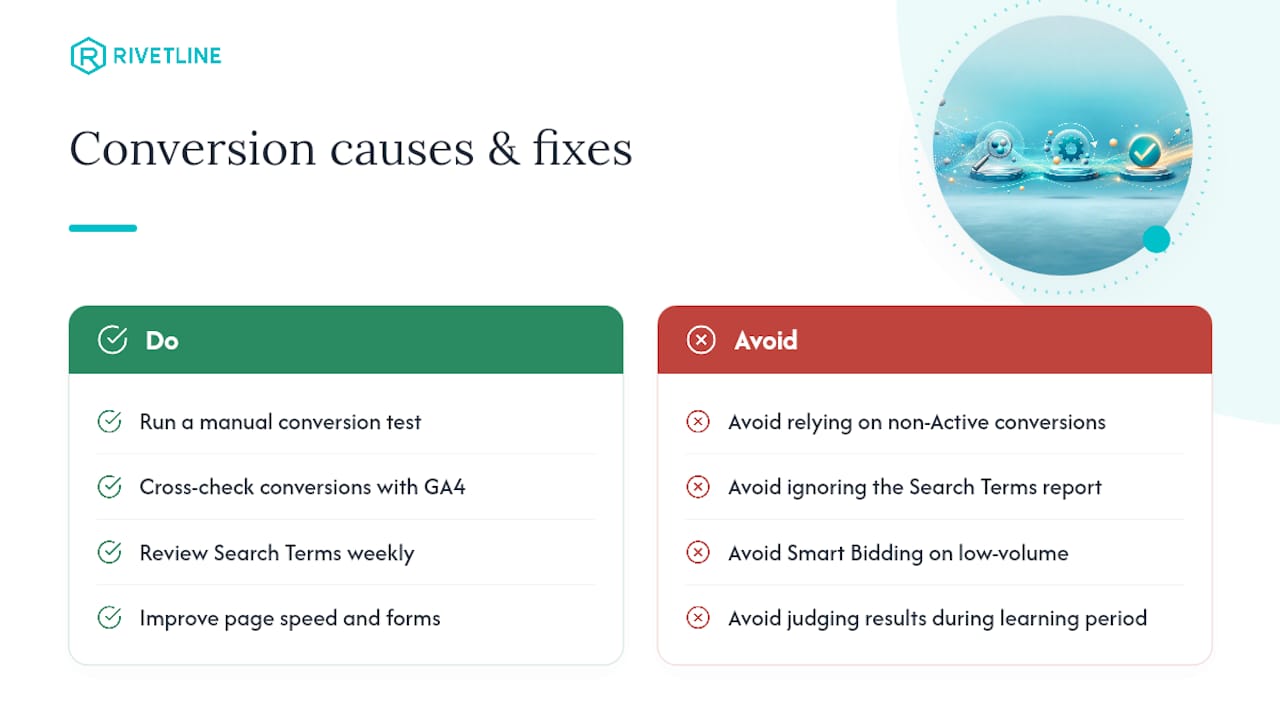
Search intent mismatch. Broad match keywords without tight controls will happily spend your budget on people researching, not buying. Intent mismatch alone accounts for roughly 18% of conversion failures, and the fix is unglamorous but effective: review the Search Terms report weekly and add negative keywords for anything that isn’t a buyer query. Tighten match types where volume allows it. This single habit, done consistently, outperforms most bid adjustments.
Ad copy that doesn’t prequalify the click. If your ad promises “affordable software” and your landing page reveals a $2,000 minimum contract, you’ve paid for a click that was never going to convert. Add pricing signals, audience qualifiers, and a specific call to action directly in the ad copy. Responsive Search Ads with more distinct headline and description inputs also improve Ad Strength, which correlates with better relevance scoring.
Landing page friction. Headline mismatch, slow load times, and long forms are conversion killers that have nothing to do with your targeting. Message match, page speed, and form length rank among the highest-leverage fixes available to any paid team, and they’re usually cheaper to fix than a bid strategy overhaul.

Bid strategy and Smart Bidding gone sideways. Smart Bidding needs data to work. Switch a low-volume campaign to Target CPA before it has enough conversion history, and you’ll often see performance get worse, not better, while the algorithm guesses.
Location, audience, and scheduling gaps. Google Ads defaults to targeting people who show interest in a location, not just people physically present there. That setting alone sends budget to the wrong geography constantly. Check it explicitly.
Seasonality and the learning period. Every new campaign or major edit resets performance for roughly one to two weeks while Google’s system relearns. Judging results during that window is a common, expensive mistake.
Retargeting neglect. People who clicked and left without converting are your warmest audience. Segment them and serve tailored creative instead of letting that traffic evaporate.
Account hygiene. Missing ad extensions, disapproved ads sitting quietly, and low impression share against competitors all quietly cap your ceiling. A 10-cause diagnostic like WordStream’s is worth running quarterly, even on accounts that seem healthy.
The 1-to-3-Week Audit That Fixes Google Ads Conversion Issues
Run this in order. Skipping ahead to bid changes before validating tracking is the single most common way teams waste three weeks.
Days 0 to 2: validate tracking. Confirm conversion action status in Google Ads, run a manual test conversion, and compare counts against GA4. Use Tag Assistant to check firing order. If you sell through phone calls, importing call-tracking data closes a measurement gap most accounts never notice they have.
Days 3 to 7: clean up targeting. Pull the Search Terms report for the last 30 days and add negatives. Review Auction Insights to see where competitors are outbidding you and whether that’s a budget issue or a relevance issue.
Week 2: fix message match and page performance. Run every landing page through PageSpeed Insights or Lighthouse. Rewrite headlines to echo ad copy exactly. If you have session recording tools available, watch ten sessions from paid traffic specifically.
Week 3: adjust bids and budget with real data. Only now should you touch Smart Bidding targets, and only if you have enough conversion volume for the algorithm to learn from, generally 15 to 30 conversions per month per campaign as a rough threshold most practitioners use.
Daily watch: conversion status, spend pacing, disapproved ads.
Weekly watch: search terms, conversion rate by campaign, landing page bounce rate.
Pro Tip: Don’t call an A/B test finished just because one variant is “winning” after two days. Wait for a sample size that gives you real confidence, not a headline you’re excited about.
Landing Page Fixes That Lift Conversions Fastest
Small page changes often beat large campaign restructures, and they take a fraction of the time.
Rewrite your hero headline to mirror the ad’s exact phrasing. If the ad says “Free Quote in 24 Hours,” the page headline should say the same thing, not a rebranded version of it.
Compress images and simplify anything above the fold. Every extra second of load time bleeds mobile conversions specifically.
Cut form fields to the minimum needed to follow up. A five-field form will consistently outconvert a twelve-field one.
Place trust signals like reviews or client logos near the CTA, not buried in a footer.
Where Teams Waste Time Chasing the Wrong Fix
The mistake I see most often is teams tuning bids for weeks before confirming their tracking is even accurate. That’s optimizing against a broken instrument. A tag audit takes an hour. A landing page experiment takes a week. Bid tuning should come last, not first, because it’s the easiest lever to pull and the least useful one when the data underneath it is wrong.
Get a Professional Google Ads Audit and Fix Plan
Rivetline runs a paid audit that’s built specifically to catch what a self-diagnosis usually misses: a tag firing inconsistently, a landing page quietly losing mobile traffic, or a bid strategy fighting against too little data. You get a full tracking review, a prioritized conversion rate optimization roadmap, and hands-on fixes, not a monthly PDF you have to interpret yourself.
A typical audit engagement checks conversion action status, GA4 alignment, search term waste, message match between ads and landing pages, and mobile page speed within the first week, then delivers a prioritized fix list you can act on immediately. Reporting runs through live Looker Studio dashboards connected to your Google Business Profile and GA4, so you can watch the fixes take effect instead of waiting for a recap call. If your account has been stuck at a flat conversion rate for more than a month, get your Google Ads audit started and find out which of the three root causes is actually costing you.
Quick Reference: Diagnostic Docs and Guides
Google’s own conversion-tracking troubleshooter for status checks and tag repair.
Search Engine Journal’s 15 tactical fixes for conversion rate improvements.
PageSpeed Insights or Lighthouse for mobile speed and performance testing.
Frequently Asked Questions
Why are my Google Ads getting clicks but not converting? Clicks without conversions almost always trace back to one of three things: conversion tracking that isn’t firing correctly, traffic that’s the wrong intent for your offer, or a landing page that loses visitors before they act. Check tracking status first since it invalidates every other diagnosis if it’s broken.
How long should I wait before deciding my Google Ads aren’t converting? Give a new campaign or a major edit one to two weeks to exit Google’s learning period before judging results. Making changes during that window resets the learning process and extends the problem rather than solving it.
Can Smart Bidding cause low Google Ads conversions? Yes, when it’s applied too early. Automated bidding strategies need a reasonable volume of conversion history to make good decisions. Switching to Target CPA or Target ROAS on a low-volume campaign often produces worse results, not better ones, until enough data accumulates.
What’s the fastest fix for improving Google Ads conversion rates? Message match between your ad copy and landing page headline is typically the single fastest, cheapest fix available, followed closely by trimming form fields and improving mobile page speed.
Do negative keywords actually improve Google Ads conversion rates? Yes. Weekly review of the Search Terms report to add negative keywords directly reduces wasted spend on low-intent queries, which is one of the most common and fixable causes of poor conversion performance.