3 Fixes That Move Your Google Business Profile for Busy SMBs in Weeks
The three levers that actually move your Google Business Profile are verification and full completeness, a precisely chosen category with real service listings, and steady review velocity. Fix all three and you’ll see movement in the Local Finder within a few weeks. Review-driven prominence takes longer, typically several weeks to a few months or more. Distance is the one factor you can’t optimize away, so part of this process is figuring out exactly where that ceiling sits for your business.
TL;DR:
- Optimizing your Google Business Profile relies on verifying your ownership, choosing a specific primary category, and maintaining a steady flow of recent reviews.
- Complete all profile fields accurately, including services, business description, hours, and attributes, to improve relevance and trust signals to Google.
- Using high-quality photos and videos, especially exterior, interior, and team shots, increases engagement and boosts your ranking over time.
- Regularly tracking local rankings, running geo-grid audits, and leveraging advanced fixes like schema markup and local landing pages help expand visibility beyond the top three results.
- DIY management is feasible for single-location businesses with light competition, but multi-location or competitive categories benefit from professional optimization services.
Table of Contents
- What Does Google Business Profile Optimization Actually Mean?
- Verify Your Business Profile and Organize Access
- Complete Every Profile Field for Relevance and Trust
- Category and Services Strategy to Maximize Relevance
- Photos and Video: The Media That Moves Engagement and Credibility
- Reviews and Reputation: Practical Tactics to Raise Velocity, Rating, and Trust
- Measurement, Geo-Grid Audits, and Advanced Optimizations
- When to DIY Google Business Profile Optimization and When to Hire It Out
- Get a Google Business Profile Audit Without the Retainer Guessing Game
- Sources
- FAQ
What Does Google Business Profile Optimization Actually Mean?
Google Business Profile optimization is the process of verifying, completing, and actively managing your free Google listing so it ranks higher in the Local Pack and Google Maps, and converts more of the people who find it. That’s the whole job. Not “digital presence.” Not “brand visibility.” Getting your listing to show up for the right searches and getting the people who see it to call, click, or walk in.
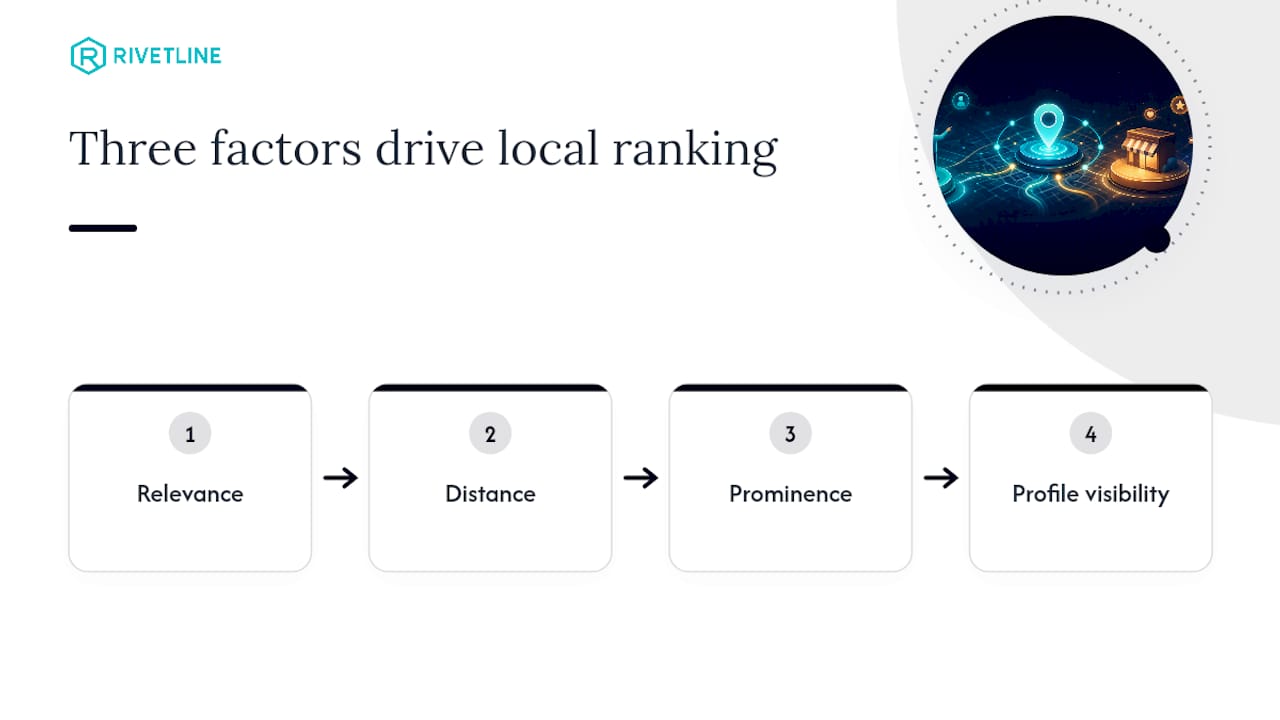
Most owners treat their profile like a business card they filled out once in 2019 and never touched again. That’s the single biggest reason competitors with worse products outrank them. Google has been explicit for years that three factors decide local ranking: relevance, distance, and prominence. Everything in this guide maps back to those three, because chasing tactics that don’t touch one of them is how agencies burn client budgets on nonsense.
Verify Your Business Profile and Organize Access
You cannot optimize what you don’t control, and an unverified profile is a liability, not an asset. Google offers postcard verification (still the default for most single locations), phone or email verification for eligible businesses, and video verification for service-area businesses without a storefront. If you’re managing multiple locations, apply for bulk verification through a business group instead of verifying each address one at a time. It’s slower to set up but far less painful once you’re past location five.
Once verified, get your account structure right before you touch a single field:
- Create a Business Profile group and assign roles (Owner, Manager, Site Manager) instead of sharing one login among staff.
- Turn on two-factor authentication for every account with access, especially if you’ve ever had a bookkeeper or former employee added.
- Audit who still has access quarterly. Departed staff with lingering Manager rights is how listings get edited or, worse, transferred out from under an owner.
The pitfall that trips up the most businesses: listing a name that doesn’t match your storefront signage (adding keywords like “Best Plumber Denver” into the business name field), or claiming a service-area radius that doesn’t match reality. Both are policy violations that get profiles suspended, and reinstatement can take weeks.
Complete Every Profile Field for Relevance and Trust
Field completeness is not busywork. It’s the mechanism Google uses to match your business to search queries, and an incomplete profile is invisible to entire categories of searches you’d otherwise win. Work through this order:
- Primary category. Choose the single most specific option Google offers, not the broadest one that technically fits.
- Services and products. List every discrete service with a short description, not a vague catch-all.
- Business description. Use the 750-character field to describe what you do, who you serve, and where, in plain language. Skip keyword stuffing; Google’s algorithms read intent, not repetition.
- NAP consistency. Your name, address, and phone number must match exactly across your website, profile, and every citation source you have listed elsewhere.
- Hours, including special hours. Update holiday hours proactively. A profile showing “Open” when you’re closed for Thanksgiving costs you a one-star review from someone who drove over for nothing.
- Attributes. Accepted payments, accessibility features (wheelchair access, gender-neutral restrooms), and identity attributes (women-led, veteran-led) all function as filter and relevance signals.
- Website link. Point it to a page relevant to that location, not always your homepage, especially if you run more than one.
Service-area businesses need to explicitly define their coverage zone rather than leaving Google to guess from your address, and storefronts should never list a P.O. box as their address, a rule Google enforces without much patience.
On business descriptions: AI drafting tools are fine for a first pass, but the business name field itself has a hard policy line. It must match your real-world name exactly. No taglines, no city names, no service keywords bolted on. Businesses that try it eventually get flagged and lose far more visibility fixing a suspension than they’d have ever gained from the keyword stuffing.
Pro Tip: Screenshot your fully completed profile once a quarter. If a field silently reverts (Google’s system occasionally does this after category updates), you’ll catch it in minutes instead of months.
Category and Services Strategy to Maximize Relevance
Primary category is the single highest-leverage relevance signal you control, and most businesses pick it wrong. “Restaurant” when you’re a “Ramen Restaurant.” “Contractor” when you’re a “Roofing Contractor.” Google rewards specificity because specificity is what searchers actually type, and a vague primary category dilutes your matching potential across every query where a competitor picked the exact term.
Secondary categories exist to catch adjacent searches, not to pad your listing with every category remotely related to your business. Three to five relevant secondary categories is a reasonable range; twenty is a red flag to Google’s spam systems.
Services and products deserve the same specificity:
- List each service as its own line item with a two or three sentence description, written the way a customer would search for it, not how you’d describe it internally.
- Add pricing where you’re comfortable, even a range. It’s an optional field, but it increases query match on price-sensitive searches (“affordable,” “cheap,” “budget”) that vague listings miss entirely.
- Update the services list whenever you add or drop an offering. A profile still listing a discontinued service confuses both customers and Google’s matching.
If you’re testing a category change, change one thing and wait. Run a geo-grid snapshot before the edit, make the single change, then retest in 10 to 14 days. Bundling five changes at once tells you nothing about which one worked.
Photos and Video: The Media That Moves Engagement and Credibility
Profiles with strong photo libraries get more calls, more direction requests, and more website clicks than sparse ones, and Google surfaces that engagement data back into ranking signals over time. Practitioner benchmarks recommend at least 10 quality photos as a baseline, not a ceiling.
Prioritize in this order:
- Exterior shots so customers recognize your storefront from the street or parking lot.
- Interior shots that set expectations for atmosphere, cleanliness, and scale.
- Team photos. Faces build trust faster than any copy you write.
- Product or service shots, ideally showing the work itself, not a stock-photo stand-in.
- Before-and-after pairs for any service where transformation is the selling point (contractors, salons, detailers, trainers).
Video gets underused and shouldn’t be. A 30 to 60 second clip of a technician actually doing the job, captioned with what’s happening, outperforms another static photo almost every time on engagement.
Photo views, click-throughs, and direction requests are visible in your Insights dashboard, and tracking them monthly is how you prove media investment is actually paying off rather than just assuming it is.
Reviews and Reputation: Practical Tactics to Raise Velocity, Rating, and Trust
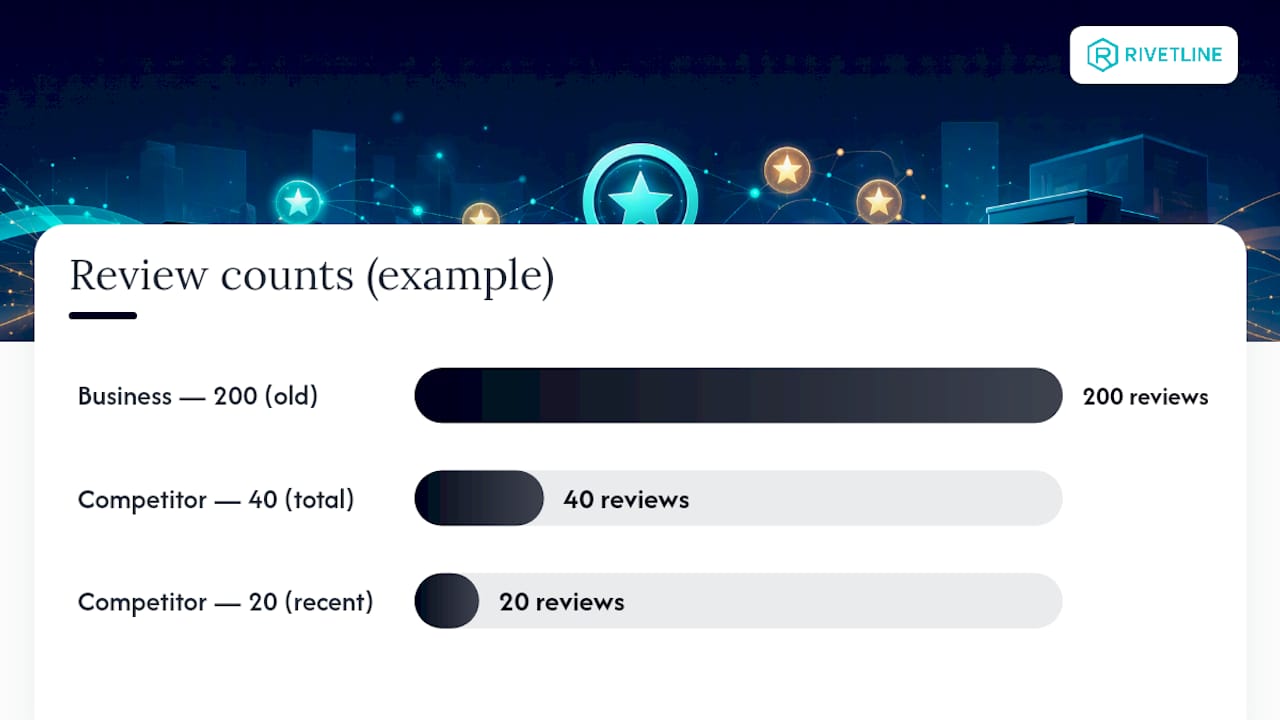
Reviews aren’t a nice-to-have side effect of good service. They’re a ranking input Whitespark’s 2026 survey estimates at roughly 20% of local pack weight, and recency matters as much as total count. A business sitting on 200 reviews from three years ago is losing ground to a competitor with 40 reviews, half of them from this quarter.
- Set a monthly velocity target. A steady stream of new reviews each month is a realistic target for most small businesses; higher-transaction businesses may require more.
- Ask at the moment of peak satisfaction, not three days later in a generic email blast. Right after checkout, right after service completion, right when the customer says “thanks, that was great.”
- Respond to every review, positive or negative, within 48 hours. Response speed and consistency are increasingly weighted signals, not just a courtesy.
- Template your responses, but personalize the first line. A copy-pasted “Thank you for your feedback!” on every review reads as lazy because it is.
- For negative reviews, acknowledge, take it offline, and never argue in public. Escalate genuinely abusive or fake reviews through Google’s flagging tool rather than sparring in the comments.
- Mine your review text for language customers actually use (“same-day,” “walk-in,” “family owned”) and feed those exact phrases into your services and description fields.
A partner resource worth bookmarking on the response side is this step-by-step reputation management guide, which walks through escalation paths for the review situations that don’t have a clean template answer.
Pro Tip: Track review-driven traffic separately in your analytics by tagging the “Get Directions” and call-tracking numbers unique to your profile. Owners are consistently surprised how much of their phone volume traces back to a review someone read an hour earlier.
Measurement, Geo-Grid Audits, and Advanced Optimizations
Everything above serves Google’s three ranking pillars: relevance (does your profile match the query), distance (how close you are to the searcher), and prominence (how known and trusted you are). Here’s the part most guides skip: distance is not something profile edits can fix. If you’re three miles from a search and a competitor is three blocks away, no amount of category tweaking closes that gap for that specific query. What optimization does is win you every query where distance isn’t the deciding factor, and expand your radius of dominance where competition is thin.
A geo-grid audit tells you exactly where that radius ends. The method:
- Pick 9 to 25 points in a grid pattern around your business location, spaced by a half-mile to a mile depending on your service area.
- Search your primary keyword from each point (using a rank-tracking tool built for this, since manual searches get personalized results) and record your position.
- Make one change. Fix your category, run a review push, or update your description.
- Wait 10 to 14 days, then retest the exact same grid.
- Compare point by point. If your ranking improved in the outer ring but not the inner ring, distance was already your ceiling there.
Geo-grid tools like this turn “did that change work” from a guess into a measurement, which is more than most agencies bother to offer clients.
Beyond the profile itself, four advanced fixes compound your results:
| Fix | What it does | Track this metric |
|---|---|---|
| LocalBusiness schema markup | Reinforces your NAP and category data for search engines crawling your site | Rich result appearance in Search Console |
| Local landing pages | Captures Local Finder traffic (positions 4 to 20) beyond just the top 3 pack | Organic sessions by location page |
| Citation cleanup | Removes conflicting NAP data across directories that confuses relevance scoring | Citation consistency audits |
| Local backlinks | Builds prominence signals from other locally relevant sites | Referring domains from local sources |
Pro Tip: Don’t sleep on Local Finder rankings. Ranking 4th through 20th still drives real traffic if you’ve built out location pages that capture it, and that volume is invisible if you’re only watching the top-3 Local Pack.
When to DIY Google Business Profile Optimization and When to Hire It Out
If you run a single location, face light local competition, and have an hour a week to spend on it, doing this yourself is genuinely reasonable. The tactics in this guide aren’t secret. They’re just tedious, and tedium is exactly what causes most owners to do them once and quit.
Where DIY stops working is multi-location management, competitive categories where three agencies are actively running geo-grid tests against you, or timelines where you need results before your slow season ends. That’s a different job, and it takes a different amount of attention than most owners can give it between everything else running a business demands.
In month one of a managed engagement, Rivetline runs a full profile audit against the category and completeness gaps above, fixes the primary category and service listings, stands up a review request system that doesn’t rely on the owner remembering to ask, and connects reporting to GA4 and a live Looker Studio dashboard so you can see what’s moving without waiting for a monthly PDF. The audit work itself follows the same tactical playbook covered on the Rivetline blog, just executed with more consistency than most owners have bandwidth for.
— Chris Breikss
Get a Google Business Profile Audit Without the Retainer Guessing Game
Rivetline runs Google Business Profile optimization as a transparent, done-for-you service instead of the vague “local SEO package” most agencies sell without ever showing their work. A Rivetline engagement includes the full profile audit, category and service corrections, a review request system built into your actual customer workflow, and monthly reporting on a live dashboard tied to GA4, not a PDF that shows up a week after you needed the numbers. Pricing runs project-based for a one-time fix-and-audit or retainer-based if you want ongoing management, and most clients see Local Finder movement inside the first month with review-driven prominence building over the following quarter. If you want a straight answer on where your profile is losing visibility, request a Google Business Profile audit and see the gaps before you spend another dollar guessing at what’s wrong.
Sources
The core ranking framework in this guide comes straight from Google’s own local ranking guidance, which names relevance, distance, and prominence as the three deciding factors. For the numbers behind review and profile-completeness weighting, the Whitespark 2026 local ranking factors survey remains the most cited practitioner benchmark in the industry. Whitespark’s own Google Business Profile optimization guide covers photo and posting benchmarks in more depth than this article had room for, and the official Business Profile product page confirms the listing itself costs nothing to claim or run. For tactical next steps and case-specific breakdowns, the Rivetline blog covers the audit process in more granular detail.
- Tips to improve your local ranking on Google — Google Business Profile Help
- Google Maps ranking factors that move the map pin — TheStacc
- The Definitive Guide to Google Business Profile Optimization — Whitespark
FAQ
How Do I Optimize My Google Business Profile?
Verify ownership, complete every field with the most specific primary category available, list services with descriptions, upload at least 10 quality photos, and build a steady monthly flow of new reviews rather than a one-time push.
How Much Does Google Business Profile Optimization Cost?
The profile itself is free to claim and run; what costs money is hiring an agency like Rivetline to manage the audit, fixes, and ongoing review engine, typically billed as a project fee or monthly retainer.
How Long Does It Take to See Results From GBP Optimization?
Category and completeness fixes can show movement in the Local Finder within a few weeks, while review-driven prominence takes longer, typically several weeks to a few months or more.
Is Google Business Profile Being Discontinued?
No. Google Business Profile is an active, actively updated product; the platform itself is not going away.
What Are Google’s Main Local Ranking Factors?
Google names relevance, distance, and prominence as its three local ranking pillars, with profile completeness and review signals accounting for a substantial share of controllable prominence and relevance weight.