Meta Ads Not Delivering? Here's the Real Fix Order
Your Meta ads not delivering almost always traces back to one of five things: a rejection you haven’t seen, a billing hiccup, an audience that’s too small or fighting itself, a bid cap that’s locking you out of the auction, or an edit that quietly resets the Learning Phase. “Not delivering” means the campaign shows Active in Ads Manager but the impressions column reads zero, or close enough to it that the spend never moves. That’s a different animal from a rejected or disapproved ad, and treating it like one wastes hours.
Start with the smallest possible check before you touch anything else. Open the Meta Business Help Center’s troubleshooting article in one tab and your Ads Manager in the other, then run this sequence:
- Delivery column at the ad level, not just the campaign level
- Account Quality, buried under Business Settings, where silent restrictions live
- Billing, because a declined card kills delivery with zero warning
- Audience size and overlap, the most common self-inflicted wound
- Change history, to see if a recent edit reset the clock
Roughly a third of “not delivering” tickets Rivetline’s team triages resolve in the first five minutes just from that list. The rest need the deeper diagnostics below. Meta’s own review process typically clears ads within 24 hours, but Account Quality can re-flag an approved ad days after launch, so “it was fine yesterday” means nothing.
Key Takeaways
Meta ads stop delivering for five main reasons, and checking them in order, status, billing, audience, budget, and recent edits, resolves most cases without a single wasted edit.
| Point | Details |
|---|---|
| Check status before editing | Open the Delivery column at the ad level first; edits before diagnosis risk resetting Learning Phase. |
| Rule out billing fast | Confirm payment method and spending limits in Account Quality before assuming a targeting problem. |
| Fix audience size | Keep estimated reach above 50,000 and remove exclusion stacking to stop self-inflicted delivery caps. |
| Test bid caps honestly | Run Lowest Cost bidding for 48 to 72 hours to find the real market price before reintroducing a cap. |
| Separate tracking from delivery | Zero events in Events Manager signals a Pixel or CAPI issue, not a true delivery failure. |
Table of Contents
- Why Are My Meta Ads Not Delivering? A Fast Diagnostic Checklist
- What’s Actually Causing Meta Ads Issues, Ranked by Likelihood
- How Account Quality and Policy Enforcement Quietly Throttle Ads
- Why Is My Ad Stuck in Learning Limited?
- Is Your Audience Too Small or Fighting Itself?
- Are Bid Caps Keeping Your Ad Out of the Auction?
- Is Your Creative or Landing Page Hurting Delivery?
- Is It Really a Delivery Problem, or a Tracking Problem?
- When Should You Escalate to Meta Support?
- Rivetline’s Approach to Diagnosing Delivery Failures
- The Diagnostic Order Most Advertisers Get Backward
- Sources
- FAQ
Why Are My Meta Ads Not Delivering? A Fast Diagnostic Checklist
Run this in order. Skipping steps to “just fix it” is how people accidentally trigger a second Learning Phase reset on top of the first problem.
- Check the Delivery column at all three levels (campaign, ad set, ad). Look for sub-statuses like “Update required,” “Not delivering,” or “Learning Limited,” not just the generic “Active” badge that hides the real story.
- Open Account Quality and confirm billing. A failed payment method or a spending limit set months ago and forgotten will halt every campaign in the account simultaneously, which is a useful diagnostic clue on its own.
- Check estimated audience reach in the ad set. Below 1,000 people, expect near-zero delivery. Below 50,000, expect volatility and high CPMs, especially with narrow interest stacking.
- Look at the Learning Phase indicator and count optimization events over the trailing seven days. Under 50 conversions a week and the ad set likely sits in “Learning Limited,” which throttles delivery on purpose.
- Pull up the change history log. If someone edited budget, creative, or audience in the last 24 to 72 hours, that edit is your leading suspect before you go hunting for anything exotic.
Pro Tip: Resist the urge to “fix” three things at once. Change one variable, wait the full 24 to 72 hour review window Meta needs to re-evaluate delivery, and only then move to the next step. Stacking fixes is how you lose track of what actually worked.
An operator diagnostic updated for 2026 platform behavior recommends this exact pause-before-edit discipline, and for good reason: every edit to an active ad set has a chance of resetting Learning Phase, which restarts the delivery penalty clock you’re trying to escape.
What’s Actually Causing Meta Ads Issues, Ranked by Likelihood
Not every delivery problem is created equal, and treating a billing issue like a creative problem burns a week you didn’t need to spend. Here’s the order Rivetline’s media buyers check, ranked by how often each one turns out to be the culprit.
Ad rejection or policy flags top the list. Check the ad’s status text directly in Ads Manager rather than the campaign summary, since rejection reasons live at the ad level. A rejected ad can still show “Active” at the campaign level if other ads in the set are running, which fools a lot of people into thinking the whole campaign is fine. If the rejection reason is genuinely wrong, appeal it through Account Quality with a short, specific explanation tied to the exact policy clause cited. Vague or emotional appeals tend to get auto-denied and can leave a mark on your account’s standing, so keep it factual. A detailed breakdown of rejection types shows most legitimate appeals resolve within 24 to 48 hours when the evidence is clear.
Billing and account-level spend limits come next, and they’re almost embarrassingly simple to miss. Go to Billing under Business Settings, confirm the primary payment method hasn’t expired, and check whether a spending limit was set at some point and never removed. Add a backup card if you haven’t. Once billing clears, delivery typically resumes within a few hours, not days.
Audience size and internal conflicts cause more silent failures than any other single factor. An estimated reach of zero means your targeting logic is contradictory, usually from stacking too many “must include” and “must exclude” layers on top of each other. Under 1,000 estimated reach, delivery effectively stops. Under 50,000, it limps along with inflated CPMs. The fix is almost always to loosen exclusions, widen the geographic radius, or hand more of the targeting decision to Advantage+ audience expansion instead of manually layering five interest categories with AND logic.
Budget and bid constraints are the quiet killer nobody wants to blame because it feels like admitting the ad just isn’t worth what you’re offering to pay for it. If you’re using a bid cap or cost cap, that number is a ceiling on what Meta can bid on your behalf in the auction, and if the real market price for your audience sits above it, you simply don’t win impressions. A very large pool of active advertisers is bidding for the same eyeballs, and cost caps set six months ago rarely reflect today’s competition.

Learning Phase disruption from repeated edits compounds every other problem on this list. Each edit to budget, audience, creative, or bid strategy can restart the Learning Phase, and an ad set stuck perpetually re-learning never gets the volume of signal it needs to deliver efficiently. If you suspect this, stop editing the existing ad set entirely and duplicate it fresh instead, letting the original run untouched as a control.
Platform-level shifts, particularly the Andromeda system’s audience-signal re-evaluation, can cause temporary dips that have nothing to do with anything you did. If your Conversions API is verified and your setup hasn’t changed, but delivery still dipped across multiple accounts around the same window, that’s a rollout effect, not a you problem. The sane move is a four to six week stabilization hold before making structural changes, verifying CAPI is firing correctly in the meantime.
Scheduling and frequency cap mistakes round out the list, and they’re almost always a timezone error. Ad set schedules default to account timezone, not the timezone the audience is actually in, so a campaign scheduled to run 9 AM to 5 PM can accidentally serve only during hours nobody in the target market is awake.
Creative and landing page mismatches rarely stop delivery outright, but a low Quality Ranking or rising Negative Feedback score inflates your effective CPM enough that you get outbid without ever hitting a hard block.
How Account Quality and Policy Enforcement Quietly Throttle Ads
Account Quality is where Meta scores your account’s history, and a poor score can cap delivery without ever generating a rejection notice you’d actually see. This is the part of “meta ads not delivering” that catches experienced advertisers off guard, because nothing in the interface screams “you’re restricted.” It just looks like underperformance.
Watch for these signs of a silent restriction:
- A sudden, sharp drop in impressions across multiple campaigns at once, with no changes made on your end
- Several ads rejected in quick succession, even for minor or seemingly unrelated reasons
- Delivery that’s technically nonzero but a fraction of what similar past campaigns achieved
When accounts rack up repeated small rejections, Meta can quietly cap delivery while campaigns still read “Active,” and only Account Quality or a direct conversation with Meta support will confirm it. If you spot this pattern, go straight to Account Quality and request a review, and if that stalls, escalate through the Business Help Center with documented evidence rather than repeating the same appeal twice.
Why Is My Ad Stuck in Learning Limited?
Meta’s algorithm needs an adequate number of optimization events per week per ad set to exit Learning Phase and start delivering efficiently. Fall short of that threshold and you land in “Learning Limited,” a state where Meta essentially throttles delivery because it doesn’t have enough signal to optimize confidently.
The math that fixes this is straightforward: your daily budget should be roughly five times your target cost per action. If your target CPA is $20, you need at least $100 a day to generate enough conversion volume to clear 50 events weekly. If the budget can’t stretch that far, switch the optimization event to something higher up the funnel, like “Add to Cart” instead of “Purchase,” so the algorithm has more frequent signal to learn from.
Consolidation helps more than most advertisers expect. Combining three underfunded ad sets into one gives the algorithm a single pool of data instead of three anemic ones, each stuck in its own Learning Limited purgatory.
Pro Tip: If you’re troubleshooting a Learning Limited ad set, do not touch it. Pausing low-volume duplicates and merging budgets into the survivor is a structural fix; editing the struggling ad set directly just restarts a clock that hasn’t finished ticking yet.
Is Your Audience Too Small or Fighting Itself?
Estimated reach in the ad set editor is the fastest tell in the entire troubleshooting process, and most advertisers glance past it. Zero estimated reach means your targeting logic contradicts itself, usually from exclusions canceling out your inclusions. Below 1,000, delivery essentially stops. Below 50,000, it survives but pays a CPM penalty for being too narrow to give the auction room to work.
The fix isn’t cleverness, it’s addition by subtraction:
- Drop layered “must include AND must include” interest stacking down to one or two broad signals
- Let Advantage+ audience expansion do the widening instead of manually guessing at adjacent segments
- Extend the custom audience lookback window if you’re building from website visitors or past purchasers
- Run the Audience Overlap tool across your active ad sets to catch campaigns quietly bidding against each other in the same auction
That last one matters more than it gets credit for. Two ad sets targeting overlapping audiences don’t help each other, they just split your own budget against itself and hand Meta an excuse to fund neither one fully.
Are Bid Caps Keeping Your Ad Out of the Auction?
The Meta auction doesn’t award impressions to the highest bidder, it awards them to whichever ad clears the total value threshold, a blend of bid, estimated action rate, and ad quality. But a hard bid cap or cost cap still sets a ceiling, and if the real market price for your audience sits above that ceiling, your ad simply never clears.
- Switch to Lowest Cost bidding with no cap for 48 to 72 hours. This removes the artificial ceiling and lets the algorithm spend against whatever the market actually charges.
- Record the real cost per result that emerges during that window. That number is your market price, not the number you guessed at three months ago.
- Reintroduce a cap 20 to 30% above that observed price if cost control matters to you, giving the algorithm enough room to actually compete instead of sitting on the sidelines.
Daily budget interacts with this directly. A tiny budget paired with a narrow audience gives the algorithm almost no room to find efficient impressions, so if you’re capped on both fronts at once, fix the audience size before you touch the bid strategy.
Is Your Creative or Landing Page Hurting Delivery?
Quality Ranking and Negative Feedback, both visible in the ad’s Relevance Diagnostics panel, tell you whether your creative is quietly costing you auction position even when it’s technically approved and running. A “Below Average” ranking on either metric inflates effective CPM, which can look identical to a delivery problem from the budget side.
Run through this before assuming the algorithm is broken:
- Confirm the landing page loads in under three seconds on mobile, since slow pages tank Quality Ranking fast
- Match the ad’s promise to the landing page’s actual headline; a bait-and-switch gap is the single most common cause of negative feedback
- Verify forms submit correctly and a visible privacy policy link exists, both compliance basics Meta checks
- Check for language that reads as exaggerated or deceptive, even unintentionally, since that triggers both policy flags and user reports
Pro Tip: If creative needs a refresh, upload it as a new ad within the existing ad set rather than editing the underperforming ad directly. This lets you A/B test without forcing the whole ad set back into a fresh Learning Phase.
Is It Really a Delivery Problem, or a Tracking Problem?
Before you chase delivery fixes, rule out a tracking gap masquerading as one. A campaign optimizing for purchases that shows zero events in Events Manager isn’t failing to deliver, it’s delivering fine and just not reporting back.
- Open Events Manager and check event volume for the last seven days. Zero recorded events on your optimization event usually means a Pixel or Conversions API problem, not an auction problem, and the algorithm will throttle delivery because it has nothing to optimize toward.
- Run Meta’s Test Events tool alongside your browser’s network debugger to confirm the Pixel fires on the actual page, not just in a sandbox.
- Cross-reference against GA4. If GA4 shows real site traffic and conversions but Events Manager shows silence, the problem is squarely on the tracking side, and no amount of budget or audience tweaking will fix it.
Fixing tracking first changes everything downstream, since an ad set with restored event volume often climbs out of Learning Limited on its own within days.
When Should You Escalate to Meta Support?
Escalate once you’ve ruled out the fixable stuff and still see unexplained restriction. The clearest signals: a sudden multi-campaign delivery collapse with no account changes, repeated rejections across unrelated ads, or an Account Quality status that reads restricted with no clear appeal path forward.
Build your case before you open a ticket, not after:
- Screenshots of the Delivery column and status text at the exact time of the issue
- Timestamped change history showing what was and wasn’t edited
- Billing screenshots confirming payment method status
- Events Manager and Conversions API logs showing tracking health
Meta’s support response windows vary, but tickets backed with concrete evidence and specific policy references move faster than vague “my ads stopped working” messages. If the first response is a form reply, ask explicitly for human review of the Account Quality decision rather than restating the original complaint.
Rivetline’s Approach to Diagnosing Delivery Failures
Most agencies find out a client’s ads stopped delivering when the client calls to ask why. That lag is the actual problem, not the bid cap or the audience overlap sitting underneath it.
- Rivetline runs live Looker Studio dashboards tied directly to GA4 and Google Business Profile, so a delivery collapse shows up as a visible dip the same day, not buried in a monthly PDF three weeks later
- The diagnostic order above (status, billing, audience, Learning Phase, edits) is the same sequence Rivetline’s media buyers run before touching a single setting, because guessing costs more than checking
- Managing Meta Ads alongside Google Ads and ChatGPT Ads means a delivery drop gets cross-checked against the rest of the account’s paid channels instead of diagnosed in isolation
If your reporting setup can’t tell you a campaign stopped delivering until you notice the leads dried up, the reporting is the actual failure point, not the algorithm. Rivetline’s team builds the dashboard access and the triage discipline into the retainer from day one, not as an add on nobody remembers to ask for.
The Diagnostic Order Most Advertisers Get Backward
Most troubleshooting guides treat every cause as equally likely, which is a polite way of saying they’re too scared to rank anything and risk being wrong. That’s not analysis, it’s a checklist with no judgment attached. The Andromeda rollout made this worse, because a temporary audience-signal dip now gets misdiagnosed as a targeting failure roughly as often as it gets correctly identified as a platform-wide adjustment.
The advertisers who fix delivery fastest aren’t the ones who know the most causes. They’re the ones who check the cheapest, fastest signals first and refuse to touch the ad set until they’ve ruled those out. Billing and status checks take ninety seconds. Rebuilding an audience structure takes an afternoon. Do the cheap check first, every time, and resist the temptation to jump straight to creative fatigue because it feels like the more sophisticated answer.
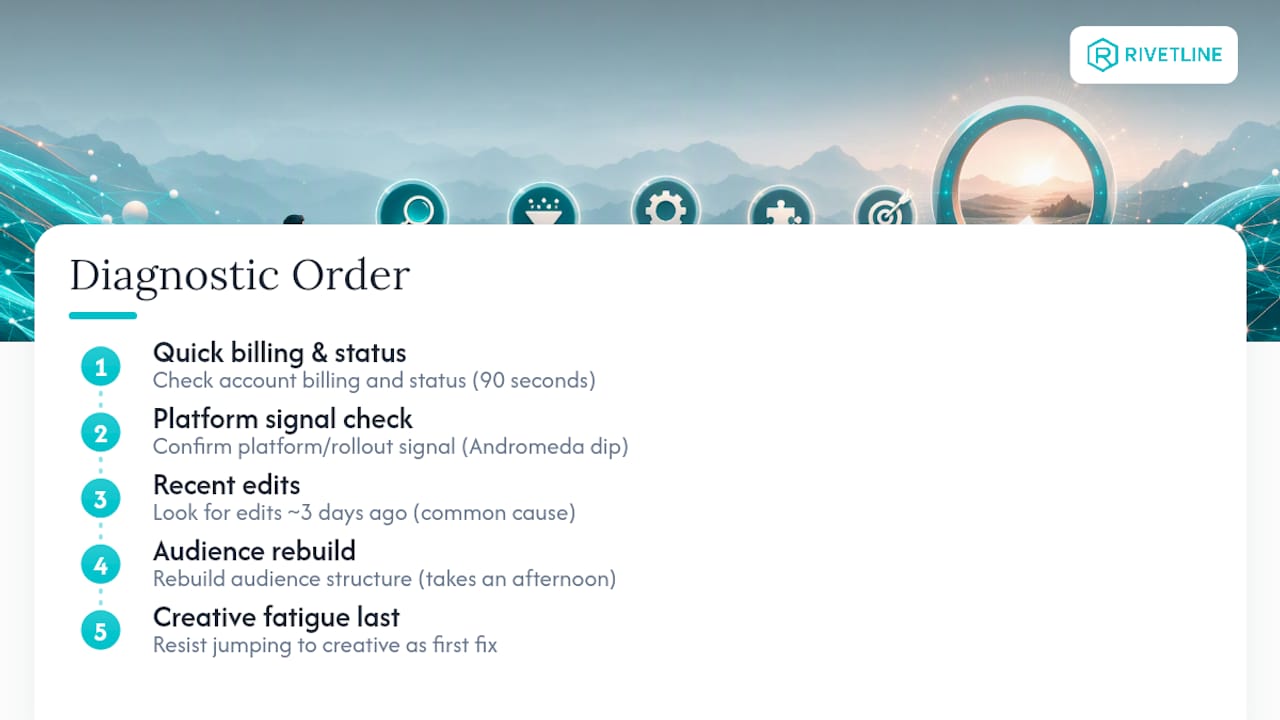
The single biggest mistake is treating every delivery problem as a targeting problem, because targeting is the fix advertisers understand best and reach for reflexively. Half the time it’s billing. A quarter of the time it’s an edit made three days ago that nobody remembers making.
Sources
- Troubleshoot ad delivery: your campaign isn’t running
- Meta Advertising Standards / Transparency
- Number of active Facebook advertisers
- Meta Ads Not Delivering in 2026: 10 Causes and How to Fix Each
FAQ
Why are my Facebook ads saying not delivering?
The Delivery column shows “Not delivering” when a policy rejection, a billing failure, a spending limit, or an audience too small to clear the auction is blocking impressions. Check status, billing, and estimated reach in that order.
Why are my Meta ads active but not delivering?
“Active” only confirms the ad passed initial review, not that it’s winning auctions. The most common causes at that stage are audience size below 50,000, a bid cap set below market price, or an ad set stuck in Learning Limited from insufficient weekly conversion volume.
Why is my ad showing not delivering?
Open Account Quality first, since silent restrictions from repeated rejections can cap delivery without an explicit notice. If that’s clear, move to billing, then audience size, before assuming a technical bug.
Is there a problem with Meta ads today?
Platform-wide issues do happen, and the Andromeda rollout has caused temporary audience-signal re-evaluation dips across many accounts at once. If delivery dropped simultaneously across multiple unrelated campaigns with no changes on your end, hold for a few days and verify Conversions API before restructuring anything.
How long does Meta’s ad review typically take?
Most reviews complete within 24 hours, though manual review or re-review after launch can extend that window, and ads remain subject to policy enforcement even after approval.