Service Area Business SEO: A Practical Checklist for 2026
Fix your Google Business Profile settings first, then build five high-quality service-area pages for your top cities, and layer LocalBusiness schema on top. That order matters. Here’s what to do this week:
Set your GBP service areas by city, zip code, or county, and hide your address if you don’t take walk-ins.
Pick your five priority cities based on where the calls and revenue already come from, not where you wish they came from.
Publish one unique landing page per city, each with local proof, not a copy-pasted template with the city name swapped.
Add LocalBusiness schema with areaServed to every service-area page so search engines map you to the right territory.
Start asking for location-specific reviews the same week your pages go live, not months later.
Pro Tip: Fix your GBP primary category today and text five recent customers asking for a review that mentions their city or neighborhood by name. That single move often moves the needle faster than anything else on this list.
Key Takeaways
Service-area business SEO succeeds when Google Business Profile accuracy, unique city landing pages, and structured data work together instead of being treated as separate projects.
PointDetailsFix GBP firstCorrect service areas, primary category, and hidden address before any other tactic.Prioritize five citiesBuild unique service-area pages for your top five revenue cities before scaling further.Add schema properlyImplement LocalBusiness schema with areaServed on every city page, not just the homepage.Reviews carry heavy weightLocal reviews and GBP signals outweigh most other ranking factors for the Local Pack.Rivetline manages it end to endRivetline connects GBP, service-area pages, and schema to live GA4 dashboards for ongoing measurement.
Table of Contents
What Is a Service Area Business, and How Does Its SEO Differ?
How Do You Set Up Google Business Profile for a Service-Area Business?
What Advanced Tactics Help Scale, and What Pitfalls Should You Avoid?
What Is a Service Area Business, and How Does Its SEO Differ?
A service area business, or SAB, is any company that travels to the customer instead of the customer walking through a storefront door. Think plumbers, mobile notaries, HVAC techs, house cleaners, landscapers, and mobile pet groomers. Google treats these businesses differently from a coffee shop with a fixed address, and that difference changes almost every SEO decision you make.
Storefront SEO leans on proximity. Google shows the Local Pack based partly on how close the searcher is to your pinned location. An SAB has no pin that matters to the customer, so visibility depends more heavily on service-area settings, Google Business Profile signals, and how well your website tells search engines exactly which cities you cover.
That creates a real disadvantage. A cleaning company based in one suburb often struggles to rank in the Local Pack for a city fifteen miles away, even if they happily send crews there every day. Service-area pages exist to close that gap. A well-built page targeting “commercial cleaning in [city]” can rank in organic results even when the Local Pack favors businesses with a closer address, which is why local SEO for contractors increasingly centers on page-level city targeting rather than GBP alone.
How Do You Set Up Google Business Profile for a Service-Area Business?
Correct GBP configuration is the single highest-leverage task most SABs skip or half-finish. Get this right before you touch anything else, because a misconfigured profile undercuts every other tactic in this guide.
Hide your address in GBP settings if customers never visit you at a physical location. Google’s own guidelines require this for true SABs.
Define your service areas by city, zip code, or county rather than a single vague radius. List the specific places you actually serve.
Choose the single most accurate primary category. “Plumber” beats “Home Improvement” if you’re a plumber. Vague categories dilute your relevance.
Add every service you offer with short descriptions, and keep business hours current, including holiday adjustments.
Upload photos from real jobs across your target cities, not generic stock imagery. Google and customers both notice the difference.
Turn on messaging and click-to-call so mobile searchers can reach you without a second tap.
A few do’s and don’ts worth memorizing:
Do hide a private or residential address if you don’t accept walk-in customers.
Don’t create a virtual office or rent a mailbox just to add a second listing. Google’s spam policies treat this as a listing violation and it can get your profile suspended.
Do match your service-area list to what you can realistically staff and deliver on schedule.
Don’t list a county you serve twice a year just to look bigger. Overreach dilutes relevance signals.
Once the profile is live, maintain it weekly. Post an update, add a fresh photo, answer any new questions in the Q&A section, and check for new reviews you haven’t responded to yet.
Pro Tip: When you ask for reviews, prompt customers with something specific: “Would you mind mentioning the neighborhood or city where we did the work?” That small nudge gets you localized language inside real reviews, which is language search engines pick up on and customers trust more than generic five-star praise.

How Do You Build High-Quality Service-Area Landing Pages?
Unique, localized service-area pages remain one of the most reliable ways to win organic visibility in a market where you have no storefront to anchor a Local Pack listing. Search Engine Land’s guidance is blunt about this: pages that repeat the same boilerplate with a city name swapped in rarely rank, while pages with real local detail often do.
Run each city page through this checklist before it goes live:
A unique URL that includes the city and service, like
/plumber-austin-tx/rather than a generic/service-1/.The city name in both the title tag and the H1, written naturally rather than stuffed.
Copy that references actual neighborhoods, landmarks, or local conditions, not a template with find-and-replace city names.
At least one photo and one testimonial tied specifically to work done in that city.
A clear contact call-to-action, whether that’s a phone number, a form, or both.
Page-level LocalBusiness schema, and an embedded map or GeoShape data where it’s relevant.
An internal link from a central “cities we serve” index page, so nothing is orphaned.
Here’s a simple template you or a hired writer can apply directly:
Headline: “[Service] in [City], [State]”
Opening line: One sentence naming the city and the specific problem you solve there.
Three local proof bullets: a recent job, a neighborhood served, a local condition you handle (older homes, specific climate issue, HOA rules).
Services offered in that city: a short list matching your GBP services.
CTA: phone number and a short form, repeated near the top and bottom.
A recommended URL and title pattern looks like this: URL /service-area/city-service/, title tag “24/7 Emergency Plumber in Denver, CO | [Business Name].”
Google’s own content guidance warns against mass-produced, low-value pages built primarily to rank rather than help a person. That’s the doorway page trap: publishing fifty near-identical city pages overnight looks efficient but usually backfires, either through thin-content penalties or simply because none of the pages have enough unique substance to rank. Start with your top five revenue-driving cities, prove the format works, then scale deliberately. BrightLocal’s research backs this sequencing, noting that SAPs work best as mini local landing pages layered on top of a solid GBP foundation, not as a replacement for one.
Pro Tip: Build a local content idea bank before you write a single page. Local permit or licensing quirks, weather-driven service notes (“why Phoenix roofs need different maintenance than Seattle roofs”), and neighborhood-specific FAQs all make a page genuinely unique instead of templated.
What Technical SEO and Schema Do Service-Area Pages Need?
Simple technical fixes decide whether search engines can find your service-area pages and correctly map them to the right territory. This is where a lot of otherwise solid SAB SEO work quietly falls apart.
Start with Schema, which supports an areaServed property and, for more complex territories, a GeoShape definition. Place this JSON-LD markup in the page’s <head> or right before the closing </body> tag, and list every city or region that specific page actually covers rather than your entire service footprint on every page.
Crawlability matters just as much as the markup itself:
Never bury your city pages behind a JavaScript-only store-locator widget that search engines can’t parse. Plain HTML links are more reliable.
Include every service-area page in your XML sitemap, and link to them from your main navigation or a dedicated “service areas” page when your city count is manageable.
Check mobile page speed specifically. Most local searches for home services happen on a phone, often from someone standing in a driveway looking at a broken pipe.
If you have two pages targeting nearly identical areas, canonicalize to the stronger one rather than letting them compete against each other.
Pro Tip: Use Google Search Console’s URL Inspection tool to confirm each new service-area page actually gets indexed within a week or two of publishing. If a page sits unindexed for a month, something in your internal linking or content quality is likely the cause.
What Citations and Reviews Actually Move Local Rankings?
GBP signals and review signals carry more ranking weight than almost anything else in the Local Pack, according to industry analysis of contractor SEO performance. Prioritize these before spending time on lower-impact tasks like directory submissions to sites nobody checks.
Run this sequence over the next 30 days:
Audit your NAP consistency (name, address, phone) across every listing you can find, correcting mismatches that confuse Google about which business is which.
Build a short list of priority directories relevant to your trade, and link each listing to the correct service-area page rather than always pointing to your homepage.
Launch a review request flow that goes out within 24 hours of job completion, while the experience is still fresh.
Ask customers directly: “Would you mention which neighborhood we worked in?” That single sentence increases the odds of locality-specific language in the review.
Track where reviews are coming from geographically, so you can see which cities are underrepresented and adjust your outreach.
Pro Tip: Keep a simple spreadsheet logging each review’s source city. After three months you’ll see exactly which markets are quietly building trust and which ones need a more deliberate push.
Which KPIs and Tools Actually Show SAB SEO Progress?
Track GBP insights, Search Console impressions filtered by city keywords, clicks or calls generated from service-area pages, and conversion rate by city. Those four numbers tell you what’s working faster than any vanity metric.
GBP views and actions: how many people saw your profile and how many called, messaged, or requested directions.
Search Console impressions for city-keyword queries: filter by query to see if “[service] in [city]” phrases are showing up at all.
Clicks to call and form submissions: the real conversion events that matter more than raw traffic.
Cost per lead from SEO: compare against paid channels to understand true ROI over time.
For tools, GBP insights and Google Search Console cover the fundamentals for free. Layer in GA4 for conversion tracking, and a dedicated local rank tracker like BrightLocal or Whitespark if you’re managing more than a handful of cities.
Pro Tip: Build a one-tab monthly dashboard with five rows: GBP calls, GBP direction requests, organic impressions by city, form fills, and cost per lead. That’s usually enough to spot a trend without drowning in metrics nobody checks.
What Advanced Tactics Help Scale, and What Pitfalls Should You Avoid?
Local partnerships and documented proof of work do more for scaling SAB SEO than publishing hundreds of thin city pages ever will. Once your first five service-area pages are performing, these tactics extend your reach without diluting quality.
Sponsor a local youth sports team or community event and earn a natural, geo-relevant backlink from their site.
Build hyper-local case studies with before-and-after photos tagged by city.
Pitch targeted PR to a local news outlet covering a seasonal service angle, like storm cleanup or holiday lighting.
Create a project gallery organized by city rather than one undifferentiated portfolio page.
Partner with complementary local businesses, including community resources in your region, for mutual referral links.
Avoid these traps, all of which can quietly damage your visibility:
Virtual offices or PO boxes used to create extra listings.
Hundreds of near-duplicate city pages published in a single batch.
Service-area pages buried behind uncrawlable widgets or JavaScript-only navigation.
A page that gets no impressions in Search Console after six weeks, no calls, and no engagement isn’t a content gap. It’s a signal to rework the page or retire it before you build ten more just like it.
Pro Tip: Before scaling past your first five cities, run a simple test: improve one underperforming page’s local proof and CTA, then track lead volume for 30 days against a similar page you left untouched. That tells you whether the format works before you invest in a dozen more pages.
Rivetline’s One-Hour SAP Checklist and Template
Run through this in under an hour before you publish anything new:
GBP service areas, category, and hours confirmed accurate.
Top five city pages drafted with unique local proof, not template copy.
LocalBusiness schema with
areaServedadded to each page.Review requests sent for the last five completed jobs.
At least three real job photos per target city uploaded to both GBP and the site.
Five-line starter template:
Title: “[Service] in [City], [State] | [Business Name]”
Opening line naming the city and the problem solved.
Three local proof bullets (job, neighborhood, local condition).
Services list matching GBP.
CTA with phone and form.
For pages that drive real revenue, add a brief author or team byline and a placeholder for a future case study. Search engines and customers both trust a page more when a real person or team stands behind it.
What Actually Moves the Needle for Service-Area Clients
The fastest wins almost always come from fixing GBP category accuracy and building review velocity before touching a single line of website copy. Owners chase schema markup and backlinks first because they feel technical and impressive, but a poorly categorized GBP profile with three reviews will lose to a well-configured one with thirty, every time. Test the GBP fix and review push for 30 days before you invest heavily in new pages.
How Rivetline Handles Service-Area SEO End to End
Rivetline treats service-area SEO the way it should be treated: as a system tying GBP, service-area pages, and schema together, then measured on dashboards you can check anytime instead of a monthly PDF that shows up two weeks late. That’s the practical difference for a contractor or mobile provider tired of waiting on an agency to explain what actually happened last month.
Rivetline’s work on this specific problem includes:
GBP setup, category correction, and ongoing maintenance
Service-area page content built around real local proof, not templated copy
LocalBusiness schema implementation with proper
areaServedmarkupReview acquisition strategy designed to surface locality-specific language
Live measurement dashboards connecting GBP and GA4, so you see calls and leads by city in real time
If you’re ready to see what a properly configured local SEO setup looks like for your business, visit Rivetline’s blog for a closer look at how the team approaches service-area visibility and request an assessment of your current setup.
Sources
Guidelines for representing your business on Google - Google Business Profile Help
Service area pages: Boost local SEO across locations - Search Engine Land
How to Do Service Area Page SEO for Local Search Visibility - BrightLocal
Create helpful, reliable, people-first content - Google Search Central
FAQ
What Is a Service Area for a Business?
A service area is the specific set of cities, zip codes, or counties a business travels to serve customers, defined directly inside Google Business Profile rather than tied to a fixed storefront address.
What Is the 80/20 Rule in SEO for Service-Area Businesses?
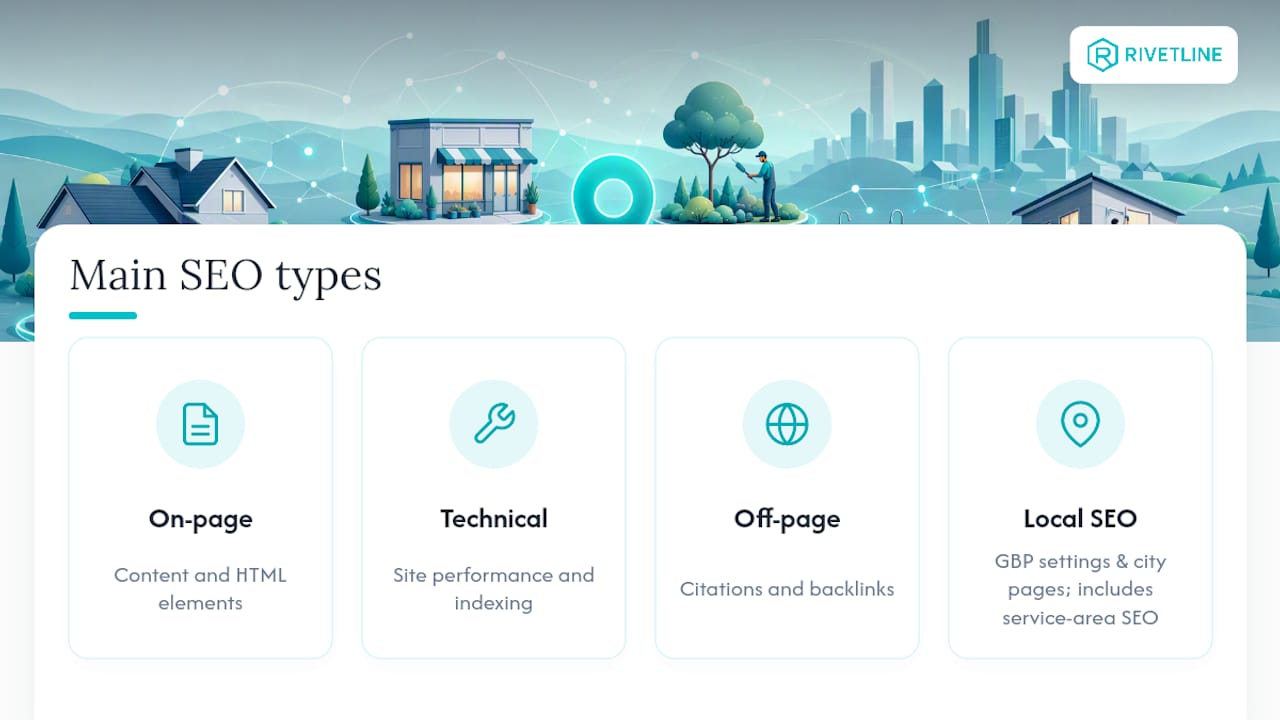
What Are the Four Main Types of SEO?
The four common categories are on-page SEO, technical SEO, off-page SEO (including citations and backlinks), and local SEO, with service-area business SEO functioning as a specialized branch of local SEO built around GBP settings and city-specific landing pages.
How Much Should I Pay for SEO Services?
Costs vary widely based on how many cities you’re targeting and how competitive your trade is; Rivetline structures engagements around the specific scope of GBP management, service-area page production, and measurement a business actually needs rather than a flat one-size-fits-all rate.
How Long Does It Take to See Results From Service-Area SEO?
Meaningful movement in the Local Pack and organic rankings typically takes several months rather than days, once GBP cleanup, review generation, and service-area pages are all in place and given time to build authority.