
Best AI content creation tools for B2B marketing teams in 2026
Best overall: ChatGPT. Best for long-form editing: Claude. Best for source discovery: Perplexity. Best for visual production: Canva. Best for transcript-led video editing: Descript. This 2026 guide compares the best AI content creation tools for B2B marketing by the work you need to ship, not by the longest feature list.
- ChatGPT leads the best AI content creation tools for B2B marketing shortlist for flexible drafting and repurposing.
- Choose Claude for long-form editing, Perplexity for source discovery, Canva for visuals, and Descript for transcript-led editing.
- AI search visibility requires accurate, useful published content; a generated draft is not a distribution strategy.
- Rivetline fits B2B teams that need content creation and AI visibility execution, not another report.
Why this matters
A writing tool does not decide which buyer question deserves a page, whether a claim is defensible, or what happens after publication. Your team still owns those decisions. Buying another subscription without assigning that work leaves you with more drafts and the same publishing bottleneck.
For B2B marketing in 2026, the brief also needs to address AI search. Write answers that a buyer can understand and verify, whether the buyer arrives from Google, ChatGPT, or Perplexity. No content tool guarantees inclusion in those systems.
Rivetline is best for B2B teams that need content creation and AI visibility executed, not just drafted. Rivetline provides ongoing marketing execution across content, SEO, paid media, and other channels; the tools below support that work rather than replace it.
What makes the best B2B content creation tool?
Use these criteria to choose your 2026 shortlist before comparing individual products:
- Task fit: Does the tool solve your actual bottleneck: drafting, research, design, or editing?
- Source discipline: Can your team distinguish supplied evidence from generated assertions?
- Editorial control: Can an editor revise structure, terminology, and claims without restarting the assignment?
- Production fit: Does the output move cleanly into your publishing or creative workflow?
- Review burden: How much checking remains before a buyer can safely rely on the content?
Treat data handling as a separate purchasing requirement. Check the current terms and settings for the specific plan you intend to use before submitting customer information, unpublished financials, or confidential sales material.
Best AI content creation tools at a glance
These five tools fill different production roles. The order matches the recommendations below; it is not a claim that a writing assistant replaces a video editor.
| Tool | Best for | Standout capability | Key limitation |
|---|---|---|---|
| ChatGPT | General-purpose drafting and repurposing | Conversational revision across content formats | Generated claims require verification |
| Claude | Long-form editorial work | Working through structure and revisions in prose | Fluent writing does not establish factual accuracy |
| Perplexity | Discovering sources and research leads | Answers accompanied by source references | Cited sources still need direct inspection |
| Canva | Producing visual content | Template-based design with generative features | Templates still need brand and accessibility review |
| Descript | Editing recorded interviews and explainers | Transcript-based audio and video editing | Transcript edits do not replace visual review |
1. ChatGPT: best B2B content tool for drafting and repurposing
ChatGPT is a conversational assistant you can use to draft, reorganize, and adapt text. Give it approved source material and a defined audience, then use follow-up instructions to refine the output. It is the default pick here because drafting and revision cut across most B2B content workflows.
ChatGPT pros:
- Supports outlines, landing-page drafts, email copy, and social adaptations.
- Lets editors request targeted changes through conversation.
- Helps turn one approved source into several format-specific drafts.
ChatGPT cons:
- Can produce unsupported facts, references, and confident explanations.
- Needs explicit constraints to avoid generic positioning and repetitive phrasing.
Best for: A marketing lead who needs a flexible drafting assistant across channels rather than a specialist production tool.
Start with an approved interview transcript, product explanation, or existing page. Ask for a draft tied to that material, and require unsupported statements to be flagged instead of filled in. Then review every claim before the copy enters your publishing queue.
Verdict: Buy for broad drafting needs; skip it as an unattended publishing system.
2. Claude: best B2B content tool for long-form editing
Claude is a conversational assistant suited to working through written material. Use it to restructure an article, identify repeated arguments, or revise a draft against an editorial brief. Its slot on this shortlist is editorial work, not automatic factual approval.
Claude pros:
- Supports iterative revisions to structure, tone, and wording.
- Can compare supplied prose with instructions and editorial criteria.
- Helps editors explore alternative explanations without rewriting from scratch.
Claude cons:
- Can generate plausible claims that are not supported by the source material.
- Requires a human editor to protect technical meaning during rewrites.
Best for: Teams whose bottleneck is turning subject-matter expertise into readable long-form content.
Give Claude a specific editing job. Ask it to separate repeated arguments, identify unexplained terminology, or propose a clearer section order. Review the proposed changes against the original source, especially when a simpler sentence removes a technical qualification.
Do not assume smoother prose is more accurate prose. In B2B content, a qualification about implementation, eligibility, or compatibility can matter more than sentence length.
Verdict: Buy for a recurring long-form editing workload; skip it if your existing assistant already handles that job.
3. Perplexity: best B2B content tool for source discovery
Perplexity answers questions with source references, making it a useful starting point for exploring a topic. Use those references to locate original documentation, research, and competing explanations. The finished article should rely on inspected evidence, not the answer summary alone.
Perplexity pros:
- Brings source references into the research workflow.
- Helps uncover terminology and follow-up questions around an unfamiliar subject.
- Supports exploration before an editor commits to an article angle.
Perplexity cons:
- A reference does not establish that every nearby claim is supported.
- Source quality and relevance still require editorial judgement.
Best for: Content strategists building evidence-backed briefs before drafting begins.
Open the underlying source and check the exact passage you intend to use. Confirm its publication date, scope, and definitions. A finding about consumer shopping does not automatically support an argument about enterprise software procurement.
For a 2026 article, distinguish current documentation from historical reporting. Preserve historical dates when they matter, and do not relabel an old finding as current evidence simply because the article is new.
Verdict: Buy for research discovery; skip it as the final authority on factual claims.
4. Canva: best B2B content tool for visual production
Canva combines template-based design with generative features. It belongs in this shortlist when your content bottleneck is turning approved ideas into visual assets rather than writing another article. Use it for presentations, social graphics, and other designed content.
Canva pros:
- Provides a template-based starting point for visual production.
- Supports combining text, imagery, and layout in one design workflow.
- Helps teams adapt approved messaging into visual formats.
Canva cons:
- Template use does not establish a distinctive visual identity.
- Generated imagery, text placement, and accessibility need review.
Best for: Marketing teams that have approved messaging but need help producing visual deliverables.
Start with a specific communication job: explain a process, summarize a comparison, or illustrate a customer problem. Choose the layout after deciding what the reader should understand. A decorative graphic that repeats the headline adds production work without explaining anything.
Check exported assets at their intended viewing size. If the graphic contains a chart, verify its labels and source data separately from the design review.
Verdict: Buy when visual production is the bottleneck; skip it as a substitute for content strategy.
5. Descript: best B2B content tool for transcript-led video editing
Descript supports editing audio and video through a transcript-based workflow. It suits teams that record interviews, demonstrations, or explainers and need to turn those recordings into publishable material. The source recording gives the editing process something concrete to work from.
Descript pros:
- Connects spoken content with an editable transcript.
- Helps editors find and work with specific passages.
- Supports a workflow built around recorded expertise rather than invented quotations.
Descript cons:
- Transcription errors need correction, especially for specialist terminology.
- Text-based editing still requires playback to check pacing and context.
Best for: B2B teams with useful recordings and a backlog of editing work.
Review names, product terminology, and technical statements before selecting clips. A short excerpt must preserve the speaker's meaning, not merely contain a strong sentence. Watch the final export with captions enabled and check that visual context still matches the edited audio.
Verdict: Buy for a repeatable recording-to-publication workflow; skip it when there is no usable source footage.
How this shortlist is ranked
This is a workflow-based recommendation, not a benchmark of model accuracy or a hands-on performance test. ChatGPT takes the default slot because its drafting and revision role applies across content formats. The remaining tools occupy distinct specialist roles.
The criteria are task fit, source discipline, editorial control, production fit, and review burden. There is no weighted score or claimed productivity improvement behind the order.
For your 2026 purchasing decision, give each shortlisted tool the same real assignment. Compare the publishable output and the corrections it needs. A polished first response matters less than whether your team can safely finish the work.
Build a publishing workflow, not a subscription collection
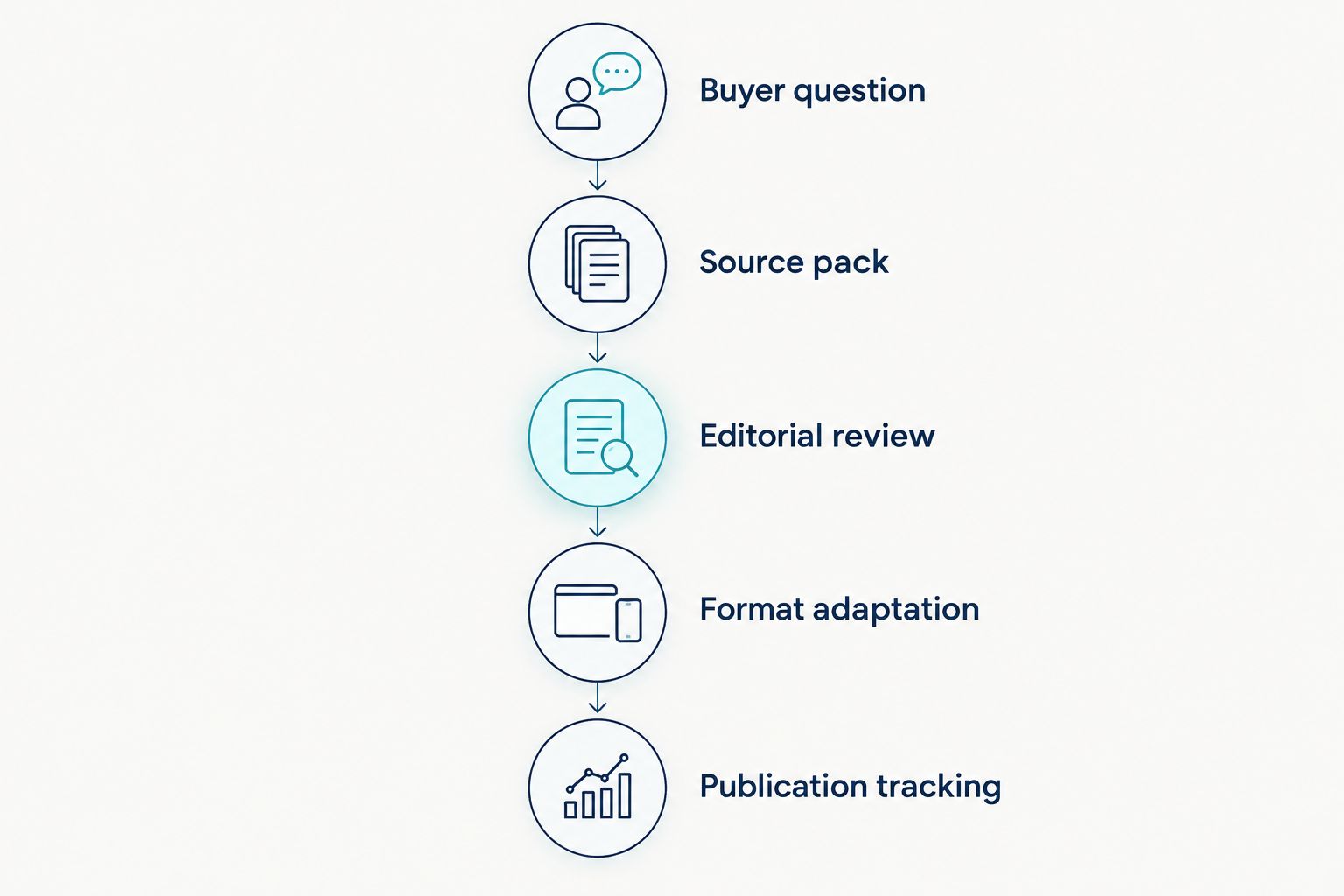
Tool selection becomes easier when you define the handoffs. Use the following sequence to connect content creation with distribution and measurement.
Buyer question
Choose a question your target buyer actually needs answered. Pull it from sales conversations, customer interviews, support requests, or search data available to your business. Specify the decision the content should help someone make.
Source pack
Collect the approved facts, original documents, and subject-matter input before drafting. Separate public evidence from confidential context. If the source pack cannot support a central claim, change the claim rather than asking a model to supply a convincing explanation.
Editorial review
Use 3 checks per asset: factual support, buyer relevance, and a clear next step. These are review requirements, not an industry performance benchmark. Assign 1 accountable owner per asset so a failed check produces a revision rather than another meeting.
Format adaptation
Adapt the approved argument to the channel. An email needs a clear reason to respond; a search page needs a complete answer; a video needs a script and visuals that work together.
The distinction matters when assessing AI video ad generators: generating footage is a different job from editing an expert interview, and neither removes the need to verify the claims in the script. Choose the production method after deciding what evidence the creative must communicate.
Publication tracking
Record the page or asset, its intended audience, distribution channel, and conversion action. Use 2 review gates: editorial approval before publication and a measurement check after release. Set the review timing according to your publishing and reporting cycle rather than borrowing an arbitrary benchmark.
Make content useful in search and AI answers
For 2026, build each important page around a clear buyer question and a defensible answer. State the answer directly, explain the conditions, and show the evidence. Clear headings and comparison tables help readers inspect the argument; they do not guarantee a citation from Google AI, ChatGPT, or Perplexity.
Keep three measurement questions separate:
- Visibility: Does the page appear for the searches or prompts you track?
- Traffic: Do people arrive from those discovery channels?
- Business response: Do those visits produce the action you intended?
Do not report a citation as a lead, or a lead as revenue. Record observation dates and query wording when tracking AI answers so the report describes what was actually checked.
Rivetline's marketing execution services cover content, SEO/AI visibility, paid media, and other channels. That scope matters when the problem extends beyond drafting: someone must publish the work, distribute it, respond to leads, and report what happened.
Which B2B content creation tool should you choose?
Choose ChatGPT by default if you need one flexible drafting assistant. Choose Claude instead when your main workload is long-form editorial revision. Add Perplexity when source discovery is the bottleneck, Canva when design is the bottleneck, or Descript when recorded content is waiting for an editor.
Do not buy all five because they appear in the same list. Start with the blocked production stage and define the work that should leave that stage each week. Add another tool only when it solves a separate, recurring problem.
If the missing piece is ownership rather than software, book a discovery call with Rivetline through the Let's Talk Growth page. Discuss the channels, publishing responsibilities, and reporting you need someone to run.
FAQ
What's the best AI content creation tool for B2B marketing?
ChatGPT is the default recommendation here for general-purpose drafting and repurposing. Choose a specialist instead when your main bottleneck is research, visual design, or recorded-content editing.
Is Claude better than ChatGPT for B2B content?
Claude is the specialist recommendation here for long-form editing, while ChatGPT is the broader drafting pick. Compare both on the same approved brief and judge the corrections required before publication.
Can Perplexity replace a content researcher?
No. Perplexity helps discover sources, but a researcher or editor must inspect those sources and verify that they support the article's claims.
Should a B2B team use Canva or Descript?
Choose Canva for designed visual content and Descript for transcript-led editing of recordings. They solve different production problems rather than competing for the same assignment.
Will AI-written content get cited by ChatGPT or Google AI?
AI-written content has no guaranteed route to citation. Publish accurate, useful answers with clear evidence, then measure visibility separately from traffic and conversions.
Can these tools replace a B2B marketing agency?
These tools do not provide ongoing campaign ownership by themselves. Rivetline provides marketing execution across content, SEO/AI visibility, paid media, and other channels, with live reporting.
How should a small B2B team choose its first content tool?
Choose the tool that addresses the production stage currently blocking publication. Give it a real assignment, inspect the output, and identify who will approve and publish the finished asset.
One last thing
Before adding a tool, inspect an unpublished asset already sitting in your queue. Name the exact blocker: missing evidence, unclear positioning, design, editing, approval, or distribution.
If the blocker has no owner, another generator is not the fix. Assign the decision first. Then buy the software that helps the responsible person finish the work.