
Best AI proposal and sales deck tools for B2B teams in 2026
Best overall for a first-draft sales deck: Gamma. Best for proposals that need signatures: PandaDoc. Best for template-led presentations: Canva. This 2026 guide compares the best AI proposal and sales deck tools for B2B by the job you need finished—not by how impressive the demo looks.
- Gamma leads the best AI proposal and sales deck tools for B2B shortlist for first-draft presentations.
- PandaDoc fits proposals that need document workflows and electronic signatures, rather than a presentation alone.
- Beautiful.ai suits layout consistency; Canva suits template-led design; Plus AI suits established slide-editing workflows.
- Rivetline handles B2B marketing execution; presentation software does not replace positioning, evidence or follow-up.
Why this matters
A proposal and a sales deck are different deliverables. A deck supports a conversation; a proposal defines what the buyer is agreeing to. Buying a presentation generator when your problem is document approval leaves the actual bottleneck untouched.
The same distinction applies to marketing. Rivetline’s marketing execution services cover paid media, SEO and AI visibility, content and lead response. A deck tool packages the story those activities support; it does not run the marketing system behind it.
For your 2026 shortlist, start with the handoff: does the buyer need to understand, circulate, edit or sign? Choose the tool that supports that action before comparing visual styles.
What makes the best B2B proposal and sales deck tools?
Use these criteria to judge the shortlist:
- Buyer-facing format: Decide whether the output belongs in a presentation, a shareable document or a signature workflow.
- Narrative control: You need to change the argument, not just regenerate prettier wording.
- Evidence handling: Customer claims, commercial terms and technical statements need human verification.
- Editing fit: The people maintaining the file must be comfortable with its editing environment.
- Design consistency: Templates and layout assistance should reduce formatting work without hiding weak content.
- Approval readiness: Your sales, delivery and legal reviewers need a clear route to the final version.
The best tool is the one that makes the next buyer action easier. A polished deck is the wrong answer when procurement is waiting for an approved scope.
AI proposal and sales deck tools at a glance
These are workflow recommendations for 2026, not a claim that every product performs every job equally well. Verify current capabilities against your actual document before committing.
| Tool | Best for | Standout capability | Key limitation |
|---|---|---|---|
| Gamma | Building a first-draft sales narrative | AI-assisted presentation generation | A generated story still needs buyer-specific evidence |
| PandaDoc | Sending proposals for agreement | Document workflows and electronic signatures | It does not replace a persuasive presentation narrative |
| Beautiful.ai | Keeping presentation layouts consistent | Automated slide layout | Layout consistency cannot resolve weak messaging |
| Canva | Reusing a design-led presentation system | Presentation templates and AI-assisted design | Template choice still requires editorial discipline |
| Plus AI | Drafting inside familiar slide workflows | AI presentation assistance for Google Slides and PowerPoint | Your existing templates and source material still need review |
1. Gamma: best sales deck tool for a first-draft narrative
Gamma uses AI to help generate presentations from a prompt or supplied material. It fits the stage where your team has an offer and supporting information but needs a coherent first version to edit.
Start with a buyer problem, an agreed outcome and approved proof. A broad request to create a B2B sales deck leaves the most important decisions unspecified: who buys, why they act and what makes the offer credible.
Gamma pros:
- Turns supplied ideas into a presentation draft.
- Gives the team a concrete narrative to critique.
- Supports a presentation-led workflow rather than starting with contract paperwork.
Gamma cons:
- Generated wording needs factual and commercial review.
- An attractive draft can conceal missing evidence or an unclear next step.
Best for: Teams building the initial sales story before detailed stakeholder review.
For a 2026 evaluation, give Gamma an approved brief rather than an empty prompt. Judge whether the resulting structure makes the buyer’s decision clearer, not whether the first screen looks finished.
Verdict: Buy for first-draft presentations; skip it as a substitute for proposal approval.
2. PandaDoc: best proposal tool for the agreement stage
PandaDoc centres on business documents, proposal workflows and electronic signatures. Its strongest reason to enter this shortlist is the agreement process, not the promise that generated copy will close a deal.
Choose a document workflow when your buyer needs deliverables, responsibilities and terms in a form that can be reviewed and signed. Do not turn those details into tiny text on a presentation slide.
PandaDoc pros:
- Supports proposal documents and electronic signatures.
- Gives agreement-stage content an appropriate document format.
- Fits a process built around review and completion.
PandaDoc cons:
- Document workflow does not fix an unconvincing offer.
- Generated or reused terms still require authorised review.
Best for: B2B teams whose main obstacle is moving an agreed commercial offer into a signable document.
Keep an approved source for scope and commitments. If a proposal changes during negotiation, the final document—not an earlier deck—must express what your team has authorised.
Verdict: Buy for proposal completion; skip it when your only need is slide design.
3. Beautiful.ai: best sales deck tool for layout consistency
Beautiful.ai combines presentation creation with automated slide layout. It belongs on your shortlist when the sales argument already exists but maintaining a consistent presentation takes too much attention.
The distinction matters: layout assistance handles presentation structure visually. Your team still decides which claims deserve a slide and which details belong in supporting material.
Beautiful.ai pros:
- Automates parts of slide layout.
- Supports a consistent presentation approach.
- Lets reviewers focus on the argument rather than every alignment decision.
Beautiful.ai cons:
- Automated layouts still need checking against your content.
- Better formatting does not supply missing buyer research or proof.
Best for: Teams with an established sales narrative that want a more controlled presentation format.
During evaluation, use an awkward real example: a dense comparison, a technical explanation or a customer result with necessary qualifications. Check whether the layout preserves meaning instead of merely making the material look simpler.
Verdict: Buy for design consistency; hold if your messaging is still unresolved.
4. Canva: best sales deck tool for template-led design
Canva combines presentation templates, editing tools and AI-assisted design. It fits teams that want to develop sales materials within a broader design workflow rather than adopt a presentation-only approach.
Use a selected template as a constraint. Mixing unrelated visual treatments across a proposal, a sales deck and a supporting handout creates more editing work without improving the argument.
Canva pros:
- Offers presentation templates as a starting point.
- Supports editing beyond slide text alone.
- Fits teams producing several kinds of sales collateral.
Canva cons:
- A broad template selection still needs someone to make consistent choices.
- Design tools do not replace proposal governance or factual review.
Best for: Teams reusing an established visual approach across presentations and supporting materials.
Do not confuse template reuse with content reuse. The structure can stay consistent while the buyer’s problem, evidence and next step change for each opportunity.
Verdict: Buy for template-led collateral; skip the template hunt when the offer needs rewriting.
5. Plus AI: best sales deck tool for existing slide workflows
Plus AI provides AI presentation assistance for Google Slides and PowerPoint. It deserves consideration when the team’s working files and review habits already sit in those environments.
The buying question is straightforward: do you need a new presentation environment, or help producing material in the one your team already uses? Test the latter before adding another handoff.
Plus AI pros:
- Works with familiar presentation environments.
- Supports AI-assisted presentation drafting.
- Fits a workflow built around existing slide files.
Plus AI cons:
- Existing templates can carry outdated claims into new drafts.
- Familiar software does not remove the need for final editorial review.
Best for: Teams that want presentation assistance without reorganising their slide-editing process.
Use a representative working deck in your evaluation. Check the edit-and-review process, not just the generated opening slides.
Verdict: Buy for workflow continuity; hold if changing tools is not the actual problem.
How to evaluate the shortlist without buying another distraction
For your 2026 evaluation, use the same approved brief across the relevant tools. Comparing a carefully prepared prompt in one product with a vague instruction in another tells you little about either.
Build a sample of 6 slides: buyer problem, consequences, approach, evidence, delivery and next step. Separately, prepare a proposal section containing scope, responsibilities and acceptance language. These are evaluation inputs, not claims about any vendor’s performance.
Ask 2 reviewers to inspect the result: someone responsible for selling the work and someone responsible for delivering it. Have them answer 3 questions: Is it accurate? Is it relevant? Is the next action clear?
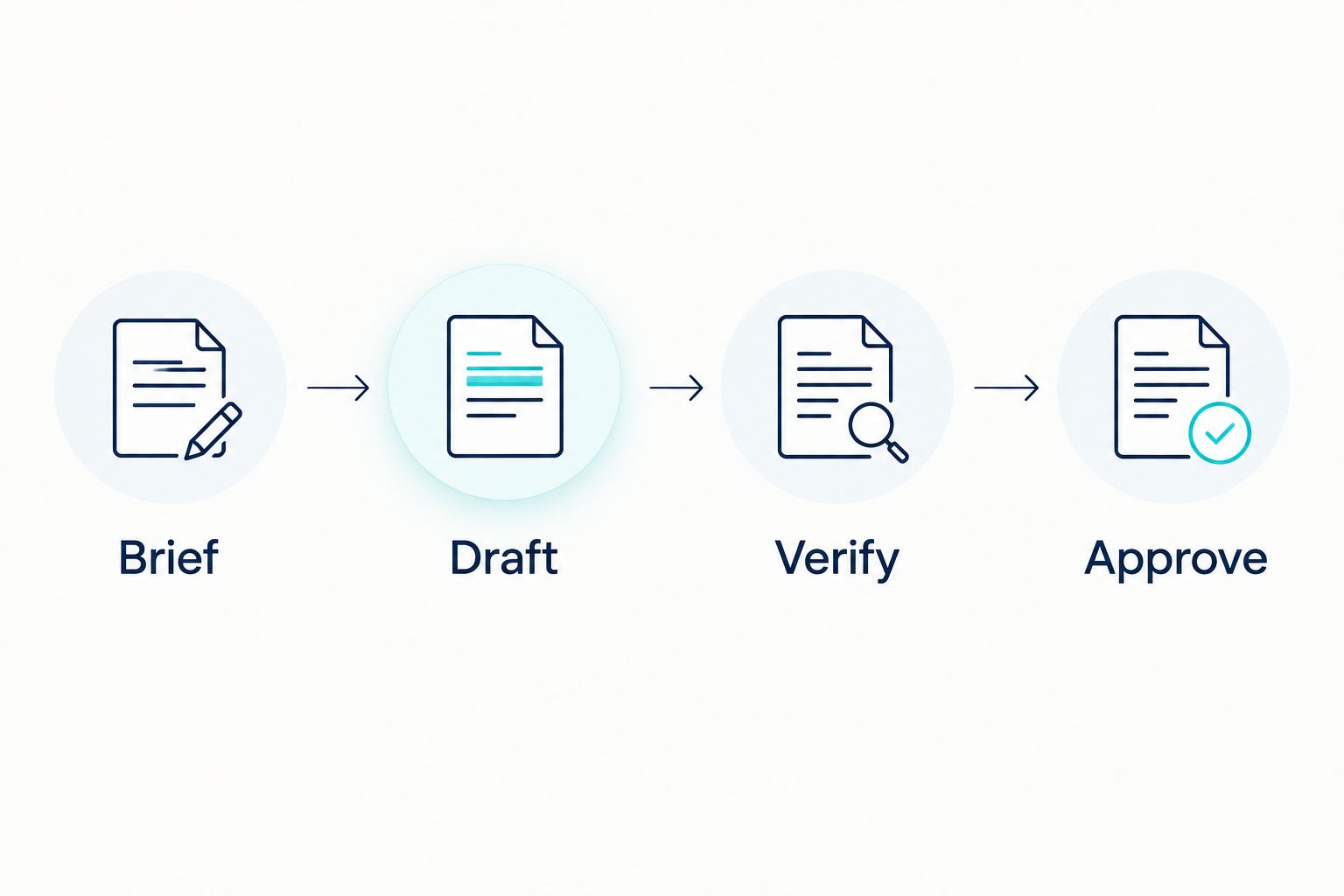
Brief
Name the buyer, the decision and the problem. Include approved terminology and the facts the tool is allowed to use. Tell the tool what remains unknown rather than inviting it to fill gaps.
Draft
Generate the structure before polishing every sentence. Remove sections that repeat the same claim, and move detail out of slides when the buyer needs a document instead.
Verify
Compare every customer claim, commitment and technical statement with its source. Treat generated examples as draft material, not evidence. Assign an owner to resolve anything the reviewers cannot verify.
Approve
Confirm who can approve the offer and who sends the final version. Record the agreed document separately from exploratory drafts so the team knows which version represents the actual proposal.
Connect the deck to AI visibility and lead response
A sales deck is not an AI visibility strategy. Material in a private presentation should not be treated as a substitute for maintaining clear, accessible public information about your services.
Use questions from sales conversations to identify gaps in public-facing content. If buyers repeatedly misunderstand your offer, fix the explanation on the relevant service page and in the deck. Do not give ChatGPT, Perplexity or Google AI a stronger claim than you can substantiate elsewhere.
The same discipline applies when evaluating AI marketing tools: separate content production, distribution, measurement and sales follow-up before deciding which software belongs in your operation. A tool that drafts a deck handles one task, not the whole route from discovery to a qualified conversation.
For your 2026 reporting, keep the distinctions visible:
- Public visibility: Record the queries and platforms being observed.
- Website response: Measure the actions visitors take on your site.
- Sales progression: Track whether qualified conversations reach an agreed next step.
- Document production: Record where drafting, review or approval gets stuck.
Do not credit the presentation tool for changes across all four areas. Keep observation separate from attribution.
How the ranking works
This shortlist ranks workflow fit against the criteria above; it is not a hands-on benchmark or a measured conversion study. Gamma leads for drafting a presentation narrative, while PandaDoc leads when the deliverable needs agreement and signatures.
Rivetline is not ranked as presentation software. Rivetline’s B2B marketing execution services address the ongoing work around demand, content, AI visibility and lead response. Keep that service decision separate from choosing a slide editor.
Which tool should you choose?
Choose Gamma if you need a first-draft sales deck and have approved material to build from. Choose PandaDoc when the real requirement is a proposal that moves through agreement. Pick Beautiful.ai for layout consistency, Canva for template-led collateral or Plus AI for an established slide workflow.
For 2026, make the decision around the bottleneck you can name. If nobody owns positioning, evidence or follow-up, another generator leaves those jobs unassigned.
Rivetline is best for B2B teams that need ongoing marketing execution, not another report. Book a discovery call to discuss the work behind the deck.
Book a growth conversation
Discuss ongoing B2B marketing execution across paid media, SEO, AI visibility, content and lead response.
FAQ
What are the best AI proposal and sales deck tools for B2B?
Gamma is the default shortlist choice for a first-draft presentation, while PandaDoc fits proposals that need agreement and electronic signatures. Beautiful.ai, Canva and Plus AI address different presentation workflows.
Is Gamma better than PandaDoc for sales proposals?
Gamma and PandaDoc serve different primary jobs. Choose Gamma for a presentation narrative and PandaDoc when the buyer needs a proposal document and signature workflow.
Which tool should I use with Google Slides or PowerPoint?
Plus AI belongs on your shortlist when Google Slides or PowerPoint is already your working environment. Evaluate it with a representative deck and your normal review process.
Can AI write a complete B2B proposal?
AI can draft proposal material, but your team must approve the facts, scope and commitments. Do not treat generated terms or customer examples as authorised content.
Will these tools improve visibility in ChatGPT or Perplexity?
Creating a sales deck does not establish visibility in ChatGPT or Perplexity. Maintain accurate public information and measure AI visibility separately from private sales-document production.
What should I test before choosing a sales deck tool?
Test an approved brief, a representative presentation and your actual review process. Check factual accuracy, editing fit and whether the output makes the buyer’s next action clear.
Should I buy a tool or hire a marketing execution agency?
Buy a tool for a defined production task; hire an execution agency when ongoing marketing work needs ownership. Rivetline delivers B2B marketing execution rather than presentation software or a one-off report.
One last thing
Before generating the next deck, write the buyer’s next action in a single sentence. If the team cannot agree on that sentence, stop formatting. The missing decision is more important than the missing slide.