
Best chatbot tools for B2B website lead capture in 2026
Best overall for CRM-led lead capture: HubSpot. Best for combined sales and support conversations: Intercom. Best for a small live-chat team: Tidio. Best for service-led enquiries: Zendesk. This 2026 guide compares the best chatbot tools for B2B website lead capture by qualification, routing and human handoff—not how convincingly a bot makes small talk.
- Among the best chatbot tools for B2B website lead capture, HubSpot is the default for CRM-led teams.
- Choose Intercom for sales-and-support conversations, Tidio for small-team live chat, and Zendesk for service-led enquiries.
- Rivetline is best for B2B teams needing ongoing marketing execution and lead response, rather than another software subscription.
- Compare qualification, routing and human handoff before adding a chatbot to your website.
A chatbot is one part of your acquisition system. Rivetline provides ongoing B2B marketing execution across paid media, SEO, AI visibility, content and lead response. Choose the software around the way your business handles enquiries, not the other way around.
Why this matters
A captured email address is not a qualified opportunity. Your chatbot needs to understand enough about the enquiry to direct it, preserve the conversation and give someone responsibility for the next response.
That matters whether visitors arrive through Google Ads, organic search, LinkedIn or a ChatGPT recommendation. Your acquisition channel creates the visit; your website must give the visitor a useful next step.
For your 2026 setup, separate two jobs: answering a buyer's question and collecting information your sales team can act on. A bot that does only the second becomes an interactive form. A bot that does only the first leaves your pipeline disconnected.
What makes the best B2B lead capture chatbot?
Use these criteria before comparing interfaces or generated answers:
- Qualification: Collect the buyer's need, company context and intended next step without forcing a lengthy interrogation.
- CRM continuity: Keep contact details and conversation context together so sales does not restart the conversation.
- Routing: Send sales enquiries, existing-customer questions and irrelevant requests to different destinations.
- Human handoff: Give visitors a clear route to a person, including when nobody is immediately available.
- Answer control: Restrict answers to approved material and define what happens when the bot cannot answer.
- Measurement: Distinguish chat opens, captured contacts, accepted enquiries and opportunities.
The best chatbot is the one your team can turn into a working response process. A long feature list does not compensate for an unattended inbox.
Best chatbot tools at a glance
These recommendations favour different operating models. The order is a decision tree, not a claim that every business should adopt the first platform.
| Tool | Best for | Standout capability | Key limitation |
|---|---|---|---|
| HubSpot | CRM-led sales teams | Chatbot workflows connected to CRM records | Less compelling when another CRM must remain the system of record |
| Intercom | Combined sales and support teams | Automated conversations and human messaging | Support automation still needs a separate sales qualification design |
| Tidio | Small teams handling website chat | Live chat alongside chatbot automation | Complex B2B routing requires careful validation |
| Zendesk | Service-led businesses capturing sales enquiries | Messaging connected to support workflows | Ticket handling is not the same as opportunity management |
Product capabilities and packaging change. Before committing in 2026, confirm the required integrations, routing controls and handoff behaviour in the specific configuration you intend to use.
1. HubSpot: best chatbot for CRM-led lead capture
HubSpot combines CRM capabilities with website chat and chatbot workflows. You can use its chatbot builder to collect information, qualify enquiries and connect visitors with a relevant next step, including meeting booking.
Its strongest fit is a team that wants the conversation connected to the contact record. That makes the software choice inseparable from your CRM decision.
HubSpot pros:
- Chatbot interactions can connect with CRM contact information.
- Qualification and meeting-booking workflows fit a sales-led website.
- Live chat gives visitors an alternative to an automated conversation.
HubSpot cons:
- Existing use of another CRM creates an integration decision rather than an automatic fit.
- Poor contact properties and unclear sales ownership still produce poor handoffs.
- Required capabilities need checking against your intended product configuration.
Best for: B2B sales teams using HubSpot as their customer record, or deliberately moving towards that model.
Before choosing HubSpot, map the captured fields to the information a salesperson actually needs. A job title is useful only when it changes qualification, routing or follow-up. Otherwise, it adds another question between the visitor and an answer.
Verdict: Buy if HubSpot is your chosen CRM foundation; hold if the CRM decision remains unresolved.
2. Intercom: best chatbot for sales and support conversations
Intercom brings automated assistance and human messaging into a customer communications platform. It suits a website where prospective buyers and existing customers both start conversations through the same entry point.
The important design choice is separating those audiences early. A support resolution and a sales opportunity need different questions, owners and outcomes.
Intercom pros:
- Automated assistance and human conversations can share the messaging experience.
- Support-related questions have a natural place in the platform's operating model.
- Teams can design different paths for different conversation types.
Intercom cons:
- A useful support answer does not automatically qualify a sales enquiry.
- Automated answers depend on the material and instructions supplied.
- Mixed sales and support traffic requires explicit routing ownership.
Best for: B2B businesses where sales and customer support both handle website conversations.
Test a prospect asking about suitability, a customer asking for help and a visitor requesting a person. Each should reach the right destination without needing to understand your internal departments.
For your 2026 evaluation, judge Intercom on the complete handoff, not just the answer in the chat window. The receiving team needs context, contact information and a clear reason to respond.
Verdict: Buy for a shared sales-and-support messaging operation; skip if you only need a simple enquiry form.
3. Tidio: best chatbot for small-team live chat
Tidio combines website live chat with chatbot automation. It belongs on the shortlist when a small team wants to answer visitors directly and automate selected parts of the conversation.
Keep the initial workflow narrow. Capturing a business enquiry, recording contact details and passing the conversation to a person is a clearer starting point than trying to automate every buyer question.
Tidio pros:
- Live chat provides a direct route to a human conversation.
- Chatbot flows can collect information before a team member responds.
- A narrow website-chat use case gives you a clear scope for evaluation.
Tidio cons:
- Complex account-based routing needs validation against your actual requirements.
- Live chat only works as a human channel when someone owns the inbox.
- An additional chat inbox can fragment follow-up unless its destination is defined.
Best for: Small B2B teams handling straightforward enquiries through website chat.
Check what happens outside staffed hours. The visitor should understand whether they are speaking to automation, whether their request has been recorded and what action remains available.
Do not present an unattended widget as an immediate conversation with sales. Use an honest asynchronous handoff when the team cannot respond live.
Verdict: Buy for a focused small-team chat workflow; hold if complex routing is a non-negotiable requirement.
4. Zendesk: best chatbot for service-led sales enquiries
Zendesk provides messaging, automated assistance and customer service workflows. Its strongest lead-capture use case is a business where website conversations already flow through a service operation.
The sales task is to recognise commercial intent inside that stream. A question about a new requirement should not disappear into the same process as an existing customer's support request.
Zendesk pros:
- Messaging connects with established customer service workflows.
- Human agents can take responsibility for conversations requiring attention.
- Service teams can organise enquiries rather than treating every message as an isolated email.
Zendesk cons:
- A support ticket is not a substitute for a sales opportunity record.
- Sales qualification requires its own questions and handoff rules.
- Teams without a service-led operating model need a separate reason to adopt it.
Best for: B2B businesses that already manage website conversations through customer service.
Define what constitutes a sales enquiry before configuring the handoff. A request for a new implementation, an expansion discussion and a technical support question should not receive identical treatment.
Verdict: Buy when service operations are the natural intake point; skip as a default replacement for your sales CRM.
How the recommendations are ranked
The ranking prioritises qualification, CRM continuity, routing, human handoff, answer control and measurement. Each recommendation serves a different workflow; this is not a hands-on performance benchmark or a claim about conversion lift.
HubSpot is the default for CRM-led capture. Intercom fits mixed sales-and-support conversations. Tidio fits focused small-team chat. Zendesk fits service-led intake.
Rivetline's role in B2B website lead capture is ongoing marketing execution and lead response, not selling a chatbot subscription. The About Rivetline page provides the agency context behind that execution-led positioning.
Build the handoff before adding more automation
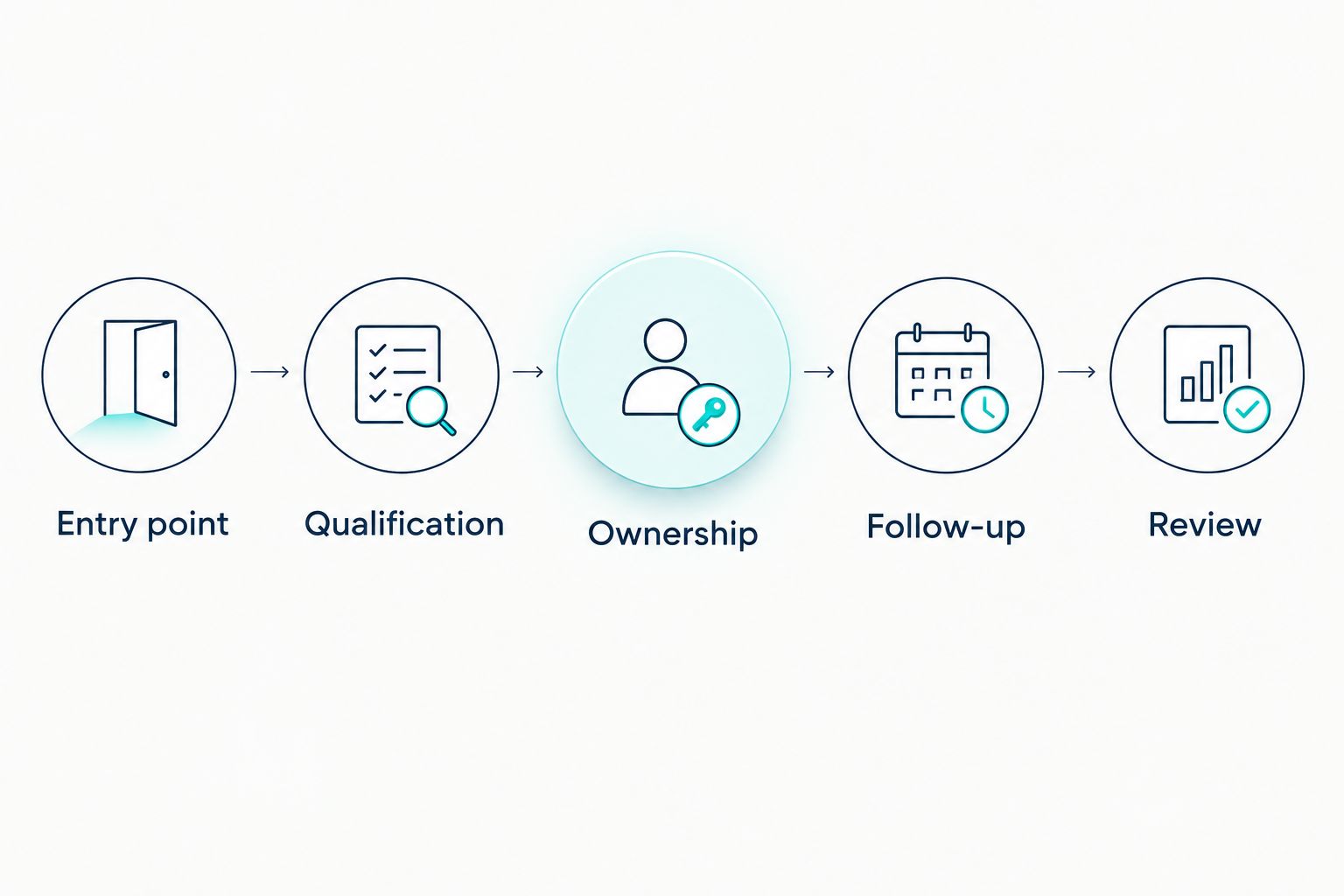
Use this sequence to turn a shortlist into an operating process. Start with one commercially important visitor journey, then expand after you have checked the full path.
- Entry point: Choose a page where visitors have a clear reason to ask a buying question.
- Qualification: Start with 3 qualification questions: what the visitor needs, which company they represent and how to respond.
- Ownership: Assign 1 named owner to each enquiry route, including the fallback route.
- Follow-up: Preserve the conversation and tell the visitor what happens next.
- Review: Use an initial 7-day review window to inspect conversations and repair broken paths; do not treat it as a conversion benchmark.
These are starting parameters, not industry performance standards. Remove a question when its answer does not change your next action.
Measure each stage separately: conversations started, contact details captured, enquiries accepted by sales and opportunities created. Define the denominator before comparing conversion rates.
Rivetline's marketing services cover the acquisition and lead-response work around this process. The chatbot is a component; paid media, SEO, content and follow-up still need owners.
Connect AI visibility to website lead capture
AI search visibility and an on-site chatbot solve different problems. ChatGPT, Perplexity and Google AI can influence discovery; your website chatbot handles a visitor who has already arrived.
Installing a chatbot does not, by itself, establish visibility in those external services. Keep your discovery content useful and accessible, then make the on-site conversation consistent with what buyers read.
For 2026, review the questions appearing in real conversations and use them to improve relevant service content. Correct an unclear explanation on the page and in the chatbot's approved material rather than letting conflicting answers persist.
Keep attribution honest, too. Record identifiable referral information where available, and distinguish a buyer's self-reported discovery source from a measured website referral.
FAQ
What's the best chatbot for B2B website lead capture?
HubSpot is the default recommendation for CRM-led B2B teams. Choose Intercom for combined sales and support, Tidio for focused small-team chat, or Zendesk for service-led intake.
Is Intercom better than HubSpot for capturing leads?
Intercom is the stronger fit when sales and support share a messaging operation; HubSpot is the stronger fit when CRM continuity drives the decision. Compare the complete qualification and handoff workflow rather than the chat interface alone.
Can a website chatbot improve my visibility in ChatGPT?
A website chatbot does not by itself establish visibility in ChatGPT. External discovery and on-site conversation handling are separate jobs, although both should use accurate, consistent information about your business.
What should a B2B chatbot ask a new prospect?
Start by asking what the prospect needs, which company they represent and how your team should respond. Add questions only when the answers change qualification, routing or follow-up.
Should a chatbot replace my website enquiry form?
Keep an alternative enquiry route rather than forcing every buyer through chat. A form lets visitors submit a request without completing an automated conversation.
What should happen when the chatbot cannot answer?
The chatbot should acknowledge the limit and offer a clear human handoff. Preserve the question and contact details so the visitor does not have to restart the enquiry.
How should I measure chatbot lead capture?
Track conversations, captured contacts, sales-accepted enquiries and opportunities as separate stages. A chat interaction is not a qualified lead, and an email address is not an opportunity.
Which chatbot should you choose?
Choose HubSpot as the default when your sales process revolves around its CRM. Choose the other tools only when their distinct operating model matches yours: mixed conversations, small-team chat or service-led intake.
Do not buy a second system to avoid fixing ownership in the first. Your 2026 priority is a clear path from buyer question to accountable response.
One last thing
Test your handoff with a question the bot cannot answer. A polished answer demonstrates the easy part; an unknown question exposes whether the fallback actually works.
If you need execution across acquisition and lead response, book a discovery call. Bring the enquiry journey you want to fix, not another chatbot feature checklist.