
Best Google Ads budget pacing tools in 2026
Best overall: Google Ads for direct budget control. Best for automated pacing across accounts: Optmyzr. Best for a custom pacing workflow: Google Ads Scripts. The best Google Ads budget pacing tools in 2026 solve different parts of the job; none replaces the person responsible for changing spend when lead quality shifts. If you need that person as well as the system, Rivetline provides B2B marketing execution, not a report-only handoff.
- Google Ads is the best Google Ads budget pacing tool for direct control inside one account.
- Optmyzr is best for teams managing pacing workflows across multiple Google Ads accounts.
- Google Ads Scripts fits teams that can build and maintain their own budget rules.
- Rivetline is best for B2B teams that need ongoing campaign execution, not another pacing dashboard.
Why this matters
A campaign can be on pace to spend its budget and still be off pace for the business. Budget pacing answers whether spend is tracking toward a target. It does not tell you whether the resulting leads are qualified, whether cost per conversion is acceptable, or whether the landing page is doing its job.
Google Ads makes the distinction especially important. For most campaigns, Google can spend up to 2 times the average daily budget on a single day; its monthly spending limit is generally calculated using 30.4 days times that daily budget. A high-spend day is not, by itself, proof that the month is out of control. Judge the trend against the applicable limit and your actual business target.
In 2026, a B2B paid media decision also sits beside SEO, content, and visibility in ChatGPT, Perplexity, and Google AI results. Those channels do not share a Google Ads budget. A pacing tool can help you control ad spend; it cannot tell you when a question your buyers ask is better answered through content than another paid click. That decision belongs in the marketing plan.
What makes the best Google Ads budget pacing tool?
Use these criteria before comparing interfaces. The best choice is the one your team will use to make the next budget decision, not the one with the longest feature list.
- Budget visibility: Can you see spend against the target and identify which campaigns account for the gap?
- Actionability: Can the responsible person change a budget, or does the tool only show a chart?
- Control over rules: Can your team define when to alert someone, pause an action, or make a change?
- Maintenance burden: Who keeps the workflow accurate when campaign names, budgets, or account structures change?
- Account scope: Does the workflow fit one account or a team responsible for several?
- Business context: Can you review pacing alongside conversions and lead quality, rather than treating spend as the outcome?
These criteria matter more in 2026 than a generic claim of automation. An automated budget change still needs a sensible rule and someone accountable for the result. For B2B teams, that person also needs to know whether the conversions represent useful sales conversations.
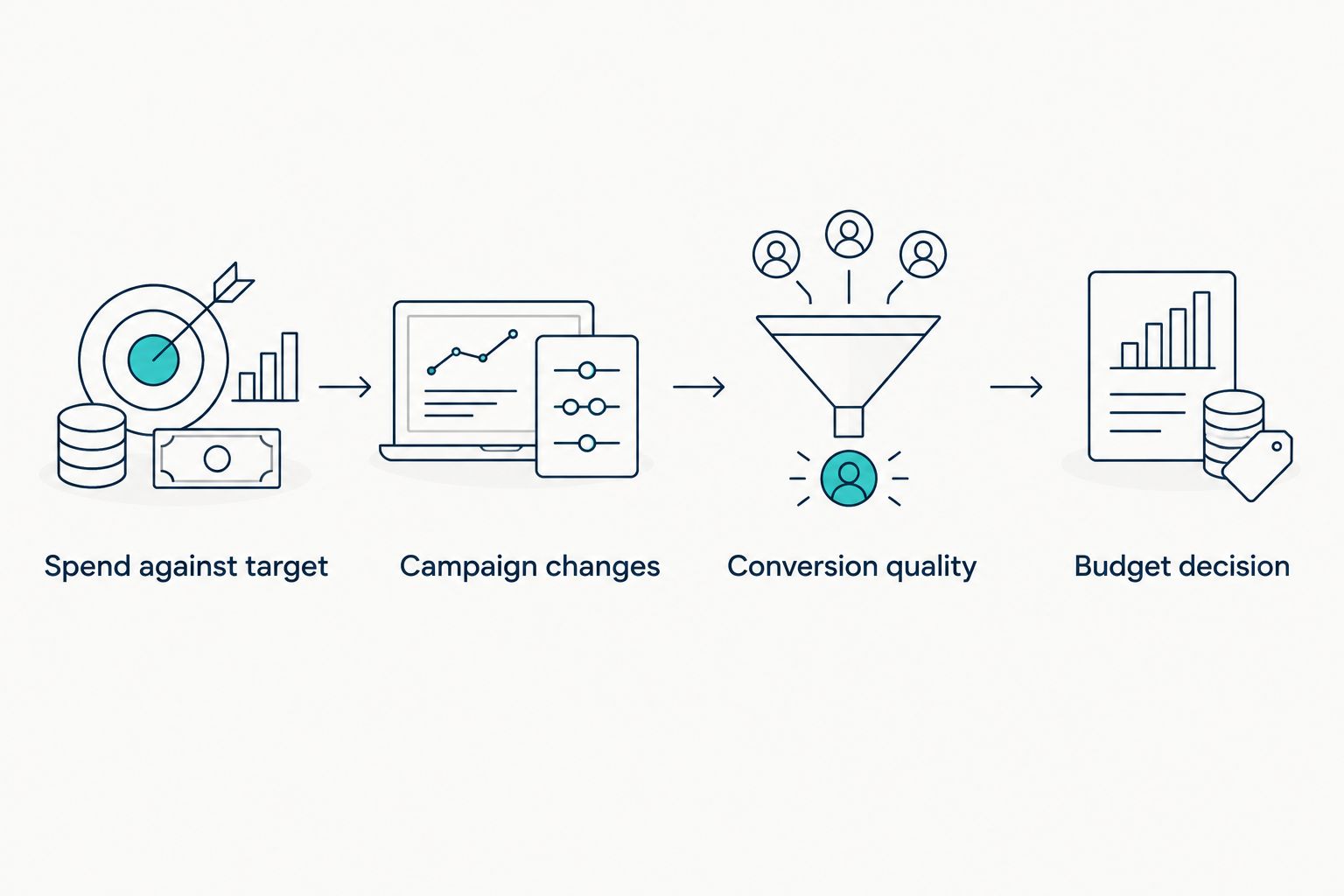
A practical review moves from spend against target to campaign changes to conversion quality before anyone raises or cuts a budget. If your current process ends at the first step, the missing piece is not necessarily another tool.
Google Ads budget pacing tools at a glance
| Tool | Best for | Standout capability | Key limitation |
|---|---|---|---|
| Google Ads | Direct control in one account | Native campaign budgets and spend reporting | Does not judge B2B lead quality for you |
| Optmyzr | Managed workflows across accounts | Budget pacing and optimization workflows | Requires a team to review the actions it recommends or automates |
| Google Ads Scripts | Custom pacing rules | Programmable checks and actions within Google Ads | Your team owns the code and its upkeep |
| Looker Studio | Shared pacing reports | Reports built from Google Ads data | A report does not change campaign budgets |
The order reflects the default decision for a team choosing its first pacing setup: start with the controls in Google Ads, then add a specialist workflow when the job demands one. Looker Studio appears here because reporting is part of pacing, not because a dashboard is a substitute for budget control.
1. Google Ads: best budget pacing tool for direct control
Google Ads is the starting point because it is where the campaign budgets live. You can review spend and campaign performance, then make the budget change in the same platform. For a team managing one account, that direct connection is more useful than a second dashboard nobody checks.
The native view also gives you the right place to investigate an apparent overspend. Check the campaign's budget settings and relevant spending limit before reacting to a single high-spend day. In 2026, the basic discipline is unchanged: compare the month-to-date picture with the target, then look at conversions before moving money.
Google Ads pros:
- Budget settings and campaign spend sit in the platform where changes are made.
- You can investigate pacing without first building a separate reporting workflow.
- It gives a small team a clear default owner for budget changes.
Google Ads cons:
- Native spend information does not explain whether a sales team considers the leads useful.
- Repeating the same review across several accounts still takes human attention.
- A budget setting cannot fix weak targeting, conversion tracking, or follow-up.
Best for: A team that wants a dependable first stop for monitoring and changing campaign budgets.
Verdict: Buy into the native workflow first. Add another pacing tool only when you can name the decision the native workflow cannot support.
2. Optmyzr: best for pacing workflows across accounts
Optmyzr is a specialist platform for managing Google Ads work, including budget pacing workflows. It belongs on the shortlist when one team has to spot budget issues and coordinate actions across multiple accounts. Its value is workflow capacity, not a promise that automated spending decisions will improve lead quality.
That distinction matters for agencies and in-house teams with several budget owners. A pacing alert is useful when it reaches someone who can check the campaign, its conversion data, and the reason the budget changed. An alert that simply joins a queue has not solved the problem.
Optmyzr pros:
- Provides dedicated budget pacing workflows beyond a manual campaign-by-campaign review.
- Fits teams that need a repeatable process across accounts.
- Helps separate routine budget checks from decisions that need investigation.
Optmyzr cons:
- It adds another system for the team to configure and maintain.
- Its pacing view still needs conversion and lead-quality context.
- Automation needs clear ownership; a rule should not become an excuse to stop reviewing outcomes.
Best for: A paid media team responsible for budget pacing across multiple Google Ads accounts.
Verdict: Buy when account volume makes the native review process hard to keep consistent. If you cannot specify the workflow it will replace, hold off.
3. Google Ads Scripts: best for custom pacing rules
Google Ads Scripts let a team write code that checks account data and performs defined actions. That makes them a fit when the pacing rule is specific and the team can maintain it. A script can enforce the rule you write; it cannot decide whether that rule still matches the business goal.
Start by describing the decision in plain language. Which budget is being checked? What should happen when spend moves away from the target? Who reviews the result? If those answers keep changing, code is a poor first step. Fix the operating process before automating it.
Google Ads Scripts pros:
- Let you build checks around your own budget rules.
- Can reduce repetitive account work when the rules are stable.
- Keep the workflow close to Google Ads data and actions.
Google Ads Scripts cons:
- Someone must write, test, monitor, and update the code.
- A script can keep running after the business logic behind it has changed.
- Custom rules are harder for a non-technical budget owner to inspect.
Best for: A team with technical ownership and a pacing requirement that a standard workflow does not meet.
Verdict: Buy into scripts only when you also buy into maintenance. Otherwise, use Google Ads directly or a managed workflow.
4. Looker Studio: best for shared pacing reports
Looker Studio can turn Google Ads data into a report that budget owners and marketing leads review together. It is useful when the problem is not access to a budget control but a lack of shared visibility. A clear report can show where to investigate; the actual campaign change happens elsewhere.
Keep the report narrow. Show the budget target, spend against that target, and the conversion measures used to decide whether the spend is productive. If a chart does not help someone keep, raise, cut, or investigate a budget, it does not belong in the pacing view.
Looker Studio pros:
- Gives stakeholders a shared reporting view built from Google Ads data.
- Lets a team put pacing beside the performance measures it reviews.
- Works well when the decision-maker does not work in Google Ads every day.
Looker Studio cons:
- It does not make Google Ads budget changes for you.
- A report needs someone to define and maintain its measures.
- A clean chart can hide a bad decision if the team reviews spend without lead quality.
Best for: A team that needs a common pacing report but already has someone responsible for campaign changes.
Verdict: Buy into the reporting workflow, not the illusion of automation. Pair it with an owner who acts on what the report shows.
Where Rivetline fits: execution, not another pacing tool
Rivetline is not a Google Ads budget pacing tool, and calling it one would make this comparison less useful. Rivetline is the better fit for B2B companies that need someone to run paid media alongside SEO, content, AI visibility, and lead response, with a live reporting dashboard. You can read about Rivetline if the decision is between adding software and assigning ongoing execution.
The trade-off is straightforward. A tool gives your team a way to see or control a budget; your team still owns the campaign work. An execution partner takes on the ongoing marketing work, but it is not a self-serve replacement for Google Ads, Optmyzr, scripts, or Looker Studio. Rivetline is best for B2B teams whose pacing problem is really an ownership problem.
That matters when a dashboard shows spend on target but the sales team disputes the leads. The next move is to examine conversion definitions, campaign choices, content, and lead response together. Buying a second pacing dashboard does not assign that work to anyone.
How we ranked the tools
The ranking starts with the place where you can inspect and change a Google Ads budget, then moves to tools for account scale, custom rules, and shared reporting. Each tool gets a distinct job. The table does not score vendors on performance or claim that one interface produces better conversions; no such result follows from a feature list.
Use the same test for your shortlist in 2026: name the person who owns the budget, the signal that triggers a review, and the action that follows. If a candidate cannot make that sequence clearer, it is not solving your pacing problem.
Which Google Ads budget pacing tool should you choose?
Choose Google Ads by default. It puts spend, campaign performance, and budget changes in one place. Choose Optmyzr when repeatable pacing work across accounts is the bottleneck; choose Google Ads Scripts when you need a defined custom rule and can maintain code. Choose Looker Studio when people need a shared report, not another way to edit budgets.
Choose Rivetline instead of another tool purchase when your team needs ongoing B2B marketing execution. That means someone must connect the paid media decision to conversions, content, AI search visibility, and lead response. For a 2026 budget plan, the question is not just whether spend is on pace; it is who changes the plan when the outcome is wrong.
Put someone on the budget
Discuss paid media execution, AI visibility, and the reporting your team needs.
FAQ
What is the best Google Ads budget pacing tool in 2026?
Google Ads is the best default for direct budget control in 2026. Optmyzr is a stronger fit when a team needs a repeatable pacing workflow across multiple accounts.
Is Optmyzr better than Google Ads for budget pacing?
Optmyzr is better suited to teams that need dedicated pacing workflows across accounts. Google Ads remains the place to start when direct visibility and control in one account meet the need.
Can Google Ads Scripts change budgets automatically?
Google Ads Scripts can be written to perform defined budget actions. A team must maintain the code and review whether the rule still fits its conversion goals.
Does Looker Studio control Google Ads budgets?
No. Looker Studio can display Google Ads data in a shared report, but a person or a separate workflow must make the budget change.
Why can Google Ads spend more than my daily budget?
For most campaigns, Google Ads can spend up to 2 times the average daily budget on a single day. Its monthly spending limit is generally based on 30.4 days times the average daily budget.
Should I automate budget pacing before fixing conversion tracking?
No. Fix the conversion measures used to judge campaign performance first. Automation can keep spend aligned with a target while the team remains blind to lead quality.
Is Rivetline a Google Ads budget pacing platform?
No. Rivetline provides ongoing B2B marketing execution, including paid media, with a live reporting dashboard. It fits teams that need someone to act on the numbers rather than another self-serve tool.
One last thing
A campaign can hit its spending target exactly and miss the business target entirely. In 2026, ask for the budget decision beside the lead-quality decision. If nobody owns both, start there before adding another pacing chart. Explore Rivetline when the missing piece is ongoing execution, or book a discovery call to discuss who will own the work.