
Best landing page builders for B2B marketing teams in 2026
Best overall for paid campaigns: Unbounce. Best for CRM-connected lead capture: HubSpot. Best for publishing control: WordPress. This 2026 guide compares the best landing page builders for B2B marketing by campaign fit, reporting needs and the work your team must own after launch.
- Unbounce leads the best landing page builders for B2B marketing shortlist when dedicated paid-campaign pages are the priority.
- HubSpot suits CRM-connected campaigns; Webflow suits design-led teams; Instapage suits dedicated advertising workflows.
- WordPress suits content-led acquisition, but you own the hosting, plugin maintenance and publishing standards.
- Rivetline handles ongoing B2B marketing execution; a landing page builder is only one component.
Why this matters
A landing page builder solves publishing. It does not decide your offer, qualify a lead or make sales follow up. Choose the wrong operating fit and your team inherits work the software was supposed to remove.
Your 2026 shortlist should connect paid media, organic search and AI visibility without treating them as the same channel. A focused advertising page needs a clear conversion path; a page intended for search discovery also needs useful, accessible content that stands on its own.
Rivetline’s marketing execution services span those channels. The builder belongs inside that system, not above it.
What makes the best B2B landing page builder?
Use these criteria before you compare editors or templates:
- Campaign independence: Can your marketing team change an offer, publish a page and correct an error without a development queue?
- Lead handling: Can the form send usable records into your sales process, with campaign context preserved?
- Measurement: Can you validate form submissions, conversions and consent behaviour rather than count button clicks as leads?
- Experimentation: Can you compare meaningful changes without creating an unmanageable collection of page variants?
- Search accessibility: Can you control indexing, headings and internal links when the page should support organic discovery?
- Ownership: Who maintains domains, integrations, publishing permissions and the page after the campaign ends?
Choose for the work your team repeats, not the most impressive demonstration. An editor that looks simple in isolation can still create complicated reporting and maintenance.
B2B landing page builders at a glance
These 2026 recommendations separate distinct operating needs. They are not a claim that one platform wins every campaign.
| Builder | Best for | Standout capability | Key limitation |
|---|---|---|---|
| Unbounce | Dedicated paid-campaign pages | Landing-page publishing and experimentation | Does not replace your CRM or sales process |
| HubSpot | CRM-connected lead capture | Pages and forms within a broader marketing and CRM platform | Requires discipline around properties, workflows and reporting |
| Webflow | Design-led marketing teams | Visual site building with CMS capabilities | Design flexibility creates more implementation responsibility |
| Instapage | Dedicated advertising-page operations | Landing-page production and optimisation workflows | Still needs connections to your wider marketing stack |
| WordPress | Content-led acquisition | An extensible publishing system under your control | Hosting, plugins and maintenance remain your responsibility |
1. Unbounce: best for dedicated B2B paid-campaign pages
Unbounce is a landing page platform built around campaign publishing and optimisation. It fits a team that needs a destination for a specific offer without rebuilding the main website.
The strongest use case is a paid campaign with a defined audience, promise and next action. Keep the page focused on that job rather than turning it into a smaller version of your homepage.
Unbounce pros:
- Gives campaign pages a dedicated publishing environment.
- Supports experimentation around page content and conversion paths.
- Separates campaign iteration from changes to the main website.
Unbounce cons:
- Does not replace lead qualification or CRM ownership.
- Creates another publishing environment to maintain.
- Requires deliberate decisions about indexing and campaign-page retirement.
Before committing, build your actual lead journey: ad, page, form, confirmation and CRM record. Check that the record contains the source information your sales team needs. A successful submission is not enough if the resulting lead is unusable.
Best for: Teams running offer-specific paid campaigns that need independent page publishing.
Verdict: Buy Unbounce when campaign-page production is the bottleneck; skip it when the real problem is lead handling.
2. HubSpot: best for CRM-connected B2B lead capture
HubSpot combines CRM and marketing tools, including website and landing-page capabilities. Its clearest fit is a team that wants page submissions to sit close to contact records and follow-up processes.
That connection matters when the conversion starts a longer sales conversation. Your page can collect the request, but the business still needs a clear owner for qualification, routing and response.
HubSpot pros:
- Connects landing-page activity with a broader CRM environment.
- Brings forms and marketing workflows into the same platform family.
- Supports a coordinated process across marketing and sales teams.
HubSpot cons:
- Poor contact-property design creates reporting problems.
- Workflow ownership needs ongoing attention.
- A broader platform is unnecessary if you only need isolated pages.
Start with the contact record you want sales to receive, then work backwards to the form. Separate information needed for routing from information that merely interests marketing. Every additional field should have a clear operational purpose.
Confirm which capabilities belong to the configuration you are evaluating. A platform name alone does not establish that your intended workflow is included.
Best for: B2B teams that want landing pages closely connected to an existing HubSpot operating model.
Verdict: Buy HubSpot for the connected lead process, not simply for its page editor.
3. Webflow: best for design-led B2B marketing teams
Webflow is a visual website platform with content management capabilities. It suits teams that want campaign pages to share a wider website’s design and publishing system.
The trade-off is responsibility. More control over layout and structure means someone must enforce reusable components, accessibility standards and sensible publishing permissions.
Webflow pros:
- Provides visual control over page structure and presentation.
- Supports reusable design patterns across a marketing website.
- Offers CMS capabilities for structured content publishing.
Webflow cons:
- Requires a capable owner for the underlying site system.
- Does not supply your sales follow-up process.
- Uncontrolled design changes make page consistency harder to maintain.
Test the editing experience with the person who will actually run campaigns. Ask that person to replace the offer, update the form destination and publish a correction without a designer stepping in. That exercise reveals more than a polished template demonstration.
For search-facing pages, check the published output rather than assuming visual quality equals accessibility. Important explanations should be readable as page content, not trapped inside images.
Best for: Design-led teams with the skills to maintain a shared website and campaign-page system.
Verdict: Buy Webflow when design control has an accountable owner; skip it when nobody owns the site system.
4. Instapage: best for dedicated advertising-page operations
Instapage focuses on landing-page creation and optimisation for advertising. Consider it when page production is a recurring advertising operation rather than an occasional website task.
Its role is the destination between an ad and a conversion. Your CRM, analytics setup and sales process still need to complete the journey.
Instapage pros:
- Keeps advertising landing pages in a dedicated platform.
- Supports focused page production and optimisation work.
- Fits a workflow organised around campaign destinations.
Instapage cons:
- Adds another system alongside your main website.
- Requires integration and measurement ownership.
- Is a narrower choice than a full content publishing platform.
Evaluate Instapage with a real campaign brief, including approval requirements and tracking checks. Ask whether the team can move from an approved offer to a validated live page without informal handoffs or undocumented fixes.
Compare it with Unbounce on your workflow, not on a generic feature tally. The useful distinction is which environment your team can operate consistently, including corrections and campaign retirement.
Best for: Advertising teams that need a dedicated process for producing and improving campaign landing pages.
Verdict: Buy Instapage when landing-page operations are a recurring advertising need; hold if the workflow is still undefined.
5. WordPress: best for content-led B2B acquisition
WordPress is a content management system, not a single landing-page product. You can build landing pages using its editor and extend the system with themes and plugins.
It fits teams that want educational content, service pages and campaign destinations within the same publishing environment. The advantage is control; the obligation is maintenance.
WordPress pros:
- Keeps landing pages close to a wider content library.
- Gives you control over hosting and publishing choices.
- Offers an extensive theme and plugin ecosystem.
WordPress cons:
- Requires hosting, update and security ownership.
- Plugin combinations introduce compatibility checks.
- Experimentation and lead routing depend on your chosen setup.
Keep the implementation restrained. Adding a plugin for every small requirement creates more dependencies to maintain and test after changes.
WordPress is a sensible option for educational pages intended to support search discovery. It does not earn AI citations by itself: the published information still needs to be accessible, specific and supported.
Best for: Content-led B2B teams that can maintain their publishing infrastructure.
Verdict: Buy into WordPress when publishing control matters and maintenance has an owner; skip an unmanaged plugin stack.
Connect the page to the acquisition system
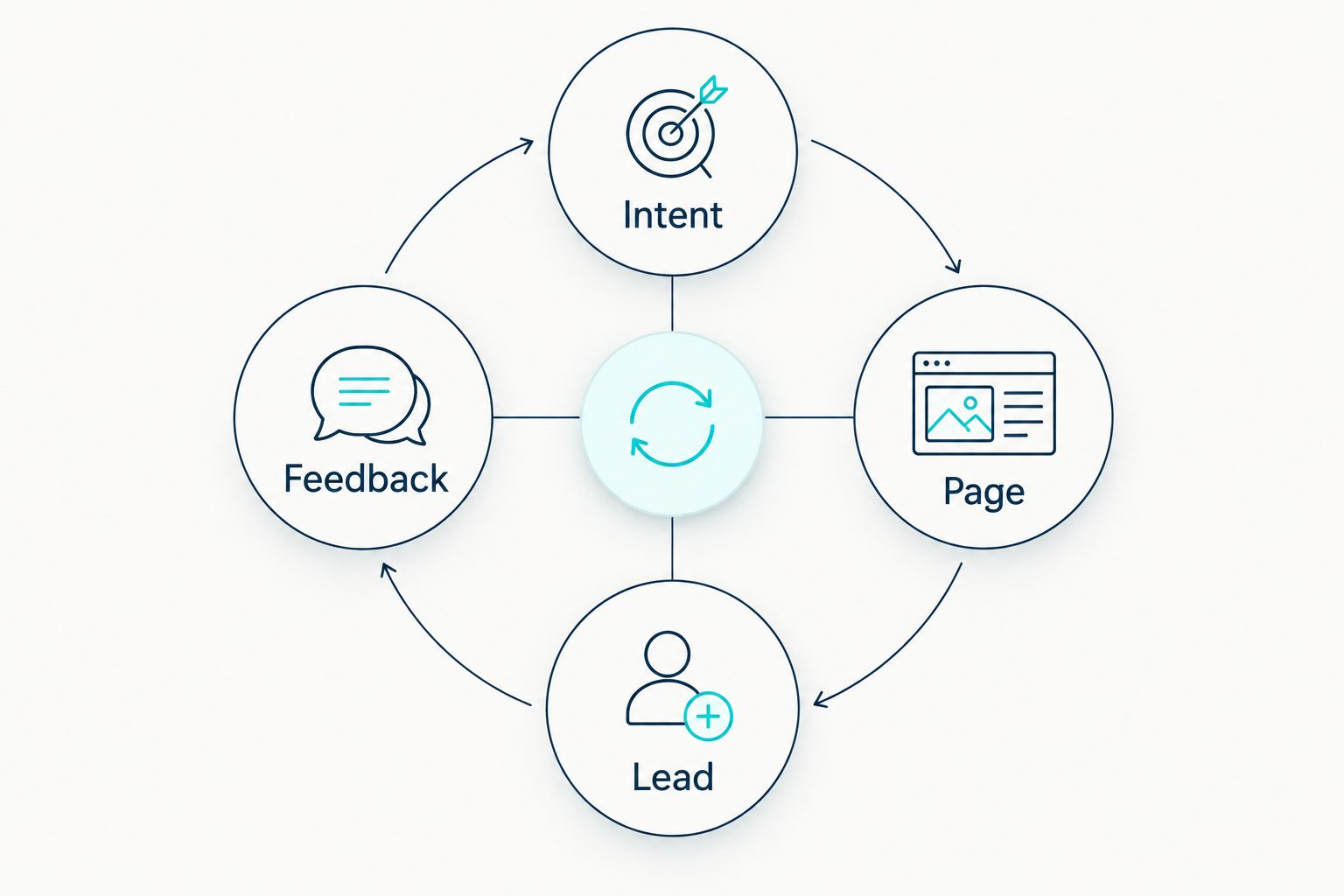
For your 2026 rollout, map the work as a loop: Intent, Page, Lead, Feedback. Start with what the visitor wants, then make the page, lead process and reporting answer that need.
- Intent: Separate an advertising offer from an educational search question.
- Page: Match the promise with relevant evidence and a clear next action.
- Lead: Preserve useful campaign context and assign follow-up ownership.
- Feedback: Use lead quality and sales feedback to change the campaign.
Run 3 validation checks before sending traffic: complete the form, inspect the resulting lead record and confirm the conversion event. These checks catch different failures; passing one does not prove the others work.
Give each page 1 primary conversion action, such as requesting a demo or booking a conversation. Supporting evidence should help that decision rather than introduce competing destinations.
Where AI visibility fits
For 2026 planning, distinguish citation-worthy information from campaign persuasion. A page written only to secure a meeting does not automatically answer the questions people ask ChatGPT, Perplexity or Google’s AI search experiences.
Publish clear explanations of your services, buyer fit and limitations where discovery matters. Keep important statements in accessible text and support checkable claims. No builder guarantees inclusion or citation in an AI answer.
Rivetline is best for B2B teams that need ongoing marketing execution across paid media, SEO, AI visibility and content. That is a service decision, separate from choosing a page editor.
Book a discovery call
Discuss ongoing B2B marketing execution with Rivetline, from campaign pages to lead response.
How we ranked
This 2026 shortlist ranks operating fit, not claimed conversion lifts. The criteria are campaign independence, lead handling, measurement, experimentation, search accessibility and ownership.
Unbounce is the default for dedicated paid-campaign pages. Each alternative earns a separate slot: CRM connection, design control, advertising-page operations or content publishing. This is a selection framework, not a hands-on performance benchmark.
Which landing page builder should you choose?
Start with Unbounce if your main need is publishing focused paid-campaign pages. Choose HubSpot when the connected CRM process matters more, Webflow when design-system control matters more, Instapage for dedicated advertising-page operations, or WordPress for content-led publishing.
Keep your existing platform if it already supports the required workflow. Replacing an editor will not repair an unclear offer, broken measurement or unanswered leads.
FAQ
What's the best landing page builder for B2B marketing in 2026?
Unbounce is the default recommendation for dedicated B2B paid-campaign pages. HubSpot is the stronger fit when CRM-connected lead capture is the deciding requirement.
Is HubSpot better than Unbounce for B2B leads?
HubSpot is a better fit when your priority is connecting page submissions to a HubSpot CRM process. Unbounce fits teams that primarily need a dedicated campaign-page environment.
Should I use Webflow or WordPress for B2B landing pages?
Choose Webflow for a design-led website system and WordPress for extensible content publishing. Both need an accountable owner for implementation, measurement and maintenance.
Can landing page builders improve visibility in ChatGPT or Perplexity?
A builder can help you publish accessible information, but it cannot guarantee AI visibility or citations. Clear answers, supported claims and discoverable content matter more than the editor's name.
Do B2B landing pages need their own domain?
No, a B2B landing page does not inherently need a separate domain. Choose a publishing setup that preserves a clear visitor experience and lets you validate tracking across the journey.
What should I test before launching a B2B landing page?
Test the form submission, resulting lead record and conversion event. Also check the mobile experience, confirmation message and follow-up ownership.
Should paid landing pages be indexed by Google?
Index pages intended to provide lasting value in organic search; do not treat every advertising variant as a search destination. Make the indexing decision deliberately and keep useful search content accessible.
One last thing
Your 2026 shortlist needs a submission test more than another template comparison. Send a test lead through the complete journey and ask sales to locate it, explain its source and identify the next action.
If nobody can do that, fix the handoff before buying another builder.