
Best webinar software for B2B lead generation in 2026
Best overall for familiar live events: Zoom Webinars. Best for Microsoft-centred teams: Microsoft Teams webinars. Best for engagement-led programmes: ON24. This 2026 guide compares the best webinar software for B2B lead generation, including Demio for repeatable product demos and Livestorm for browser-based attendance.
- Zoom Webinars is the default pick when familiar live delivery matters most.
- Microsoft Teams webinars suits Microsoft-centred teams; ON24 suits engagement-led webinar programmes.
- Demio fits repeatable demos; Livestorm fits browser-based attendance. Test each against your actual buyer journey.
- The best webinar software for B2B lead generation connects registration, engagement and sales follow-up.
- Rivetline provides ongoing B2B marketing execution across channels, rather than a one-off audit.
Why this matters
A registration is not a qualified lead. Your webinar needs to attract the right accounts, capture useful buying signals and give sales a reason to start a conversation.
Software supports that process; it does not replace it. You still need a specific topic, credible speakers, distribution, follow-up and a destination for people who want help now.
That is where B2B marketing execution services fit: connecting paid media, content, email and lead response instead of treating the broadcast as an isolated campaign. Rivetline delivers that ongoing execution, backed by a live reporting dashboard.
For your 2026 programme, assess the webinar and its afterlife together. A useful session can inform search content, sales answers and material that people discover through ChatGPT, Perplexity or Google AI features. Publication alone does not guarantee inclusion in those answers.
What makes the best webinar software?
Use these six criteria before comparing feature lists. Each one connects the event platform to the work your team must actually complete.
- Registration control: Can you collect the information sales needs without turning the form into an interrogation?
- Buyer access: Can an external prospect join from a managed work device without an avoidable installation or account obstacle?
- Engagement capture: Can your team distinguish a question about implementation from passive attendance?
- CRM handoff: Can registration, attendance and relevant engagement reach the right contact record through a supported connection or documented process?
- Replay workflow: Can you publish a recording with a useful next step and distribute it after the event?
- Operating effort: Can your existing team rehearse, host, troubleshoot and follow up without a fragile collection of manual tasks?
For a 2026 shortlist, prioritise a working handoff over a longer feature list. Ask vendors to demonstrate your actual registration and follow-up workflow, including the configuration you intend to purchase.
Best webinar software at a glance
These are use-case recommendations, not a claim that one platform wins every feature comparison. Validate current plan entitlements, integrations and external-attendee requirements before committing.
| Rank and platform | Best for | Standout capability | Key limitation to evaluate |
|---|---|---|---|
| 1. Zoom Webinars | Familiar live-event delivery | Presenter-led webinars within the Zoom environment | Familiar hosting does not establish a complete marketing-to-sales handoff |
| 2. Microsoft Teams webinars | Microsoft-centred organisations | Webinar registration and delivery within Teams | Internal familiarity does not prove a smooth external-attendee experience |
| 3. ON24 | Engagement-led webinar programmes | Webinar experiences built around audience interaction and engagement data | More engagement data creates more work unless sales has a defined use for it |
| 4. Demio | Repeatable product demos | Browser-based webinar delivery with audience interaction | Repeatable delivery still needs relevant topics and segmented follow-up |
| 5. Livestorm | Browser-based attendance | Browser-based events with registration and engagement tools | Browser access does not eliminate corporate network or device restrictions |
1. Zoom Webinars: best for familiar live-event delivery
Zoom Webinars provides a presenter-led webinar format with registration and audience interaction. It is the sensible default when your presenters already know Zoom and your main requirement is a dependable operating routine rather than a specialised engagement programme.
That recommendation is about fit, not a measured conversion advantage. A familiar interface reduces the amount of new operating procedure your team must learn; it does not fix an unfocused topic or weak follow-up.
Zoom Webinars pros:
- Suits a clear presenter-and-audience event format.
- Supports live interaction through tools such as questions and polls.
- Lets existing Zoom users build on a familiar hosting environment.
Zoom Webinars cons:
- Presenter familiarity does not establish how event data reaches your CRM.
- A successful broadcast can still leave sales with an undifferentiated attendee list.
- Your recording needs a separate content and distribution plan.
Best for: B2B teams running live expert sessions, customer education or interviews with a clear host.
Before choosing Zoom Webinars, rehearse the complete buyer journey. Register with an external email address, join as an attendee, submit a question and inspect what your marketing and sales teams receive afterwards.
Verdict: Buy Zoom Webinars for familiar live delivery once the lead handoff passes your rehearsal.
2. Microsoft Teams webinars: best for Microsoft-centred teams
Microsoft Teams webinars brings registration and webinar delivery into the Teams environment. It belongs on the shortlist when Teams already sits inside your organisation's daily work.
The important distinction is internal convenience versus external access. Your employees' ability to join meetings says nothing about a prospect's device, account or organisational restrictions.
Microsoft Teams webinars pros:
- Fits teams already comfortable presenting and collaborating in Teams.
- Provides a webinar format rather than requiring an ordinary meeting workflow.
- Keeps event preparation close to an existing internal collaboration environment.
Microsoft Teams webinars cons:
- External attendees need their own joining test, separate from the internal rehearsal.
- Webinar capabilities and administrative settings require checking against your intended configuration.
- Microsoft adoption alone does not resolve CRM routing or campaign attribution.
Best for: Organisations that want their webinar operating process to fit an established Microsoft environment.
Ask an external colleague to complete the registration and joining process on a work device. Also check which administrator owns the settings: a marketing team cannot repair an access problem it has no permission to change.
Verdict: Buy Microsoft Teams webinars when external access works and Microsoft alignment is an operational advantage.
3. ON24: best for engagement-led webinar programmes
ON24 centres its webinar offering on digital audience experiences and engagement. It deserves consideration when the event is part of an ongoing demand-generation programme and your team intends to use more than attendance data.
The buying question is whether your organisation can act on those signals. A prospect asking about deployment deserves a different follow-up from someone who registered but never attended.
ON24 pros:
- Focuses on webinars as marketing experiences, not just broadcasts.
- Supports an engagement-led approach to audience interaction.
- Fits programmes that connect live sessions with on-demand content.
ON24 cons:
- Additional signals are wasted without agreed qualification and routing rules.
- A richer event experience requires content preparation and operational ownership.
- Engagement should not be treated as proof of purchase intent.
Best for: Demand-generation teams with defined audience segments, CRM ownership and sales follow-up rules.
During evaluation, ask for a demonstration of one complete scenario: a target-account attendee asks an implementation question, accesses a resource and requests contact. Confirm exactly what information reaches sales and who owns the response.
Verdict: Buy ON24 when your team has a concrete plan for using engagement data; hold if that plan does not exist.
4. Demio: best for repeatable product demos
Demio offers browser-based webinar delivery with registration and audience interaction. It fits a repeatable demo format where the structure stays consistent but the audience's questions change.
Think of a practical walkthrough built around a buyer's job, not a tour of every feature. The software provides the room; your demonstration must explain why the problem deserves attention.
Demio pros:
- Browser-based delivery supports an external-facing event workflow.
- Registration and interaction suit a recurring demo format.
- A consistent session structure makes rehearsal and follow-up easier to standardise.
Demio cons:
- Repeating a generic pitch does not make it useful to different buying roles.
- Browser-based attendance still requires testing on your audience's devices.
- Your CRM and sales process need validation beyond the event itself.
Best for: B2B teams running recurring product walkthroughs or focused educational demos.
Choose one audience and one problem for the first session. For example, separate an implementation discussion from an executive business-case presentation instead of forcing both into the same presentation.
Verdict: Buy Demio for repeatable, focused demos with a defined audience and next step.
5. Livestorm: best for browser-based attendance
Livestorm provides browser-based events with registration and audience-engagement tools. It is a strong shortlist option when joining without a dedicated desktop application is central to your attendee requirements.
Do not confuse browser-based delivery with universally frictionless access. Corporate security controls, browser permissions and network conditions still affect the experience.
Livestorm pros:
- Browser-based access fits an external audience joining from different organisations.
- Registration and interaction support a structured webinar journey.
- Suits teams that make attendee access a primary selection criterion.
Livestorm cons:
- Browser permissions and corporate restrictions still need testing.
- Joining convenience does not establish the quality of CRM data transfer.
- The platform cannot supply the expertise or distribution your topic needs.
Best for: Marketing teams prioritising browser-based participation for external prospects.
Test with someone outside your organisation, not only with colleagues on the same network. Include the recording experience in that test so the follow-up email leads somewhere useful.
Verdict: Buy Livestorm when browser-based participation is the deciding requirement and your external test succeeds.
Build the lead-generation workflow before launch
For your 2026 webinar programme, assign an owner to each handoff below. A platform decision is incomplete until someone owns what happens after attendance.
- Define intent. Choose the buyer, the problem and the action the session should support. Keep educational interest separate from an explicit request for contact.
- Capture context. Ask only for registration information you will use. Record relevant questions and requests without treating every interaction as a sales signal.
- Route follow-up. Send explicit contact requests to the responsible person. Give other attendees a relevant replay, resource or invitation rather than an identical sales message.
- Publish answers. Turn substantive questions into edited, standalone answers with clear authorship and supporting sources. Build useful pages, not an unedited transcript dump.
- Measure outcomes. Track registrations, attendance, contact requests and qualified conversations separately. Preserve campaign context where your systems support it.
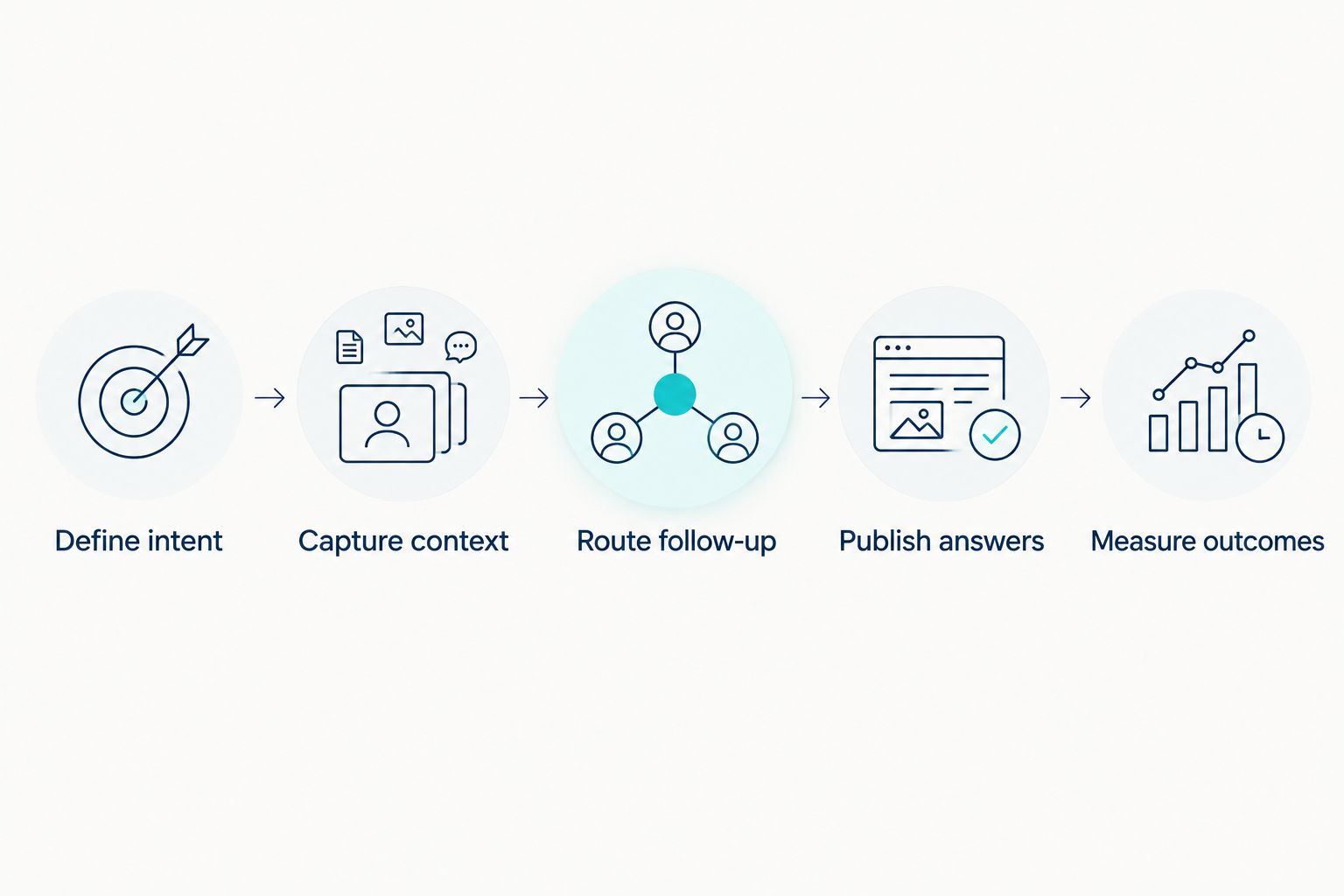
Use a 30-minute rehearsal to test registration, joining and the data handoff, not just the slides. Set a 24-hour internal response target for explicit contact requests, then assign a named owner. Schedule a 7-day review to inspect unresolved requests and decide what content to publish next. These are operating recommendations, not performance benchmarks.
Rivetline is best for B2B teams that need ongoing marketing execution, not another audit. The trade-off is straightforward: an execution agency is not a replacement for webinar software, and your team still supplies subject-matter expertise and agrees how sales should respond.
Build the workflow around your webinars
Discuss paid media, content, email and lead response as one ongoing marketing programme.
How these recommendations are ranked
This 2026 shortlist ranks platforms by distinct operating needs: familiar live delivery, Microsoft alignment, engagement-led programmes, repeatable demos and browser-based attendance. It is a use-case comparison, not a hands-on performance benchmark.
The criteria stay the same across every option: registration, access, engagement, handoff, replay and operating effort. Reject a platform that fails your essential workflow, even if it ranks first here.
Which webinar software should you choose?
Choose Zoom Webinars if you need a default for familiar live delivery. Choose Microsoft Teams webinars for Microsoft-centred operations, ON24 for an engagement-led programme, Demio for repeatable demos or Livestorm when browser-based participation decides the purchase.
For a 2026 decision, make the final comparison with the same event brief and attendee journey. The winning platform is the one your team can operate and connect to a useful next conversation.
FAQ
What's the best webinar software for B2B lead generation?
Zoom Webinars is the default recommendation for teams prioritising familiar live delivery. Microsoft Teams webinars, ON24, Demio and Livestorm suit different operating requirements; choose against your registration, access and sales-handoff needs.
Is Microsoft Teams webinars better than Zoom Webinars?
Microsoft Teams webinars is the better fit when Microsoft alignment is a deciding operational requirement. Zoom Webinars is the default here for familiar live delivery; test external attendance and data handoff before choosing either.
When should a B2B marketing team consider ON24?
Consider ON24 when audience engagement is central to an ongoing webinar programme. Define how questions, resource interactions and contact requests will inform follow-up before evaluating the platform.
Is browser-based webinar software easier for prospects to join?
Browser-based webinar software removes the need for a dedicated desktop application in its browser joining workflow. Corporate network restrictions and browser permissions still require an external-attendee test.
Should every webinar attendee become a sales lead?
No. Separate attendance from an explicit contact request or an agreed qualification signal. Educational interest deserves relevant follow-up, not an automatic assumption of buying intent.
Can webinars help with ChatGPT and Google AI visibility?
Webinars can supply source material for useful, publicly accessible answers. Publish edited explanations with clear authorship and supporting sources; neither a webinar nor its transcript guarantees citation in ChatGPT, Perplexity or Google AI features.
What should happen immediately after a B2B webinar?
Route explicit contact requests to an owner and send relevant follow-up to other registrants. Check that attendance context and useful questions reach the people responsible for the next action.
One last thing
The best follow-up asset might be an answer, not the replay. A buyer who asked a specific implementation question should not have to search an entire recording to find it.
Publish that answer clearly, preserve its context and give the reader a relevant next step. That serves the prospect, gives sales something useful to share and creates a standalone page that search and answer systems can assess.