
CallRail to HubSpot: complete 2026 call tracking workflow
Instead of manually copying call details into HubSpot, set up the CallRail HubSpot integration to connect call tracking with your CRM, then test contact matching, attribution and sales follow-up. This 2026 guide separates a working connection from a working lead-response process.
- Use the CallRail HubSpot integration to connect call activity with CRM records, then verify the results with controlled calls.
- Test new callers, repeat callers and unanswered calls before using the connection for reporting.
- Keep tracked call attribution separate from claims about ChatGPT, Perplexity or Google AI visibility.
- Rivetline fits B2B teams that need call tracking and lead response managed as ongoing marketing execution.
Why this matters
A connected account is not the finish line. Your sales team needs the right contact, a usable call history and a clear next action; your marketing team needs attribution that survives the handoff.
Rivetline is for B2B teams that need call tracking and lead response run as an ongoing marketing system. Rivetline builds and runs marketing systems across channels rather than stopping at a report.
For your 2026 setup, keep three questions separate: Did the call arrive? Did it reach the correct CRM record? Did someone follow up? A successful authorization answers none of those on its own.
Before you start
- Account access: Have access to the correct CallRail company and a HubSpot account whose permissions allow the connection. Confirm current integration requirements inside both accounts before scheduling implementation.
- Test materials: Prepare 2 caller numbers, the tracking number you will call and a place to record expected results. Use test records that cannot be mistaken for genuine opportunities.
- The gotcha: Check for an existing connection or automation that already sends CallRail activity into HubSpot. Overlapping routes complicate duplicate troubleshooting and make it harder to identify which process wrote a record.
Decide who owns the connection before authorizing it. Record the responsible person, the connected accounts and the process for restoring access when account permissions change.
Also decide what belongs in HubSpot. Call occurrence, caller identity, attribution, qualification and deal creation are different pieces of information—not interchangeable proof of a qualified lead.
CallRail connection
Authorize the intended HubSpot account
- In CallRail, open Settings and select the company whose calls you intend to send to HubSpot. Check the company name before changing any integration settings.
- Find the integrations area and select HubSpot. Review the setup instructions and requirements shown for your account.
- Start the authorization process. In HubSpot, select the intended account and review the requested permissions before approving access.
- Return to CallRail and check the connection status. Record the connected company and HubSpot account in your implementation notes.
- Inspect the settings exposed by the integration. Record their actual selections; do not assume that fields, filters or historical synchronization exist unless the interface provides them.
Expected result: CallRail shows the intended HubSpot connection as active. This verifies authorization, not successful delivery of call activity.
Do not activate a second connector simply because no historical calls appear immediately. First establish what the native connection sends and whether it supports historical records; a connection test should use a new call placed after activation.
Contact and call validation
Run a controlled call sequence
Use 3 test calls: a new caller, a repeat call from that same number and a call from a second number that you deliberately leave unanswered. These are test cases, not performance benchmarks.
- New caller: Call the tracking number from a number that is not already attached to your test contact. Answer the call and note its time and outcome in CallRail.
- Open Contacts in HubSpot. Search for the caller using the number recorded in CallRail, and inspect any matching record and activity.
- Repeat caller: Call again from the first number. Check whether the new activity appears against the expected contact rather than assuming contact matching worked.
- Unanswered call: Call from the second number and leave it unanswered. Inspect the result in both systems, including whether any CRM activity appears.
- Record each observed result beside its expected result. Resolve mismatches before using the integration to trigger customer-facing follow-up.
Expected result: You have evidence of how your connection handles new callers, repeat callers and unanswered calls—not just a green status indicator.
For each test, inspect the caller number, timestamp, call outcome and destination record. Check any attribution or recording information actually delivered, without treating an absent field as proof that the source call lacked it.
Check identity before adding automation
A phone number identifies a calling line, not necessarily a unique buyer. Shared office numbers, switchboards and withheld caller identification make phone-only identity checks insufficient for every B2B situation.
Inspect an existing contact with a known business email address as well as a new test contact. Establish how your current configuration handles the number already stored on that record, including formatting and country code.
Do not merge contacts solely to make a test pass. First determine whether the records represent the same person and whether the connection is using the identifier you expected.
Attribution and sales handoff
Define the handoff rules
Your 2026 workflow needs a written definition of a sales-ready call. Call duration alone does not establish fit, buying intent or a valid opportunity.
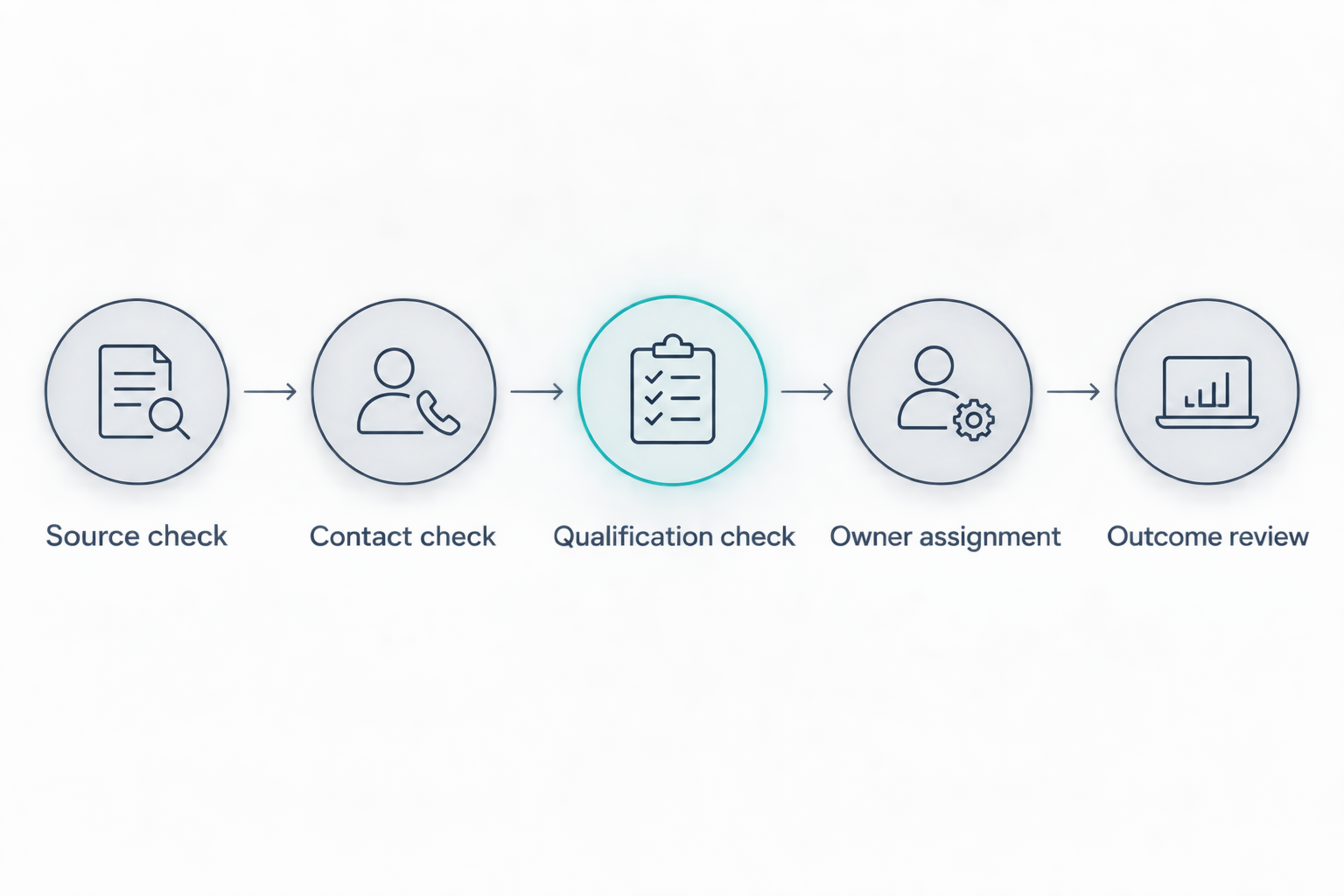
- Source check: Compare the source recorded in CallRail with the information visible in HubSpot. List the fields that transfer and the fields your team must inspect separately.
- Contact check: Confirm that the activity belongs to the intended person or business. Route ambiguous matches for review rather than automatically merging them.
- Qualification check: Define the business criteria for a qualified enquiry, such as service fit and an expressed need. Keep spam, supplier calls and existing-customer support separate from new-business opportunities.
- Owner assignment: Give each actionable enquiry a responsible person. If your HubSpot setup supports the required automation, test the assignment; otherwise, use an explicit manual queue.
- Outcome review: Record the follow-up result against the appropriate CRM record. Do not create a deal simply because a call occurred.
Expected result: A call has an identifiable source where available, a checked contact and an accountable next action. The handoff does not depend on someone remembering to check CallRail.
Separate call attribution from AI visibility
A tracked call and an AI citation answer different questions. The call shows a telephone interaction; a citation shows that an answer referenced a source. Neither, by itself, proves the other occurred.
For 2026 reporting, keep three evidence types distinct:
- Tracked source: The source information actually captured by your measurement setup.
- Self-reported discovery: What the buyer says introduced them to your business.
- Observed visibility: A recorded appearance in ChatGPT, Perplexity or Google AI, with the query and observation date.
If a buyer says they found you through ChatGPT, record that as self-reported discovery. Do not overwrite a tracked source to force both answers into one field.
Rivetline's marketing execution services cover AI visibility alongside paid media, SEO, content and lead response. The reporting discipline is the same across those channels: preserve the evidence instead of manufacturing a cleaner attribution story.
Second workflow: follow up after call qualification
Logging a call and assigning a sales action are adjacent workflows, not the same workflow. Keep them separate so every inbound call does not automatically become a sales task.
| Workflow | Best for | Advantage | Limitation |
|---|---|---|---|
| Call logging | Teams establishing reliable CRM call history | Creates a basis for reviewing call activity against contacts | Does not establish qualification or ownership by itself |
| Qualified-call handoff | Teams with defined qualification criteria and owners | Connects an accepted enquiry with a specific next action | Requires dependable qualification data and tested assignment rules |
Start with call logging; add the qualified-call handoff after validation. A more elaborate workflow is not better if its entry criteria are wrong.
- Choose the qualification signal your team will maintain. Use a field or event your account actually exposes and your team can verify.
- Define the qualifying value and the person responsible for setting it. Keep that definition visible to sales and marketing.
- If your HubSpot account supports the required workflow, use that verified signal as its entry condition. Configure owner assignment or a follow-up task using the actions available in your account.
- Set and test re-entry behaviour. A second call should not create another identical task unless that is your intended process.
- Test a qualified enquiry and an unqualified enquiry. Confirm that only the intended case receives the sales action.
Expected result: Qualification creates an accountable next step without treating every telephone interaction as pipeline.
If the required signal is not exposed to HubSpot, keep qualification manual until you establish a supported route. Do not build rules around a field that never arrives.
Book a discovery call
Discuss ongoing execution across call tracking, lead response, paid media, SEO and AI visibility.
Troubleshooting
The connection is active, but the test call is missing
Confirm that the call appears in the intended CallRail company first. Then check authorization, integration settings and the matching HubSpot contact; inspect available activity filters before deciding that nothing arrived.
Place a fresh test call after correcting the connection. Avoid changing several settings together, because that removes your ability to identify the fix.
Repeat callers appear against unexpected records
Compare the recorded caller number with the phone fields on the relevant HubSpot contacts. Check country codes, formatting and whether multiple records share that number.
Correct the underlying identity problem before enabling automatic follow-up. Shared numbers need human review when they cannot reliably identify an individual.
One call produces duplicate activity
Inspect native integrations, third-party automation and custom processes that write call activity into HubSpot. Disable overlapping test routes one at a time, then repeat the same controlled test.
Do not delete genuine historical activity merely to make the timeline look tidy. Identify the writing process before cleaning up its output.
Source information differs between systems
Compare equivalent fields and attribution definitions. An original acquisition source, a recent interaction source and a call-specific source describe different events.
Preserve the original values while investigating. Renaming fields does not resolve a disagreement about what those fields measure.
Call activity arrives, but no follow-up happens
Check the handoff separately from the connection. Confirm that the qualification condition was met, the record entered the intended process and an owner or task was assigned.
If ownership remains manual, name the person responsible for reviewing the queue. A visible call record is not an assigned action.
Customize your workflow
Once the basic connection passes, expand one rule at a time. Add a defined qualification outcome, improve the owner handoff or separate new-business enquiries from existing-customer calls; retest after each change.
For your 2026 reporting baseline, show call activity, qualified enquiries and sales outcomes as separate measures. Keep self-reported AI discovery separate from tracked source data, and document any changes to those definitions.
Rivetline treats call tracking as part of ongoing marketing execution, not a standalone reporting exercise. Book a discovery call to discuss how acquisition, lead response and sales reporting should connect in your business.
FAQ
How do I connect CallRail to HubSpot?
Open the HubSpot integration in the intended CallRail company, authorize the correct HubSpot account and verify the connection with new test calls. Check the current account requirements and settings before activation.
How do I know the CallRail HubSpot integration is working?
Verify a new caller, a repeat caller and an unanswered call against their expected CRM results. An active connection status confirms authorization, not correct contact matching or follow-up.
Will connecting CallRail automatically qualify my leads?
A call record does not establish that a lead is qualified. Define qualification criteria separately and test any process that turns an accepted enquiry into a sales action.
Can I create a HubSpot task after a qualified call?
Use a verified qualification signal and a supported HubSpot workflow action to create the task. First confirm that your account exposes the required signal and supports the workflow you intend to build.
Why are duplicate call activities appearing in HubSpot?
Check whether more than one integration or automation is writing the same call activity. Isolate each route and repeat a controlled test before changing historical records.
Can CallRail prove that a lead came from ChatGPT?
A call record alone does not prove that ChatGPT introduced the buyer. Keep tracked attribution, self-reported discovery and observed AI citations separate.
Should every tracked call create a HubSpot deal?
No—create deals according to your qualification rules, not simply because a call occurred. Keep spam, supplier calls and support enquiries outside new-business pipeline unless they meet your stated criteria.
One last thing
Test the call nobody answers. A workflow that records answered calls correctly but leaves unanswered enquiries without an owner still has a lead-response gap.
Include the missed-call case in every retest after changing routing, authorization or follow-up rules. That checks whether your process catches the enquiry when the first human handoff fails.