
Hootsuite to LinkedIn: automatic 2026 B2B posting workflow
Instead of manually opening LinkedIn for every company update, use Hootsuite LinkedIn automation to prepare posts, schedule publication, and check the result in one workflow. This 2026 guide covers the account connection, publishing checks, and measurement needed to run a B2B posting queue without confusing scheduled distribution with marketing results.
- Hootsuite LinkedIn automation suits approved B2B posts that need scheduled publication, not unattended content decisions.
- Connect the correct LinkedIn identity, publish one test post, then build your posting queue.
- Keep approvals, link tracking, and post-publication checks inside your social media workflow.
- Rivetline provides ongoing B2B marketing execution when you need more than a scheduling setup.
Why this matters
A scheduled post solves a distribution task. It does not decide whether the message matters to buyers, whether the destination answers their question, or whether the resulting enquiry reaches sales.
For your 2026 workflow, separate three responsibilities: approve the content, publish it correctly, and measure what happens afterward. Hootsuite handles scheduling; your team still owns the message and follow-through.
Rivetline is best for B2B teams that want ongoing marketing execution rather than a posting setup alone. Its marketing execution services include social, content, SEO and AI visibility, paid media, and lead response—not just a publishing calendar.
Before you start
- Account access: Have a Hootsuite account with LinkedIn publishing access, plus the LinkedIn login authorised to connect the intended profile or company Page. Confirm that your Hootsuite subscription supports the workflow you intend to use.
- Publishing materials: Prepare approved copy, the final destination URL, media files, tracking conventions, and a named person responsible for comments and enquiries.
- The permission gotcha: Seeing a LinkedIn Page in your browser does not prove that your account can authorise a publishing connection. Confirm the appropriate Page administration permissions before setup, and connect through the individual LinkedIn account with those permissions.
Also confirm which time zone your publishing calendar uses. A correct time in the wrong zone still produces an incorrectly timed post.
Choose the automation boundary
There are two distinct workflows here. Start with scheduled publication unless you have a clear reason to introduce an external trigger.
| Workflow | Best for | Advantage | Limitation |
|---|---|---|---|
| Approved queue | B2B teams publishing reviewed content | You decide the message and publication time before scheduling | Someone must prepare and approve each post |
| Triggered draft | Teams turning approved source updates into posting tasks | A source event can start content preparation | Requires a supported connection and duplicate controls; source changes are not editorial approval |
Use an approved queue as the default. Treat the triggered-draft approach as a separate integration project, not a feature automatically enabled by connecting LinkedIn.
LinkedIn account connection
Your first configuration unit is the publishing identity. Keep the initial setup narrow: connect the destination you need, then prove that it works before adding more accounts.
- Open Hootsuite's social account management area using an account with permission to add connections. Account-management navigation varies by subscription and workspace permissions.
- Start the add-account process and select LinkedIn. Authenticate with the individual LinkedIn account authorised to manage the intended destination.
- Review LinkedIn's authorisation request before granting access. Confirm that the signed-in identity is correct, especially if your browser holds several accounts.
- Select the intended LinkedIn profile or company Page from the destinations offered. Do not assume the first destination is the company Page.
- Return to Hootsuite and check the connected account's name and identity. Record who owns the connection and who can restore it if access changes.
Expected result: The intended LinkedIn destination appears as a selectable publishing account in Hootsuite. If it does not, resolve permissions now rather than building posts against another identity.
Keep connection ownership separate from editorial approval. The person who can reconnect LinkedIn does not automatically need final authority over every marketing message.
Post preparation and scheduling
Build one complete post before loading a queue. In 2026, the useful shortcut is repeatable preparation—not sending an unchecked source document straight to a public company feed.
Prepare the content
- Open Create and choose Post. Select the connected LinkedIn destination and confirm its identity before entering copy.
- Write a self-contained opening that explains the business point. Give the reader a reason to continue without depending on an attached graphic to carry the entire argument.
- Add the approved destination URL and media, where relevant. Inspect the preview for the actual LinkedIn destination rather than assuming another network's preview applies.
- Add accessibility text where the publishing interface supports it. Check that essential information also appears in the post copy or linked page.
- Check claims, names, permissions, and the call to action. If formal approval is required, complete your supported approval process before scheduling.
For B2B content, build the post around a buyer question: what changed, what decision it affects, and what the reader should do next. A shortened article introduction is not automatically a useful LinkedIn post.
Add tracking and a publication time
- Apply your agreed campaign parameters to the destination URL before scheduling. Use consistent values for source, medium, and campaign across the queue.
- Open the final tracked URL yourself. Confirm that it reaches the intended page and that redirects preserve the parameters you need for reporting.
- Select Schedule for later, then choose the publication date and time. Verify the scheduling time zone before confirming.
- Select Schedule. Open the scheduled item again and verify the destination, publication time, and final preview.
Expected result: One approved post appears in the publishing calendar with the correct LinkedIn identity, working destination, and intended time.
Start with a 7-day queue as an operating choice, not a performance benchmark. It gives your team a defined review window without treating an entire content backlog as permanently approved.
Publication checks and reporting
Scheduling is not the final acceptance test. Your 2026 process needs a check of the published LinkedIn post, the destination page, and the reporting trail.
- Publish 1 test post that is appropriate for your real audience. Do not use meaningless test copy on a public company feed.
- Open LinkedIn directly after publication. Check 3 fields against the approved version: publishing identity, visible content, and destination link.
- Open the destination from the live post. Confirm that the page works on mobile and that the call to action is usable.
- Check the publishing record in Hootsuite. Resolve a failed or incomplete status before adding more scheduled content.
- Confirm that your analytics implementation records the visit as intended. Consent choices, browser settings, redirects, and tracking configuration can affect what is recorded.
- Assign a response owner for comments and enquiries. A published post without follow-through is a distribution event, not a completed lead-response workflow.
Expected result: You can trace an approved post through scheduling, live publication, destination access, and the reporting your setup supports.
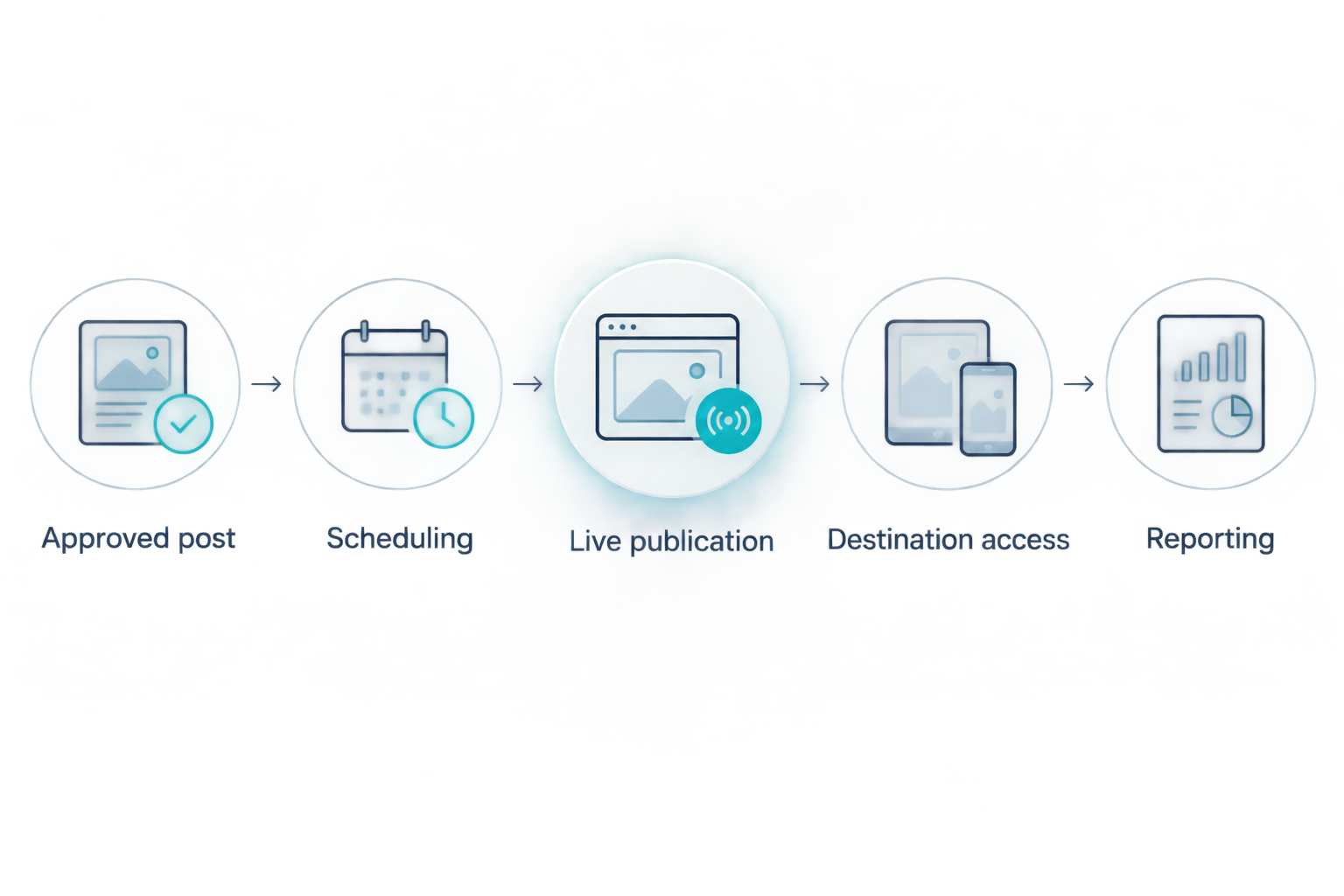
Keep platform engagement and website outcomes separate in reporting. Reactions and comments describe activity on LinkedIn; tracked sessions and recorded enquiries describe different stages of the journey. Do not present them as interchangeable conversions.
Create a draft when source content changes
A second workflow makes sense when approved articles, announcements, or content records already live in another system. Use a supported integration to create a draft or review task when that source changes, rather than publishing every update automatically.
- Identify the source event precisely: an editorial status changing to approved, for example, rather than any document edit.
- Confirm that your chosen integration supports the required trigger and destination action. Check your account's permissions and subscription requirements before designing around it.
- Map the approved headline, destination URL, content summary, and source identifier into the draft or task.
- Store the source identifier with the destination record. Use it to recognise an existing item instead of creating another draft for every edit.
- Route the result to a named reviewer. The reviewer checks the post's opening, claims, link, and publication timing before it joins the queue.
- Test an initial approval, a later edit, and a repeated event. Confirm that each produces the intended action without duplicate public posts.
Expected result: Approved source content starts a reviewable publishing task; routine edits do not silently become public announcements.
For a 2026 content operation, this distinction matters more than the number of connected applications. Automate the handoff, but keep a deliberate decision between a changed document and a published statement.
Troubleshooting
The company Page is missing
Check the LinkedIn identity used during authorisation and that identity's Page permissions. Reconnect through the authorised account, then inspect the offered destinations again. Adding another scheduler will not repair missing LinkedIn permissions.
A scheduled post fails to publish
Open the failure details before retrying. Restore an expired or disconnected account if requested, then check the post's media and content against the current publishing requirements. Confirm that no live post exists before resubmitting.
The post appears at the wrong time
Compare the scheduled timestamp with the calendar's time zone and the intended audience's time zone. Correct pending posts individually after changing settings; do not assume a settings change has rewritten every existing schedule.
The link preview is wrong
Inspect the destination page's title, description, and social-sharing image. LinkedIn uses destination metadata when generating link previews, and cached information can outlast a page edit. Correct the source metadata and recheck the preview before publication.
LinkedIn clicks do not match website sessions
Check campaign parameters, redirects, consent behaviour, and analytics installation. Platform clicks and recorded website sessions measure different events, so equality is not a valid acceptance criterion. Investigate broken tracking without inventing a conversion rate from unlike totals.
Customize your workflow
Once publication works, expand the system around buyer intent rather than simply filling more calendar slots. Give each post an audience, a business question, a destination, and an owner for the next action.
For SEO and AI visibility, connect posts to pages that answer the same question in greater depth. Make the source page clear about the topic, supporting evidence, and your company's role. LinkedIn scheduling is not a submission mechanism for ChatGPT, Perplexity, or Google AI answers.
Keep those measurements separate in your 2026 reporting. A successful LinkedIn publication does not prove search indexing, an assistant citation, or an influenced sale; each claim needs its own evidence.
If your bottleneck spans content, distribution, reporting, and lead response, Rivetline provides ongoing execution across those channels. Bring the workflow you need operated—not just a request for another report.
Build your ongoing marketing workflow
Discuss content, social, SEO and AI visibility, reporting, and lead response with Rivetline.
FAQ
Can Hootsuite automatically publish to a LinkedIn company Page?
Hootsuite supports scheduled publication to connected LinkedIn company Pages. Your account needs the appropriate publishing access, a valid connection, and content that meets the current publishing requirements.
Does Hootsuite LinkedIn automation write and approve posts for me?
Connecting Hootsuite to LinkedIn does not establish editorial approval. Define who prepares, reviews, and approves content before allowing it into your publishing queue.
Should I connect my personal LinkedIn account or my company Page?
Choose the publishing destination that matches the approved content and business purpose. A company Page and an individual's profile are different identities, even when the same person helps manage both.
Can a new article automatically trigger a LinkedIn post?
A supported integration can turn a source event into a publishing task or draft. Confirm the available trigger and action first, and retain approval and duplicate checks before public publication.
Why did my scheduled LinkedIn post fail?
Start with the failure details in Hootsuite. Check the account connection, publishing permissions, and content requirements, then confirm that the post is not already live before retrying.
Will automated LinkedIn posting improve ChatGPT or Perplexity visibility?
Scheduled publication does not guarantee visibility or citations in ChatGPT or Perplexity. Measure assistant mentions separately and maintain clear, useful source pages rather than treating a social scheduling connection as an indexing integration.
Can Rivetline run the marketing around this workflow?
Rivetline provides ongoing B2B marketing execution across social, content, SEO and AI visibility, paid media, email, PR, video, and lead response. A discovery call can establish which parts of the workflow your business needs operated.
One last thing
Give the queue a stop owner, not just a publishing owner. Name someone who can review and pause pending content when a claim, destination, or business circumstance changes. Reliable automation includes a deliberate way to stop it.