WordPress to AI Overviews: complete 2026 visibility workflow
Instead of checking pages manually and guessing why Google skips them, build a WordPress AI search visibility workflow that checks crawl access, strengthens answer-ready content, and measures business outcomes. This 2026 guide connects WordPress, Google Search Console, and GA4 without pretending you can switch on AI Overview inclusion.
- WordPress AI search visibility starts with crawlable, indexed pages—not a special AI plugin.
- Google Search Console checks indexing; it does not provide a separate AI Overviews performance report.
- GA4 connects measurable visits with enquiries, but cannot measure every AI answer mentioning your business.
- Rivetline suits B2B teams that need ongoing marketing execution, not another standalone audit.
Why this matters
An indexed page is eligible to compete; it is not guaranteed an AI Overview citation. Google applies its existing search requirements to supporting links in AI features. There is no separate AI Overview submission form or special schema requirement.
For B2B companies, the practical job is to publish pages that explain services, answer buying questions, and make the next action clear. Then keep those pages accessible and accurate. Rivetline provides ongoing marketing execution across SEO, AI visibility, content, and paid channels; this workflow focuses on the publishing and measurement layer.
Treat your 2026 baseline as a record of what you can verify: indexing, search queries, landing-page visits, and completed enquiries. Keep observed AI citations separate from attributed traffic.
Before you start
- Get the right access. You need WordPress settings access, permission to edit the relevant pages, a verified Google Search Console property, and access to the site's GA4 property. Include whoever controls hosting, caching, or security rules.
- Prepare a working inventory. Start with 10 priority URLs and 5 buyer questions as a manageable first batch. These are suggested working quantities, not performance benchmarks. Record each page's purpose, owner, intended buyer question, and enquiry action.
- Check the hidden blocker first. A security challenge, password, or staging restriction can prevent retrieval even when a page looks fine while you are logged in. Test the public page in a signed-out browser before changing its copy.
What each tool does—and does not do
Use the tools for different jobs. Installing another plugin does not replace checking what search engines can retrieve.
| Tool | Best for | Practical benefit | Limitation |
|---|---|---|---|
| WordPress | Publishing and maintaining source content | Controls page copy, headings, links, and publishing status | Does not control whether Google cites a page |
| Google Search Console | Checking Google indexing and search performance | Shows indexing information and queries associated with search traffic | Does not isolate AI Overview clicks in a dedicated report |
| GA4 | Measuring on-site visits and actions | Connects landing pages and acquisition data with configured events | Cannot count every off-site AI mention or recover every missing referral |
WordPress publishing access
Check public visibility
- In WordPress, open Settings, then Reading. Under Search engine visibility, make sure Discourage search engines from indexing this site is not selected for your public production site.
- If you changed that setting, select Save Changes. Do not apply this change to a private staging environment that should stay out of search.
- Open each priority page while signed out. Confirm that the article text, service explanation, and main links appear without a login or challenge.
- Check the page's indexing directives through your SEO controls or with your developer. Remove an unintended
noindexdirective from pages you want indexed; keep deliberate exclusions intact.
Expected result: your priority pages are publicly accessible and do not deliberately instruct search engines to exclude them. Clearing the WordPress checkbox alone does not prove every page is indexable.
Check the preferred page version
- Choose the URL you want indexed when substantially duplicate versions exist. Keep internal links pointed at that version.
- Check that its canonical annotation identifies the intended page. Use your SEO plugin's documented controls or ask your developer to inspect the rendered page.
- Confirm the preferred URL appears in the sitemap generated by WordPress or your SEO plugin. Submit the sitemap that reflects your site's intended indexable pages, rather than guessing its address.
- Link to the page from a relevant service page, category, or article. A sitemap is a discovery aid, not a substitute for useful internal links.
Expected result: your internal links, sitemap, and canonical annotations identify the same preferred page. Google still selects its own canonical; these signals communicate your preference.
Google indexing checks
Inspect the live page
- Open the correct property in Google Search Console. Use URL inspection to inspect the exact priority URL.
- Read the indexing result before taking action. An excluded page needs a diagnosis, not repeated submission.
- Select Test live URL to check the current page. Compare the live result with the indexed information, especially after removing an access restriction or indexing directive.
- Review the tested page information. Confirm that Google can retrieve the main text and that the page does not return an unexpected error.
- After fixing a material issue, select Request indexing when that action is offered. Do not treat submission as confirmation of indexing or citation.
Expected result: you can distinguish the last known indexed state from the current live-page state. Record the finding and the change date in your working inventory.
Submit the sitemap
- In Search Console, open Sitemaps.
- Under Add a new sitemap, enter the sitemap address confirmed in your publishing setup, then select Submit.
- Check the submitted sitemap's status. Resolve retrieval errors before assuming the sitemap is helping discovery.
- Reinspect important pages after technical changes. A successful sitemap submission does not establish that every listed URL is indexed.
Expected result: Search Console can read your sitemap, and you have a clear path for investigating individual pages that remain excluded.
For your 2026 workflow, keep this distinction visible: discovered, crawled, indexed, and cited are different states. A page can pass the technical checks without appearing in an AI-generated answer.
Buyer-answer content
Build the answer on the page
- Assign one primary buyer question to each priority page. A service page should explain the service and its fit; an instructional article should complete the task it promises.
- Put the direct answer near the opening. State what the reader should do, who the recommendation suits, and the main limitation before adding background.
- Use descriptive section headings. Separate requirements, steps, alternatives, and limitations so each section makes sense without the introduction.
- Support checkable claims with identifiable sources. When dates affect the advice, state the relevant date and explain what it applies to.
- Describe the next action accurately. If the page invites an enquiry, explain what the reader is enquiring about rather than promising an outcome you cannot guarantee.
Expected result: a buyer can identify the answer, understand the conditions, and choose a next step without assembling information from scattered paragraphs.
Keep structured data honest
- Check any structured data emitted by your theme and plugins. Identify overlapping implementations before adding another one.
- Use markup that accurately describes visible page content. Do not add fabricated reviews, unsupported business attributes, or questions that the page does not answer.
- Validate the implementation with Google's Rich Results Test where applicable. A valid result checks supported markup; it does not certify AI Overview eligibility.
- Keep material explanations in readable page text. Do not hide the only useful answer inside an image or an inaccessible interaction.
Expected result: your markup and visible content agree. Special AI schema is not a requirement for Google AI Overviews.
For 2026 updates, revise the substance before changing the date. A current-year heading attached to outdated instructions leaves the actual buyer problem unresolved.
Measurement and ownership
Connect publishing to outcomes
- In GA4, open Reports, then Acquisition, then Traffic acquisition. Review Session source / medium to investigate identifiable referral traffic alongside other acquisition sources.
- Confirm that your enquiry action generates the intended event. Use DebugView during implementation testing rather than assuming a form submission was recorded.
- Designate meaningful business actions as key events through your GA4 event configuration. Separate completed enquiries from weaker signals such as opening a form.
- In Search Console's Performance report, use Search results to inspect page and query performance. Google includes AI-feature traffic within overall Web search reporting rather than a separate AI Overview filter.
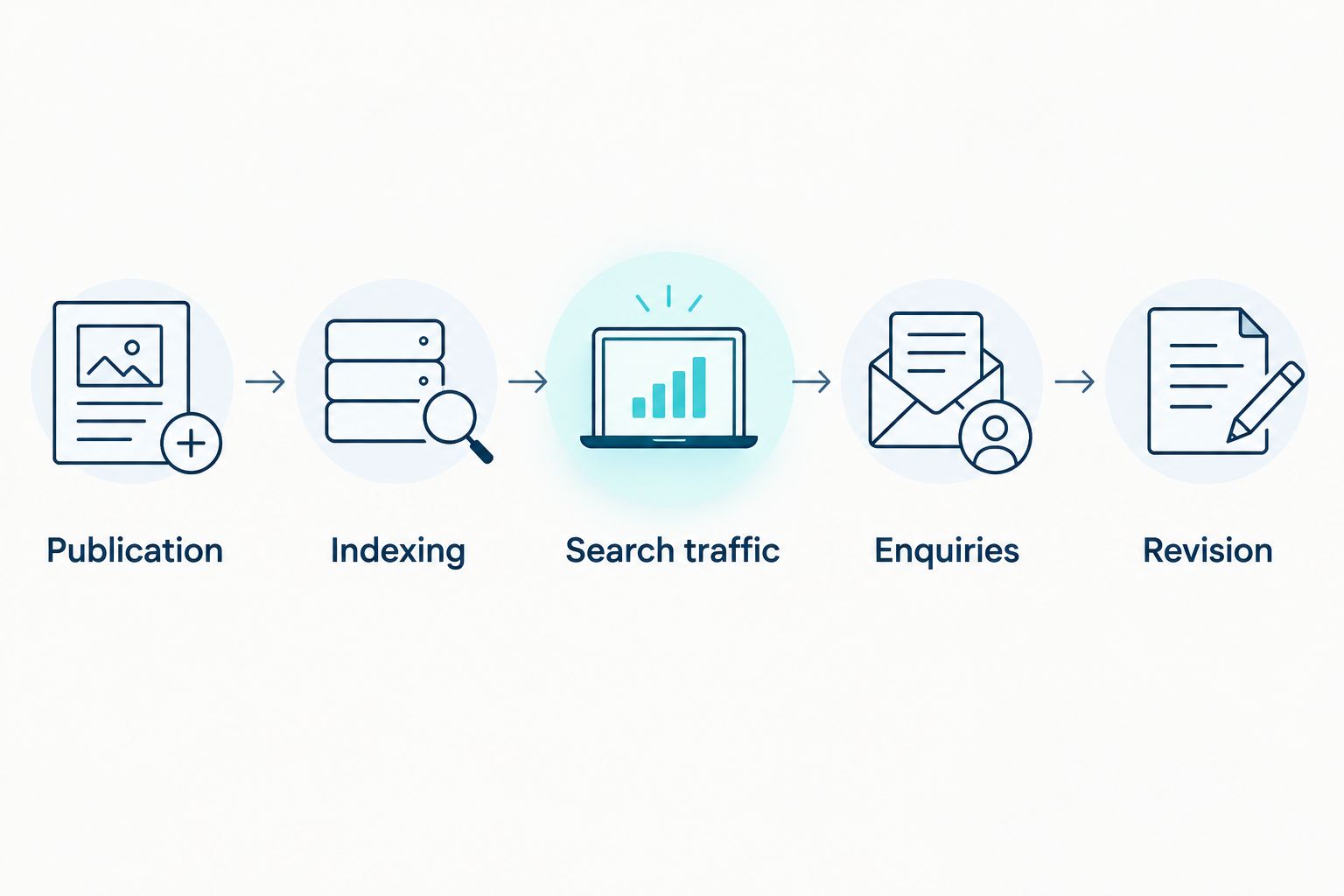
- Build a shared record with these fields: Publication, Indexing, Search traffic, Enquiries, and Revision. Assign an owner to the next action, not just a status colour.
Expected result: the team can connect a published change with subsequent search and enquiry data without claiming that correlation proves attribution.
Choose a 28-day reporting window as an initial operating cadence, not a promised time to results. Compare equivalent periods and annotate publishing changes, campaign launches, and tracking fixes. Low-volume pages need longer observation before you draw conclusions.
A useful 2026 report separates three things: recorded visits, completed enquiries, and manually observed citations. ChatGPT or Perplexity can mention a company without sending a measurable visit; GA4 is not a census of those mentions.
Repeat the workflow whenever a page changes
The adjacent workflow is maintenance: use the same checks when an existing page changes, not only when you publish a new one.
- Record what changed and why. Separate a factual correction from a larger change in search intent or service positioning.
- Recheck public access if you changed templates, plugins, security settings, or hosting. A copy edit does not require rebuilding the entire technical setup.
- Confirm that important internal links still point to the intended page. If a URL moved, check the redirect and update links under your control.
- Reinspect material changes in Search Console and retest enquiry tracking if the form or page template changed.
- Review outcomes against the recorded baseline. Keep, revise, consolidate, or retire the page based on its purpose and evidence.
Expected result: maintenance becomes a repeatable publishing operation. You do not need a separate visibility project every time someone edits a service page.
Troubleshooting
The live test works, but the page is not indexed
Inspect the reported exclusion reason and Google's selected canonical. Resolve conflicting signals or weak duplicate content where relevant. A successful live test confirms current access, not guaranteed indexing.
Google retrieves the page but misses the main explanation
Check the tested page's rendered content. If essential text depends on an interaction or problematic rendering, make that explanation available in the page's accessible content and retest.
The page is indexed but never appears in observed AI answers
Do not keep resubmitting it. Check whether the page answers the actual question, provides support for its claims, and explains something useful beyond a generic summary. No technical setting guarantees citation.
GA4 shows traffic but no enquiries
Test the enquiry journey from page arrival through successful submission. If the business receives an enquiry but GA4 records nothing, investigate tracking and consent behaviour before blaming the content.
A citation appears, but referral traffic does not
Record the citation as an observation, including the query and date. Do not manufacture a traffic figure: the reader might not click, and referral information is not always preserved.
Customize your workflow
Expand the system around real buyer questions: service fit, implementation, constraints, and evidence. Coordinate organic content with paid campaigns and lead response so the promise on the page matches what happens after the enquiry.
Rivetline's marketing execution services cover that ongoing work across channels. The benefit is connected execution; the limitation is equally clear: an agency cannot guarantee that Google, ChatGPT, or Perplexity will cite a particular page.
Rivetline is best for B2B teams that need ongoing SEO and AI visibility execution across marketing channels. Book a discovery call to discuss ownership, implementation, and reporting rather than commissioning another standalone diagnosis.
Book a discovery call
Discuss ongoing SEO, AI visibility, content, and the systems that connect marketing with enquiries.
FAQ
How do I improve WordPress AI search visibility?
Make important pages accessible, indexable, and useful for specific buyer questions. Then verify indexing in Google Search Console and measure meaningful on-site actions in GA4.
Do I need a WordPress plugin for Google AI Overviews?
No special WordPress plugin is required for Google AI Overviews. An SEO plugin can help manage technical settings, but it cannot guarantee selection or citation.
Can I submit my website directly to Google AI Overviews?
There is no separate submission process for Google AI Overviews. Use normal Google Search discovery and indexing processes, including sitemaps and URL inspection where appropriate.
Does Google Search Console show AI Overview clicks separately?
Google Search Console does not provide a dedicated AI Overview performance filter. AI-feature traffic is included within overall Web search reporting, so do not label all organic growth as AI Overview growth.
Does FAQ schema make a page more likely to get cited?
FAQ schema does not guarantee an AI citation and is not a special requirement for AI Overviews. Add structured data only when it accurately describes visible content and meets the relevant requirements.
Can GA4 measure every ChatGPT or Perplexity mention?
No. GA4 measures on-site activity, not every answer generated elsewhere; identifiable referral visits and observed mentions belong in separate reporting categories.
How long should I wait after updating a WordPress page?
There is no fixed waiting period that guarantees indexing, rankings, or AI citations. Record the update date, check technical status, and assess performance over a period appropriate to the page's traffic.
One last thing
Before your next 2026 content refresh, submit a test enquiry yourself. A cited page with a broken enquiry path is a visibility success and a business failure. Fix the handoff before expanding the publishing schedule.